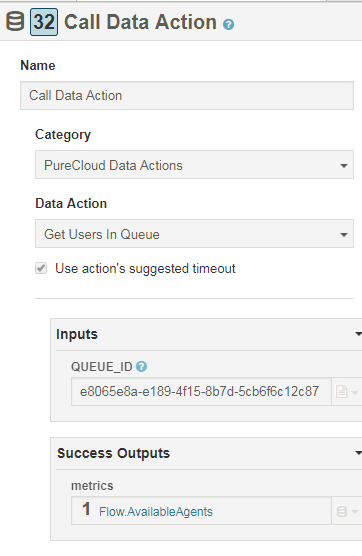
Got it working. Data action posted by Jason Mathison in Developer forum is working as such (see the end of the article I was referring to). Just import the data action and name it as you want. I named it "Get Users in Queue". Use the Action Test feature under actions setup tab to see if it works.
Some observations:
- The role you used for OAuth client must have analytics > conversationDetail > Query for conversation details permission assigned
- It took a while to figure out what the Queue ID is. You will see it for example if you go to Admin > Queues > select the queue. The Queue id is the cryptic string in the URL
In my case place the value of metrics to a variable AvailableAgents. In the inbound call flow I have decision based to AvailableAgents > 0. If "Yes", I will transfer to ACD. If "No" I will transfer to another flow.
------------------------------
Juha Niinimaki
Konecranes Oyj
------------------------------
Original Message:
Sent: 09-21-2018 04:34
From: Juha Niinimaki
Subject: Inbound IVR - No agents on queue
Thanks Craig. I'm just in the beginning of learning how the data actions work. I found one article in developer forum that might help with troubleshooting PureCloud Data Action - Error 400 Get users on queue - need help I'll let you know if I succeed to build a working data action. Anyway thanks for pointing me to the right direction.
------------------------------
Juha Niinimaki
Konecranes Oyj
------------------------------
Original Message:
Sent: 09-21-2018 03:43
From: Craig Stevenson
Subject: Inbound IVR - No agents on queue
Hi Juha,
You are correct, this is a custom action. One of the developers here had been working on something and I thought it was a new function from Genesys... major face palm going on over here right now!!
I've had a look at it, and tested it on my system and it fails with a syntax error, but I'll attach a text file containing the code which may help, and you may be able to fix the error in it :-)
------------------------------
Craig Stevenson
QPC UK
Original Message:
Sent: 09-21-2018 03:20
From: Juha Niinimaki
Subject: Inbound IVR - No agents on queue
Hi Craig,
This sounds interesting, but where do I find the "Get On Queue User Count as String" action? I have PureCloud Data Actions integration configured, but it only lists three static actions. None of them are useful in this case. I guess you are referring to some custom action here. Can you share some details about it?
------------------------------
Juha Niinimaki
Konecranes Oyj
Original Message:
Sent: 09-20-2018 05:07
From: Craig Stevenson
Subject: Inbound IVR - No agents on queue
Hi Darryn,
You could create a task that uses the Call Data Action. Use a PureCloud Data Action and "Get On Queue User Count as String".
Put the name of the queue you want to check, and then a name for the variable that will contain the number of idle agents.
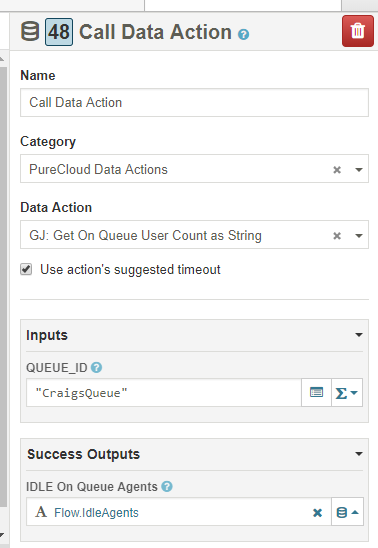
You could then check the value in your variable and route the call accordingly.
Hope that helps,
------------------------------
Craig Stevenson
QPC UK