It should be DetectLanguage("Message.Message.body.","auto") == "es" with a small "b", dunno if that matters.
Otherwise you might wanna enable Execution history on the flow so you can see the variable values and what happens in each step.
------------------------------
Jan Heinonen
Contact Center Specialist
GlobalConnect AB
------------------------------
Original Message:
Sent: 08-13-2025 09:59
From: Michael Harris
Subject: Inbound Message Language Detection
I'm using a switch with have two cases:
Case 1 (English): DetectLanguage("Message.Message.Body.","auto") == "en"
Case 2 (Spanish): DetectLanguage("Message.Message.Body.","auto") == "es"
Does this look right? I'm not getting any response when responding with english or spanish.
------------------------------
Michael Harris
Operations Business Analyst
------------------------------
Original Message:
Sent: 08-13-2025 09:04
From: Jan Heinonen
Subject: Inbound Message Language Detection
Hello,
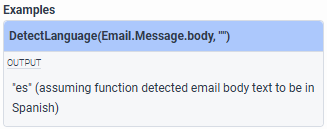
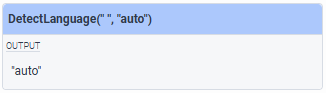
You don't need to specify what language you want to identify, instead it will return the language it identifies.
The last input is what you want it to return if it doesn't find a language.
------------------------------
Jan Heinonen
Contact Center Specialist
GlobalConnect AB