Olá @Saul Barrera, saudações do Brasil!
Intermittent behavior in script conditions is often caused by timing (the queue context is not populated yet when the custom action runs).
I'd suggest displaying/logging the current {Scripter.Queue Name} when it fails. If it's empty or different, trigger the validation later (after the interaction is connected/assigned) and, if possible, use a stable key like Queue ID. I´ve used here the same logic in the past:
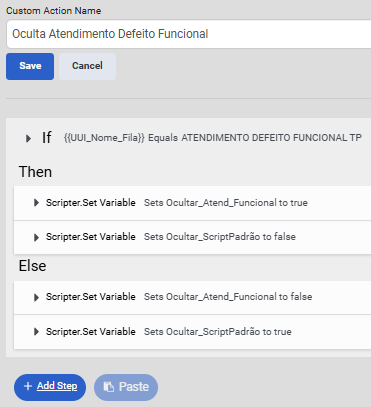
Another solution, and I think is more eficcient and I using now, is pass an explicit routing flag from Architect into the script instead of relying on the queue name string. A participant data with the value that´s define wich one script will be visible.
------------------------------
Fernando Sotto dos Santos
Consultor Grupo Casas Bahia
------------------------------