Hi @Jorge Candia,
I was running some tests in case we receive a similar type of request in the future.
Data Filtering Rules use regular expressions. When creating the filter, you can select the direction and the channel where the rule will be applied. In the Regular Expression field, you add your regex.
Initially, I started with something simple:
This would match examples like:
This works when the inappropriate word is typed exactly as expected. However, one important point is that this regex is case-sensitive. So if the other side changes the format slightly, for example by using an uppercase letter, the filter may no longer match it.
Because of that, I moved to the next version, using "abcd" and "efgh" as examples of terms that should be blocked:
\b(?:[Aa][Bb][Cc][Dd]|[Ee][Ff][Gg][Hh])\b
This would match examples like:
abcd
ABCD
AbCd
efgh
EFGH
EfGh
In this case, the regex works whether the term is typed in uppercase, lowercase, or a mix of both. However, if someone tries to bypass the system, they could add underscores, spaces, or other special characters between the letters.
To account for that, I created a third version:
\b(?:[Aa][\W_]*[Bb][\W_]*[Cc][\W_]*[Dd]|[Ee][\W_]*[Ff][\W_]*[Gg][\W_]*[Hh])\b
This would match examples like:
abcd
ABCD
a b c d
a_b_c_d
a.b.c.d
a-b-c-d
a!!!b@@@c###d

efgh
EFGH
e f g h
e_f_g_h
e.f.g.h
e-f-g-h
e!!!f@@@g###h
All three examples are valid, depending on how strict or flexible the filter needs to be. There are probably other ways to build this as well, but these examples show a progression from a simple exact-word match to a more flexible pattern that can catch common attempts to bypass the filter.
The test I ran was using Web Messaging, and from the agent's view, the inappropriate words appear like this:
------------------------------
Elisson Fernandes
------------------------------
Original Message:
Sent: 05-10-2026 19:48
From: Elisson Fernandes
Subject: Limitations when blocking offensive or sensitive words in WhatsApp interactions within Genesys Cloud
Just to add to Kaio's response: in our case, this worked well for masking/blocking links in Web Messaging.
We had a few scenarios where someone joined the chat pretending to be from the IT team and asked the agent to open a link to "install a fix," but it was actually malicious content.
------------------------------
Elisson Fernandes
------------------------------
Original Message:
Sent: 05-10-2026 18:29
From: Kaio Oliveira
Subject: Limitations when blocking offensive or sensitive words in WhatsApp interactions within Genesys Cloud
Hi Jorge
-
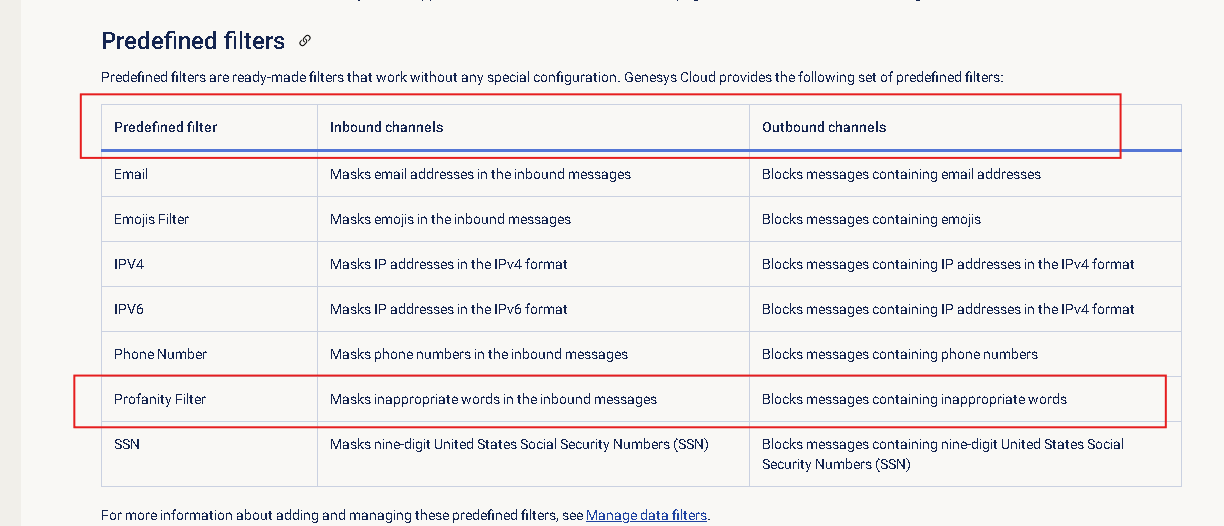
I've never used that function, but I believe the "Digital Data Filtering Rules" could help you with that.
-
Here's a link for reference: https://help.genesys.cloud/articles/overview-of-digital-data-filtering-rules/
-
------------------------------
Kaio Oliveira
GCP - GCQM - GCS - GCA - GCD - GCO - GPE & GPR - GCWM
PS.: I apologize if there are any mistakes in my English; my primary language is Portuguese-Br.