Genesys Cloud - Main

 View Only

Sign Up

  Thread closed by the administrator, not accepting new replies.
  • 1.  Looking for a way to reference not found outbound variables or scape the string literal for curly braces in ScreenPop Scripts

    Posted 02-07-2022 15:50
    No replies, thread closed.

    Greetings all,

    We have several high traffic Outbound campaigns with a degree of automation.
    Sometimes a Callback gets scheduled for a Record that is later removed from the Calling List before the Callback is due. 

    When that happens and the agent receives the Callback, the Script (and in fact Purecloud in general) is unable to find the record values in the calling list, (because it was deleted, duh.)
    It's not viable, to search all the potential callbacks waiting in queue, whenever a Record is removed from the Calling List, to see if they match with the it... So, what we wanted to attempt, was to detect when some of the variables had a non standard value; Then we would give a notice to the user to close the Record as it is, or even closing it automatically by disconnecting it via API.

    The script appears like this when the record is missing, note the values between curly braces, like when you are editing the Script (or when you made a script for a different calling list with different columns)
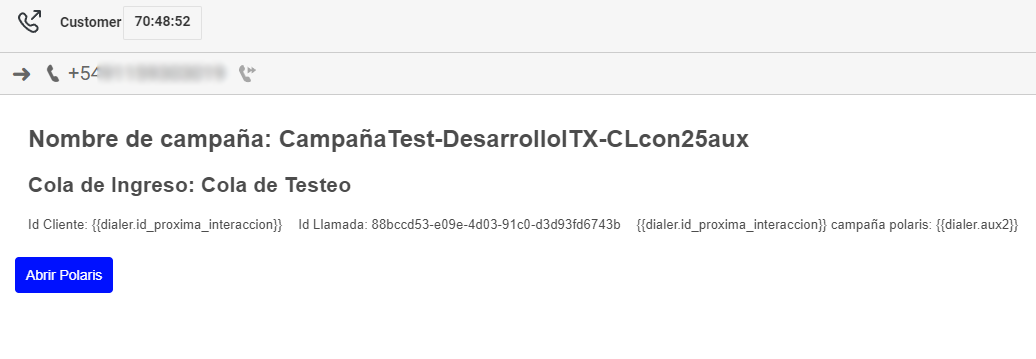
    So the idea was for an automated Action to validate if the "Outbound.id_proxima_interaccion" variable has the value "{{dialer.id_proxima_interaccion}}" .-
    However, there's no way to express this, I tried escaping the curly braces "\{{" or "\{\{", I tried it comparing to null / "" , but it doesn't work either.

    The variable for a given XXX column in the calling list takes the value {{dialer.XXX}} but you don't have a way to reference that value, at least not a way I've found.

    Does anyone know a way to reference a "missing" variable, or to set an action to act when the variable is missing altogether?

    Regards.


    #Integrations
    #Outbound
    #Unsure/Other

    ------------------------------
    Facundo Nowicky
    Interaxa S.A.
    ------------------------------


  • 2.  RE: Looking for a way to reference not found outbound variables or scape the string literal for curly braces in ScreenPop Scripts

    Posted 02-07-2022 15:56
    No replies, thread closed.
    Will test tomorrow this idea referenced in the Dev forum

    ------------------------------
    Facundo Nowicky
    Interaxa S.A.
    ------------------------------


  • 3.  RE: Looking for a way to reference not found outbound variables or scape the string literal for curly braces in ScreenPop Scripts

    Posted 02-07-2022 16:18
    No replies, thread closed.

    Just tested the idea to use a Dynamic Variable with the formula "length({{Outbound.id_proxima_interaccion}})"  with no luck:

    The Dynamic variable results in a "NaN" value, which can't be logically processed either in a If/Else logic...


    ------------------------------
    Facundo Nowicky
    Interaxa S.A.
    ------------------------------


  • 4.  RE: Looking for a way to reference not found outbound variables or scape the string literal for curly braces in ScreenPop Scripts

    Posted 02-08-2022 08:19
    No replies, thread closed.
    Morning Facundo,
         Try using this function to determine if there is a value before evaluating it : IsNotSetOrEmpty(NOT_SET)

    IsNotSetOrEmpty
    Function
    Determines whether a value is NOT_SET or empty.

    Implementations

    Boolean IsNotSetOrEmpty( Null item )
    Returns true since the value pass in is NOT_SET.
    Return Value
    • Boolean : Returns a true since the value passed in is NOT_SET.
    Parameter 
    • Null item : The value NOT_SET.
      Availability
      • Valid for use in Common Module Flow, Inbound Call Flow, Inbound Chat Flow, Inbound Email Flow, Inbound Message Flow, In-Queue Call Flow, Outbound Call Flow, Secure Call Flow and Workflow types.


      ------------------------------
      Chris Martin
      CCS Medical
      ------------------------------