Genesys Cloud - Main

 View Only

Sign Up

  • 1.  Manual Call Restriction

    Posted 10 days ago

    Title: Manual Call Restriction

    Hi Team,

    We have three divisions in our Genesys Cloud organization: Sales, Finance, and Support.

    The Sales division handles only Predictive Dialing Campaign interactions and inbound calls. Our customer wants to restrict normal outbound calls and manual queue-based outbound calls for only a few agents in the Sales division, while allowing the remaining Sales agents to continue making these calls. There should be no restrictions for users in the Finance and Support divisions.

    Is there any possible approach to achieve this requirement in Genesys Cloud? If anyone has implemented a similar solution or has any suggestions, I would greatly appreciate your guidance.

    Note: The Sales division agents handle only Predictive Dialing Campaign interactions and inbound calls.

    Thank you!


    #Outbound

    ------------------------------
    Muhammed Shaibant
    x
    ------------------------------


  • 2.  RE: Manual Call Restriction
    Best Answer

    Posted 10 days ago

    Hi Muhammed,

    I don't believe Divisions alone would achieve this, as they are primarily used to control access to Genesys resources rather than individual calling capabilities.

    One approach worth exploring is using Roles and Permissions instead. You could create a separate role for the subset of Sales agents who should only handle Predictive Dialing Campaigns and inbound calls, and remove the permissions related to manual outbound calling and "Call on behalf of queue" from that role, while leaving the remaining Sales agents with the existing role.

    I haven't implemented this specific scenario myself, so I'd be interested to hear if others have taken a different approach or can confirm which permissions are required for manual outbound and queue-based outbound calling.


    ------------------------------
    Phaneendra
    Technical Solutions Consultant
    ------------------------------


  • 3.  RE: Manual Call Restriction

    Posted 10 days ago

    One additional point-I believe the key permission to review is Conversation > Call > Add. Based on the Resource Center, this permission is a prerequisite for placing manual outbound calls, and it's also listed as a prerequisite for Call on behalf of Queue. Creating a separate role for the restricted Sales agents and removing this permission may achieve the behaviour you're after. I'd still recommend validating it with a pilot user before rolling it out.

    Resources:


    ------------------------------
    Phaneendra
    Technical Solutions Consultant
    ------------------------------


  • 4.  RE: Manual Call Restriction

    Posted 10 days ago

    Dear Phaneendra,

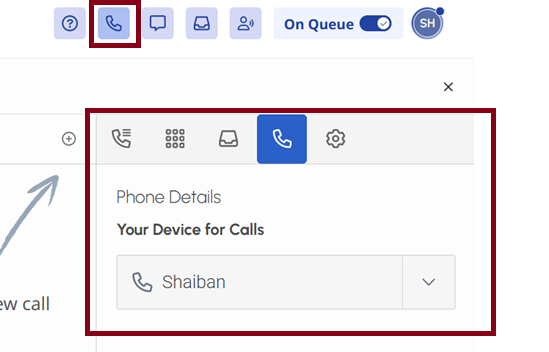
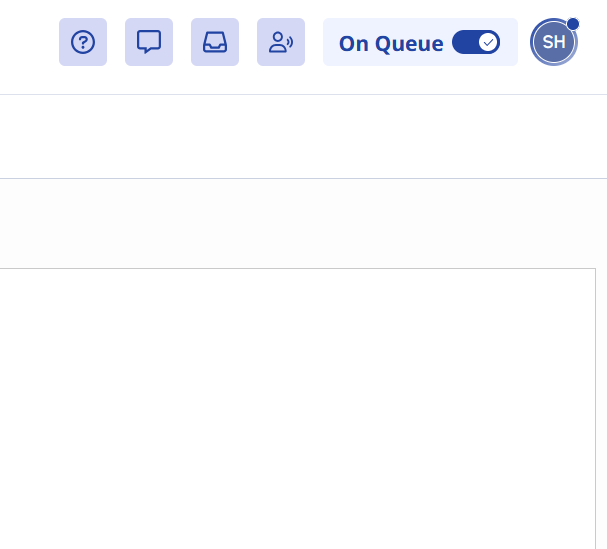
    As you suggested, I removed the roles and reassigned them to the users. As a result, both calling options (Manual Outbound Calls and Normal Outbound Calls) are now disabled.

    However, I noticed that the Calls icon has also been removed. Because of this, we are no longer able to access the WebRTC settings to select the phone.

    In this scenario, will the agents still be able to receive inbound calls and predictive campaign calls?

    Please find the attached screenshots showing the behavior before and after the permission changes.

    Before 
    After 
    Thank you.


    ------------------------------
    Muhammed Shaibant
    x
    ------------------------------


  • 5.  RE: Manual Call Restriction

    Posted 10 days ago

    Hi Muhammed,

    Thanks for testing and sharing the screenshots. I haven't tested this scenario myself, but it looks like removing Conversation > Call > Add also removes access to the Calls panel. Have you had a chance to verify whether inbound ACD interactions and predictive campaign calls still work after the permission change? That would help determine whether this is a limitation of the current permission model.


    ------------------------------
    Phaneendra
    Technical Solutions Consultant
    ------------------------------


  • 6.  RE: Manual Call Restriction

    Posted 10 days ago

    Hi @Muhammed Shaibant,

    I have not implemented anything similar but I have managed to restrict users from calling outbound without a queue, which means if they try to call outbound without a queue, the call is disconnected.
    I believe you may be able to achieve something from this approach.

    I used triggers to check every outbound call and if the call does not have a queue on it, it disconnects.

    Similarly you can check every outbound call, and based on a data-table of specific division/users, you can either allow or disconnect outbound calls, irrespective of how the call is made, using a queue or not. You will need to check the Division of the user making the call, if it is not SALES, then you do nothing and allow the call to progress as normal. If it is SALES, then you check the data table to see if the user is from the ALLOW list, if yes let call progress, otherwise disconnect the call.

    Hope this helps.

    Regards


    ------------------------------
    Vineet Kakroo
    Senior Technical Consultant
    ------------------------------


  • 7.  RE: Manual Call Restriction

    Posted 10 days ago

    Thank you for your reply Vineet very helpful.


    ------------------------------
    Phaneendra
    Technical Solutions Consultant
    ------------------------------


  • 8.  RE: Manual Call Restriction

    Posted 9 days ago

    Hi Muhammed, maybe you could add an extra site por the Sales division and assign the WebRTC phones to this site.

    Then, configure the number plan accordingly to your needs, if no dial plan is found, the call will not progress.

    I know that you are not disabling the capacity of making a call, just restricting the numbers that the agents can reach


    ------------------------------
    Fabian Teves
    Ingeneria de Comunicaciones
    ------------------------------