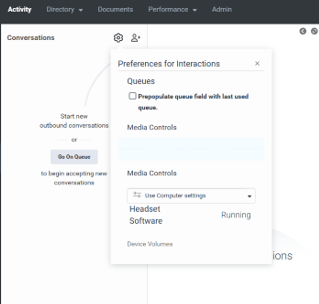
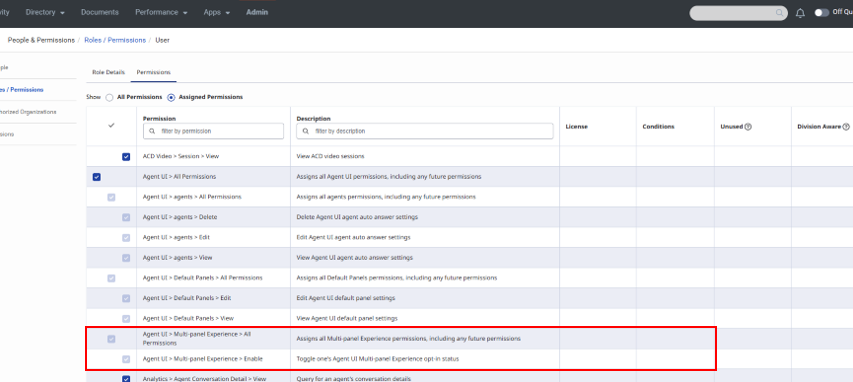
We have begun communications with our business partners about the Agent Multi-Contextual Tool Panel. We have identified that our agents are unable to see the Enable toggle option in the interaction preferences panel. We've verified that the following permission is active for the agents experiencing this view issue: Agent UI > Multi-panel Experience > Enable.
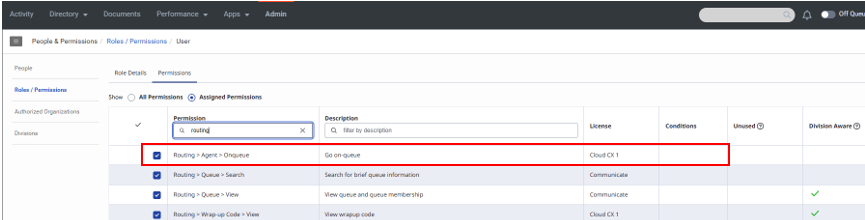
Our engineer ticketed support for this issue and was given a response that they also need to have Routing > Agent > Onqueue to see this toggle in preferences. We've confirmed that the impacted users also have that permission active. Both permissions are active through the default User role that is applied to our agent groups.
Agent view of preference panel:
User role permissions active:
Through my own research I have identified that Conversation > Settings > Edit also allows for toggle view. However, this also provides Org level access to the panel manager with no ability to set conditions to limit access, which is not appropriate for our agent level users.
Are there additional permissions required for viewing the toggle in the interaction preference panel? We would like to give our agents as much time as possible to get a feel for the new experience. Any guidance would be much appreciated.
Thank you!
#PlatformAdministration#Roadmap/New Features
#SystemAdministration------------------------------
Jenn Tvrdy
Premera Blue Cross
------------------------------