Workforce Engagement Management

 View Only

Sign Up

  • 1.  📢New Feature - Start time variance across all Weeks of the Planning Period and Enable Flexible Activities to be relative to the Shift End Time

    Posted 25 days ago
    Edited by Tracy Vickers 24 days ago

    Hi All, 

    This week, the Workforce Management Scheduling team are rolling out two new enhancements to Work Plan configurations.

    1. Planning Period Maximum Shift Start Time Variance

    Under the Work Plan Details --> General Constraints Tab, you can now configure the Maximum Shift Start Time Variance to respect the Weekly schedule or Planning Period. 

    Using the Planning Period as the Variance Period ensures that all scheduled shifts for the Planning Period have start times within the same consistent window, across all weeks of the 1-6 week Planning Period. Helping provide stable and consistent shift patterns for employees.

    2. Work Plan Activity Maximum Length from the end of a shift 

    When creating/editing a Work Plan Activity, you can now more precisely limit when an activity is scheduled relative to the Shift End time. Using a combination of Minimum and Maximum Length from the Shift End Time. Helping to enforce agreements, such as the last break of the day, must be scheduled between 1:30 and 0:30 hours before the end of the shift. 


    #ScheduleGeneration

    ------------------------------
    Paul Wood
    Product Manager for Genesys Cloud Workforce Management
    ------------------------------


  • 2.  RE: 📢New Feature - Start time variance across all Weeks of the Planning Period and Enable Flexible Activities to be relative to the Shift End Time

    Posted 20 days ago

    I think this a great new feature! I also love the fairly recent shift details enhancement with the min and max for a particular shift (most tools just have a max like Calabrio).
    My only issue that comes up is sometimes is with the 6 week planning period limit (or monthly). In instances where for example you  limit evenings in a week for example it works great but once in this example you choose a 1 week planning period you are locked in. Then for example if someone says also i want 6 Saturdays a year you cannot do that one at the same time. You can only go to a monthly planning period and make it alternate months but then you can't do the one week period.
    So basically i can hit both rules seperate but not at the same time unless I choose the 1 week then fixed a rotation for the weekend. I do think this is an issue when you get more complex customers. But i also do get the 6 weeks ethos and why its the case.


    ------------------------------
    Neil Draycott
    ------------------------------


  • 3.  RE: 📢New Feature - Start time variance across all Weeks of the Planning Period and Enable Flexible Activities to be relative to the Shift End Time

    Posted 20 days ago

    Hi Neil, 

    Thanks for the feedback. 
    There are a couple of challenges here that you have mentioned. Could you help me understand them in a little more detail?

    6-week Planning Period Limit
    From your experience, what other periods would you expect to see paid hours and schedules planned over?

    6 Weekend shifts per year
    This is an unusual working agreement; is it used in conjunction with any other longer-term planning periods, such as annualised hours?

    Have you experienced any other working agreements that can't be met by Work Plan Rotations or the new Work Plan Fairness constraints?

    Paul


    ------------------------------
    Paul Wood
    Product Manager for Genesys Cloud Workforce Management
    ------------------------------


  • 4.  RE: 📢New Feature - Start time variance across all Weeks of the Planning Period and Enable Flexible Activities to be relative to the Shift End Time

    Posted 19 days ago

    Hi Paul - quick reply! I will try and explain

    I get why Genesys uses six‑week schedules and caps planning periods at six weeks. For short‑term forecasting it makes sense - beyond that it's hard to get a reliable picture of the demand profile. For straightforward set‑ups this works fine. I do think though reality is most don't just publish 6 weeks they do a few blocks of 6 weeks  because agents want to know what are they working beyond 6 weeks where shifts are not fixed.

    The difficulty comes when you've got more bespoke requirements, like the example I mentioned. In Genesys, the planning period drives everything, including weekends. So you're locked into applying the same planning rules to weekends as you do for the rest of the schedule.
    With other systems I've used, you can set your planning period for the core rota and then manage weekends separately. That flexibility means you can handle odd weekend obligations without being tied to the same cycle. Genesys doesn't give you that option, so weekends can become a sticking point when they don't line up neatly with the planning period. You can get lucky and the core planning period works with the weekends but for more bespoke needs its pot luck.

    Also the shift details min and max rules are really good but other than check the rota for fairness Its hard to check and takes time. Other tools have a shift distribution view for quick reference in the schedules module like a shift category view to see whos got how many lates for example over any period of time you wish to view.

    Not sure if that made sense! Like you say its bespoke not that common but I want Genesys to be better than what i've used before in every way!


    ------------------------------
    Neil Draycott
    ------------------------------


  • 5.  RE: 📢New Feature - Start time variance across all Weeks of the Planning Period and Enable Flexible Activities to be relative to the Shift End Time

    Posted 19 days ago

    I've run into an issue with split shift agents.

    I've been scheduling splits like this previously.
    This shift ran without issues last week.

    However, this workplan is no longer valid under your new maximum length period because the maximum allowable length of any activity is 12 hours.
    Since I need the base activity to be longer than 12 hours, there are no options to modify those new settings on the base "on queue" activity.
    Even the other activities have a limit to "maximum length from shift end value" of 12 hours.

    I received the following warning:
    This work plan cannot produce any valid schedules due to constraint conflicts. Potential fixes:

    - Make activity latest start time from shift start later than +15:30
    - Increase activity maximum length from shift end to more than 12 hour(s)

    When I attempt to edit the base activity.
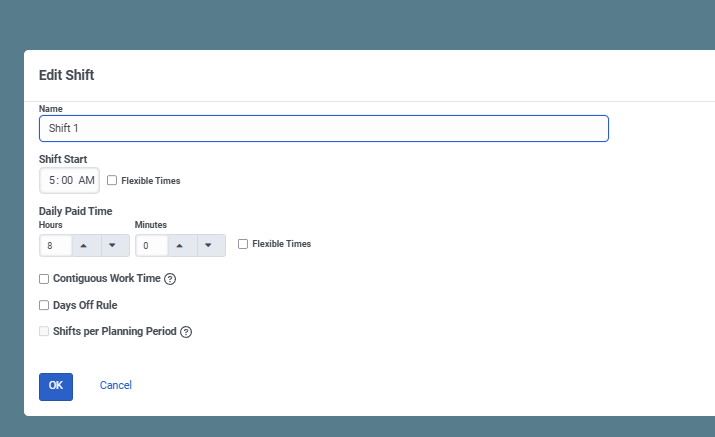
    Attempting to edit any other activity, maximum value is 12 hours.
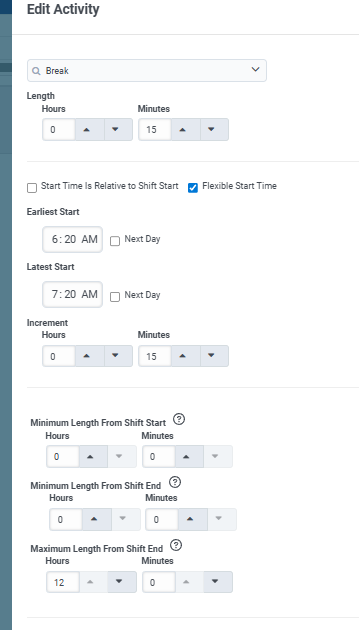
    Was this an oversight or were we scheduling split shifts incorrectly?
    We operate 24/7 and have about a dozen split shifts, only two are broken since the latest update and they are quite extreme in the difference in the start times for each shift.


    ------------------------------
    Aloke Aggarwal
    Analyst
    ------------------------------


  • 6.  RE: 📢New Feature - Start time variance across all Weeks of the Planning Period and Enable Flexible Activities to be relative to the Shift End Time

    Posted 19 days ago

    Hi Paul,  I have a few agents who work split shifts with a large gap in between. For example:

    • Shift 1: 4:30 AM – 8:30 AM
    • Shift 2: 5:00 PM – 8:00 PM

    This creates a total shift span of about 15 hours, which exceeds the current 12-hour maximum shift window allowed in work plans. Previously, this configuration worked, but now it appears to fail validation Due to the 12 hour restraints. 

    Is there any way to extend the maximum shift span beyond 12 hours (e.g., up to 18 hours) so we can continue using work patterns instead of manually building these schedules?


    ------------------------------
    Wendy Dodson
    ------------------------------


  • 7.  RE: 📢New Feature - Start time variance across all Weeks of the Planning Period and Enable Flexible Activities to be relative to the Shift End Time

    Posted 18 days ago

    Hi @Wendy Dodson
    This was brought up yesterday in one of our Developer chats by the Professional Services team. The team are reviewing the use case and looking to issue a bug fix as soon as possible.

    I'm sorry for any trouble caused. We were not familiar with this use case when designing the functionality, and designed it for the broadest single-shift labour laws we knew of.

    Paul   


    ------------------------------
    Paul Wood
    Product Manager for Genesys Cloud Workforce Management
    ------------------------------


  • 8.  RE: 📢New Feature - Start time variance across all Weeks of the Planning Period and Enable Flexible Activities to be relative to the Shift End Time

    Posted 18 days ago

    Hi @Paul Wood,

    Makes sense as to how it could be overlooked, glad to hear you are already working on a solution.

    As a workaround, manually entering the agents schedules for a few weeks (hopefully) seems to be okay. 


    ------------------------------
    Aloke Aggarwal
    Analyst
    ------------------------------