I am happy to announce two new Schedule Generation enhancements planned for release during the week of March 16, 2026: Minimum Coverage, and Target Consistent Net Staffing.
Minimum Coverage
Minimum Coverage provides a new mode of schedule generation & rescheduling where shift generation targets satisfying a user supplied amount of minimum staffing. WFM Schedulers can use this function to systematically generate shifts that ensure minimum coverage for time periods of low or no demand, where maintaining a baseline staffing level is necessary for compliance or operational readiness.
Note that lack of agents and/or work plan configurations allowing shifts during times where you have specified minimum staffing can prevent minimum staffing from being met.
When Minimum Coverage is enabled, for best results use the "Activity Smoothing: Schedule activities to offer the most consistent service goal prediction across the whole schedule" option, which places activities based on staffing requirements and minimum coverage configuration. The other two selections ("Reduce concurrent activities...") do so without considering staffing requirements.

You can enable and configure Minimum Coverage and the amounts of Minimum Staff independently for each Business Unit.
The minimum staffing you supply acts as a floor, ensuring that the staffing requirement that schedule generation or rescheduling process attempts to meet is at least the amount you specify for the planning groups, days of week, times of day.
You can supply the amount of minimum staffing, in increments of 0.1 minimum staff, in various ways:
- For all Planning Groups and times.
- For all Planning Groups and times where your forecast requires staff.
- For specific Planning Groups and days of week for all times of day.
- For specific Planning Groups and days of week for times where your forecast requires staff.

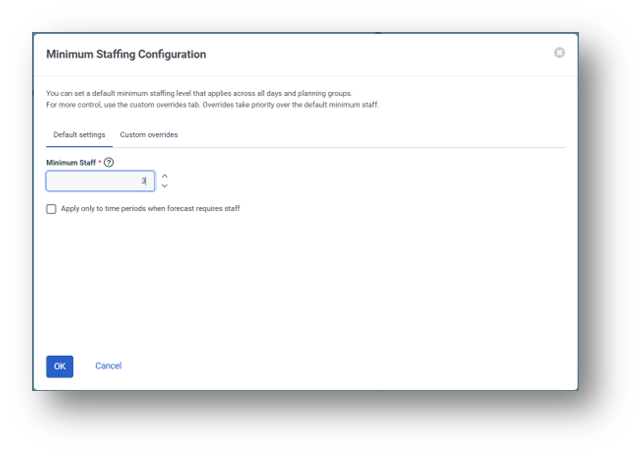
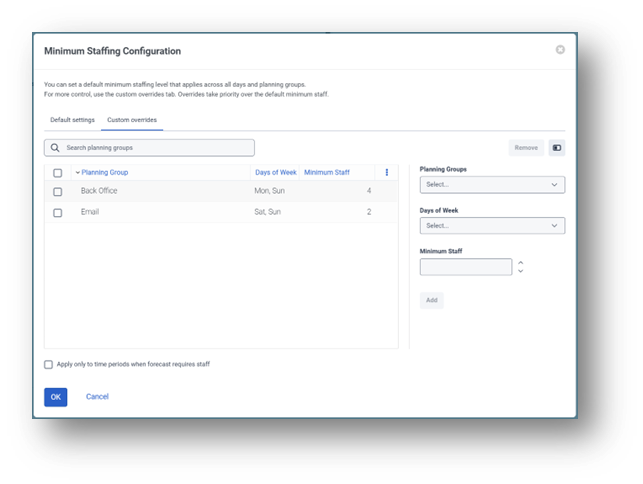
Access to these settings in the Business Unit is controlled by new permissions:

A new schedule generation validation message type for minimum coverage has been added. You can configure the message severity for each business unit.

The schedule generation results are now organized into 'Agent Results' and 'Schedule Results' tabs. Messages related to minimum coverage will appear on the schedule results tab.

Target Consistent Net Staffing
Select this option to generate shifts that deliver the most consistent service goal prediction across the entire schedule. When enabled, the system targets generating schedules that maintain a consistent level of overstaffing or understaffing across all time periods. Enabling this option may increase schedule generation time.

#ScheduleManagement
#WFMConfiguration,BestPractices
------------------------------
Eric Hagaman
Director, Product Management
Genesys - Employees
------------------------------