Enhancements to Capacity Planning Flexibility & Forecasting Horizon
🚀Enhancements to Capacity Planning Flexibility & Forecasting Horizon
We're rolling out several enhancements to Capacity Planning and Staffing Configuration designed to give you greater flexibility, improved filtering, and longer-term planning capabilities.
These updates help streamline how you manage Planning Groups and Staffing Groups, while also enabling more strategic, forward-looking workforce planning.
🌟 What's New
🔧 Increased Planning Group Limit per Staffing Group
You can now scale your configurations more easily:
- The number of Planning Groups (PGs) associated to a Staffing Group (SG) can be increased up to 50
- The default limit remains at 10 PGs
- Higher limits are available via a Care request
- Limit increase request can be made in increments of 10, not to exceed 50. Only ask for what you really need and not the full 50 if it's not needed.
Why it matters:
Supports more complex organizational structures without requiring additional SGs.
🔍 New Filtering in PG/SG Association View
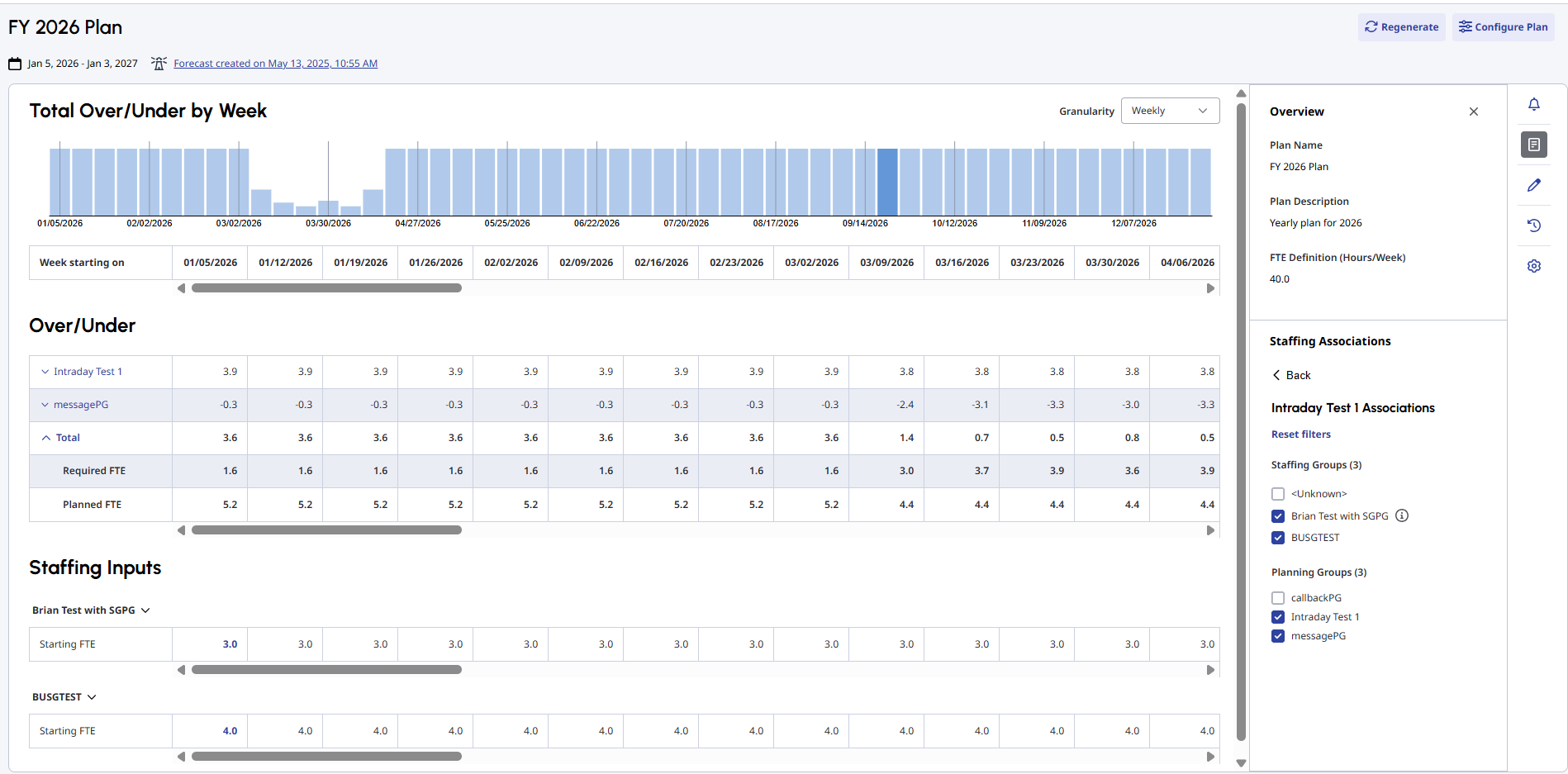
You can now filter Staffing Groups (SGs) and Planning Groups (PGs) directly within the Capacity Plan in the PG/SG Association View
Filtering behavior:
- Selecting an SG automatically selects its associated PGs
- Selecting a PG automatically selects its associated SGs
- If an SG has additional PGs not selected:
- An icon will indicate a partial selection
- A "Reset Filters" option restores the default view (all SGs and PGs selected)
Why it matters:
Quickly isolate and analyze specific segments of your workforce without losing context.
📊 Filter-Aware Charts & Grid Updates
All charts and grid data now dynamically update based on selected filters.
Over/Under Section:
- Displays only the selected PGs
- Introduces a new "Total" row showing:
- Combined Over/Under FTE for all PGs selected
- Total Required FTE
- Total Planned FTE
Chart Updates:
- Charts now reflect filtered data
- Values align with the Total row
Staffing Inputs Section:
- Shows SGs that are fully or partially selected
- For partially selected SGs:
- Total Planned FTE is shown
- Expanded view shows only FTE allocated to selected PGs
Why it matters:
Ensures consistency between what you filter and what you see-no more manual reconciliation.
📅 Extended Forecast Horizon (Up to 104 Weeks)
You can now use forecasts with start dates up to 104 weeks (2 years) in the future for:
- Capacity Plans
- Staffing Requirements
Why it matters:
Enables longer-term strategic planning and better alignment with business growth forecasts.
⚡ Benefits at a Glance
- Scale Staffing Groups to support more complex structures
- Filter and analyze PG/SG relationships with precision
- See accurate, real-time updates across charts and grids
- Plan further ahead with extended forecast support
- Reduce manual work when building and reviewing capacity plans
📅 Availability
These enhancements are available starting April 20, 2026 to April 24,2026 based on regions.
No additional configuration is required beyond optional Care requests for increased PG limits.
#CapacityPlanning------------------------------
Belinda Herrera
Genesys, Staff Product Manager
------------------------------