No problems here.
If you can sit on one of the machines having a problem and log in as the supervisor having problems, using Chrome, press F12 to bring up the Developer Tools. Click on the Console tab and look for errors while reproducing the problem. That will probably give you a clue.
You can also click on the Network tab, reproduce the problem, then right-click in the log area and save it as a .har file, then use the Google HAR Analyzer to look at it
https://toolbox.googleapps.com/apps/har_analyzer/Resource Center directions on gathering the file:
https://help.mypurecloud.com/articles/gathering-console-network-logs/Choose the file you saved by clicking
CHOOSE FILE and browsing to it. Then un-check all the boxes except
4xx and
5xx so it just shows errors.
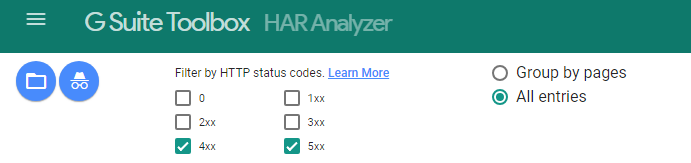
You might see some problems showing up in there that will indicate where the problem lies.
I know that's all kind of vague...let me know if you need more detailed instructions.
------------------------------
George Ganahl CCXP, GCA
Principal Technology Consultant
Genesys
------------------------------