Hi Elisson,
Your suggestion has actually worked.
I removed the 'externalContacts:contact:view' permission, then took a call and now the Customer Journey option is now in Tools, and i clicked to show in call, albeit receive that error about contact permissions.
Then i enabled 'externalContacts:contact:view' permission again, and on next call, the call journey and external contact is appearing as normal.
I added view permissions for 'segment', 'outcome' as they were showing an error relating to it but otherwise works as expected.
Many thanks for your help on this.
regards,
------------------------------
Wasim Altaf
NA
------------------------------
Original Message:
Sent: 05-06-2026 20:05
From: Elisson Fernandes
Subject: Permission for Customer Journey Tab in call
Hi Wasim,
I was running some tests and noticed the following:
When I remove External Contacts > Session > View, the option disappears.
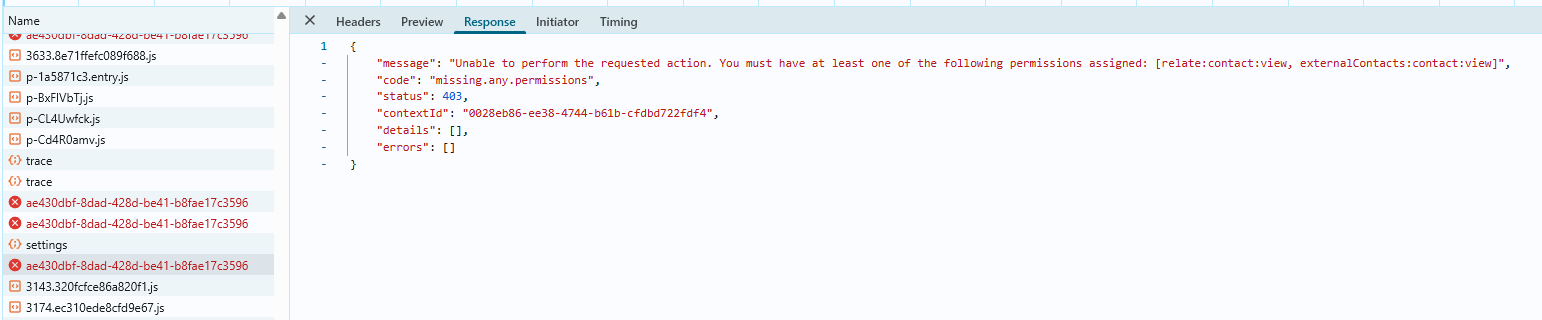
When I keep that permission enabled and remove externalContacts:contact:view, the option shows up, but when I click it, I get an error saying it failed to load the page, with the message below.
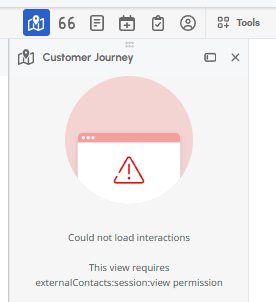 I believe this is a "standard" error, because when I checked the browser debug logs, the message shown is:
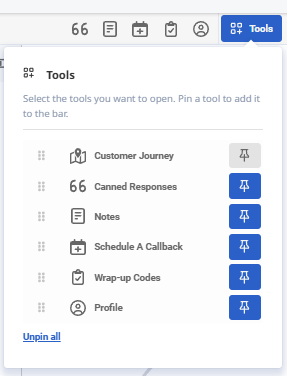
Since the agents have both permissions, could this be happening because Customer Journey is not enabled/checked under Tools?
------------------------------
Elisson Fernandes
------------------------------
Original Message:
Sent: 05-06-2026 08:16
From: Wasim Altaf
Subject: Permission for Customer Journey Tab in call
thanks Stephan, yes checked this article and is where it advises to enable this permission i mentioned in my post (External Contacts > Session > View), but still wont appear when the call is answered.
------------------------------
Wasim Altaf
NA
Original Message:
Sent: 05-06-2026 08:11
From: Stephan Taljaard
Subject: Permission for Customer Journey Tab in call
Hi Wasim
I found the following article on resource center regarding the prerequisites, not sure if this might help - https://help.genesys.cloud/articles/customer-journeys-for-agent-experience/
Regards
------------------------------
Stephan Taljaard
EMBEDIT s.r.o