Genesys Cloud - Main

 View Only

Sign Up

  • 1.  Permission for Customer Journey Tab in call

    Posted 10 days ago

    Hello,

    I am trying to determine the permission to view the Customer Journey tab when a call is answered.

    This appears when answering calls as a administrator (presumably as all permissions are enabled).

    However when doing so as an agent with role related permissions, it is not there. We have the External Contact that populates and for administrators, the Customer Journey tab is alongside.

    Tried External Contacts > Session > View. Also checked a few others relating to Session views.

    thanks


    #Telephony

    ------------------------------
    WA.
    ------------------------------


  • 2.  RE: Permission for Customer Journey Tab in call

    Posted 10 days ago

    Hi Wasim

    I found the following article on resource center regarding the prerequisites, not sure if this might help - https://help.genesys.cloud/articles/customer-journeys-for-agent-experience/

    Regards


    ------------------------------
    Stephan Taljaard
    EMBEDIT s.r.o
    ------------------------------


  • 3.  RE: Permission for Customer Journey Tab in call

    Posted 10 days ago

    thanks Stephan, yes checked this article and is where it advises to enable this permission i mentioned in my post (External Contacts > Session > View), but still wont appear when the call is answered. 


    ------------------------------
    Wasim Altaf
    NA
    ------------------------------


  • 4.  RE: Permission for Customer Journey Tab in call

    Posted 10 days ago

    Hi Wasim

    This is noted.  I also found this article - https://help.genesys.cloud/articles/view-a-customers-journey-details/

    Hopefully someone else in the community can assist and provide additional info on this.

    Regards


    ------------------------------
    Stephan Taljaard
    EMBEDIT s.r.o
    ------------------------------


  • 5.  RE: Permission for Customer Journey Tab in call
    Best Answer

    Posted 10 days ago


    Hi Wasim,

    I was running some tests and noticed the following:

    When I remove External Contacts > Session > View, the option disappears.

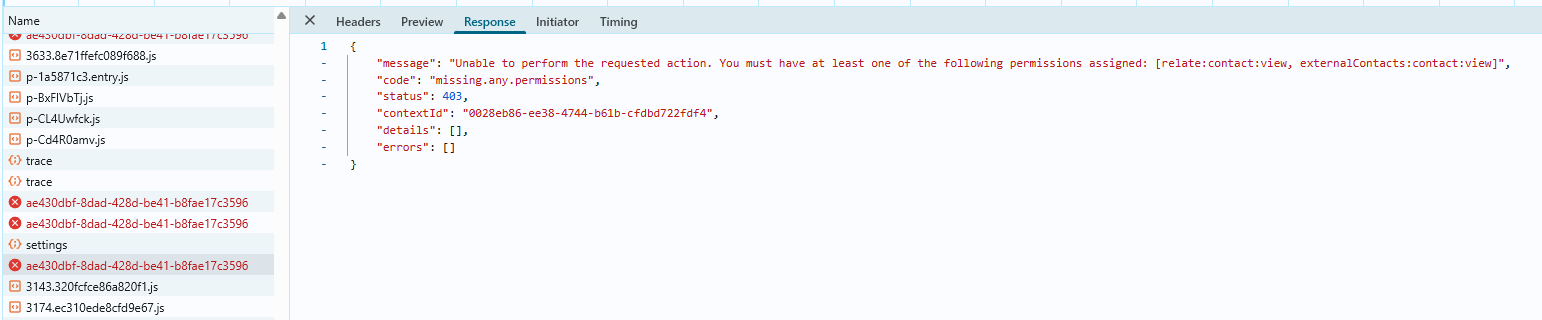
    When I keep that permission enabled and remove externalContacts:contact:view, the option shows up, but when I click it, I get an error saying it failed to load the page, with the message below.
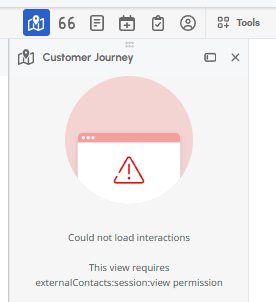

    I believe this is a "standard" error, because when I checked the browser debug logs, the message shown is:
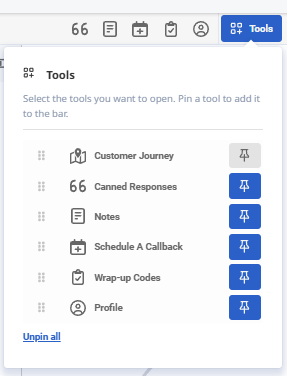
    Since the agents have both permissions, could this be happening because Customer Journey is not enabled/checked under Tools?


    ------------------------------
    Elisson Fernandes
    ------------------------------


  • 6.  RE: Permission for Customer Journey Tab in call

    Posted 9 days ago

    Hello,

    Do they also have Journey > Event > View ?


    ------------------------------
    Jan Heinonen
    Contact Center Specialist
    GlobalConnect AB
    ------------------------------


  • 7.  RE: Permission for Customer Journey Tab in call

    Posted 9 days ago
     
    I ran a test by removing that permission to confirm the behavior. When it's removed, the Customer Journey icon also disappears, similar to what happens with External Contacts > Session > View.


    ------------------------------
    Elisson Fernandes
    ------------------------------


  • 8.  RE: Permission for Customer Journey Tab in call

    Posted 9 days ago

    Hi Elisson,

    Your suggestion has actually worked.

    I removed the 'externalContacts:contact:view' permission, then took a call and now the Customer Journey option is now in Tools, and i clicked to show in call, albeit receive that error about contact permissions.

    Then i enabled 'externalContacts:contact:view' permission again, and on next call, the call journey and external contact is appearing as normal.

    I added view permissions for 'segment', 'outcome' as they were showing an error relating to it but otherwise works as expected.

    Many thanks for your help on this.

    regards,


    ------------------------------
    Wasim Altaf
    NA
    ------------------------------


  • 9.  RE: Permission for Customer Journey Tab in call

    Posted 10 days ago

    Hello Wasim, 

    @Stephan Taljaard is correct with his second post.  If this permission doesn't work then I recommend the next step being opening a case with support. As it sounds like you have all the necessary permissions but something isn't clicking in the backend. 

    Cheers, 


    ------------------------------
    Cameron
    Online Community Manager/Moderator
    ------------------------------


  • 10.  RE: Permission for Customer Journey Tab in call

    Posted 9 days ago

    The Customer Journey tab is not controlled by standard permissions alone (like External Contacts > Session > View). That's why you can see it as an admin but not as an agent, even after assigning similar permissions.

    Access to the Customer Journey view depends on a combination of:

    • Journey / Customer Journey licensing (Genesys Cloud CX / EX / Journey features)
    • Feature enablement in the org
    • User role permissions related to Journey (not just External Contacts)
    • Data availability (interactions/events tied to the contact)

    A few things to check:

    1. Make sure the agents have the appropriate Journey-related permissions (not only External Contacts).
    2. Confirm that the feature is enabled and licensed for those users (some Journey capabilities are not included in all licenses).
    3. Verify that the interaction actually has journey data associated - otherwise the tab may not appear.
    4. Compare the admin role vs agent role side-by-side to identify missing permissions.

    If everything looks correct, it's often related to licensing scope, since admins typically have full access by default.

    In short: this behavior is expected if the agents don't have the full Journey feature access, even if they can see External Contact data.


    ------------------------------
    David Betoni
    Principal PS Consultant
    ------------------------------