Hi Amit,
As Phaneendra has said above, your understanding is correct that the IVR metrics are separated from the Queue metrics.
Those are treated as different "Participants" of the call (We have other participants such as the customer, agents, etc.), each participant will have their own set of metrics.
Usually the call happens between 2 participants.
So for example.. The customer calls and gets to an IVR, so we have 2 participants here (Customer + IVR).
At some point the IVR transfers the call to a queue and the IVR is removed from the call as a participant (So now we have Customer + Queue as participants).
Then an agent is available and the Queue transfers to the Agent, and the queue is also removed (So now we have Customer + Agent as participants), etc.
For the example above, the customer participant will usually have the full duration of the call in their metrics, while the IVR, Queue and Agent participants will only have the information regarding the time they were part of the call.
---------------
Now, regarding the metrics that you asked about.
As Phaneendra mentioned, "abandon" is usually used for the queues.
But we do have "disconnect" as a metric for the IVRs.
They are also separated between "Customer disconnect" and "Flow disconnect".
"Flow disconnect" would happen when you make the disconnection in the flow (for instance when the Call Center is closed or on holiday, etc.)
"Customer disconnect" would be simply when the customer hangs up the call during the IVR, which I imagine is what you are talking about when you say "Abandon".
---------------
As for getting to this information through APIs, you can try this:
Use this API: POST /api/v2/analytics/flows/aggregates/query
With a request body similar to this:
{
  "interval": "2026-03-31T03:00:00.000Z/2026-04-01T02:59:59.999Z",
  "timeZone": "America/Sao_Paulo",
  "metrics": [
    "tFlow"
  ],
  "groupBy": [
    "flowId",
    "exitReason"
  ],
  "filter": {
    "type": "and",
    "predicates": [
      {
        "type": "dimension",
        "dimension": "flowId",
        "operator": "matches",
        "value": "xxxxxxxxxxxxxxxxxxxxxxxxxxxxx"
      }
    ]
  }
}
In the body above I'm filtering by a specific Flow Id, while extracting the "tFlow" metric.
I'm also defining that I want my response to be grouped by the "exitReason" (This will show us if the disconnect reason was the customer disconnecting or the flow).
The response from this request would look something like this:
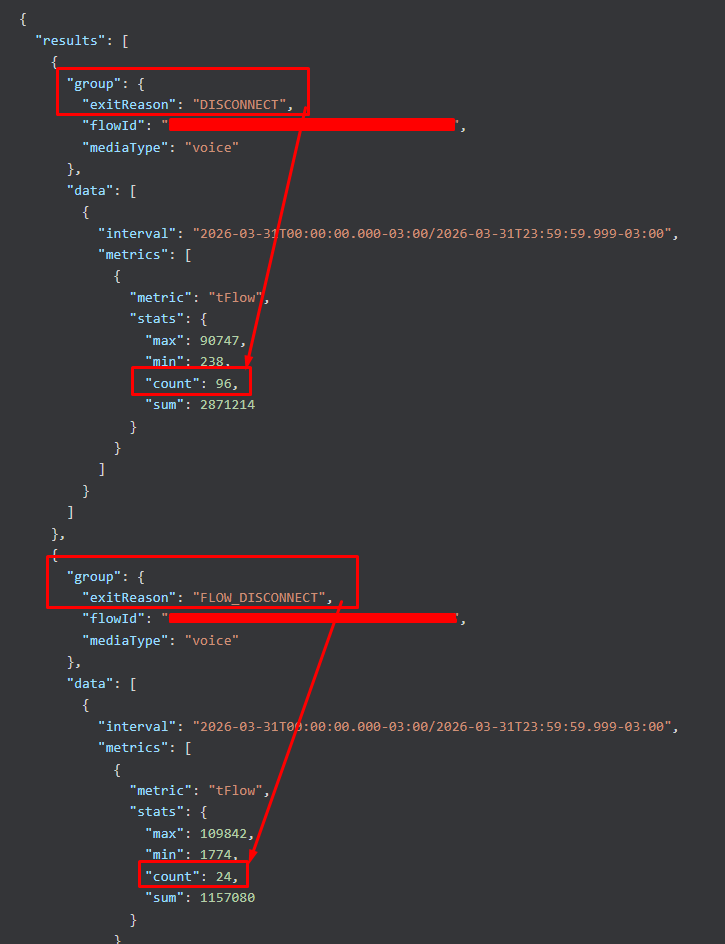
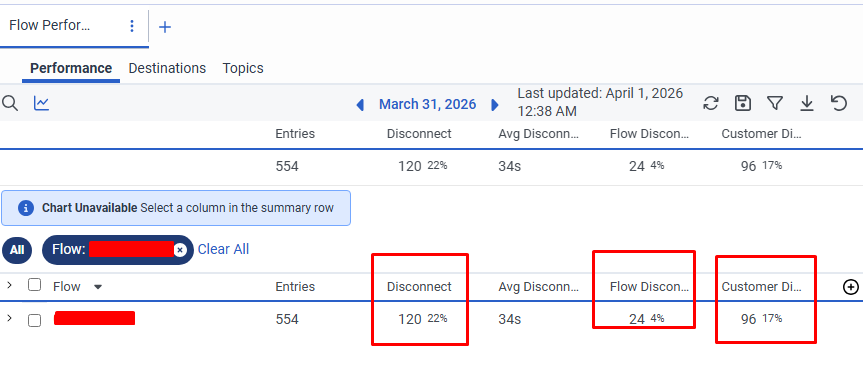
Notice above that it shows we had "96" disconnections groups with the reason "DISCONNECT", and 24 with the reason "FLOW_DISCONNECT".
Those 96 are disconnections from the Customer.
You can see this same information through the default reportings (Flow Performance View):
------------------------------
Marcello Jabur
------------------------------