Genesys Cloud - Main

 View Only

Sign Up

  • 1.  Running an Alert Report in Genesys Cloud

    Posted 6 hours ago

    Hello, 

    I'm having trouble finding the reports menu that the below instructions refrerence, can someone provide screenshots?  I'm looking to run a report for the alerts that we have setup for different time periods.  Thank you!

    ed on the metrics and thresholds you've configured.

    1. Access the Reports Menu

    • Log in to your Genesys Cloud account.

    • Navigate to the Reports section in the main navigation menu.

    2. Select the Alert Report

    • In the Reports menu, look for Alerts or Alert Reports (depending on your deployment and service).

    • Click on the specific alert report you want to run.
      This could be a standard alert report showing all triggered alerts, or a custom alert report if you've created one.

    3. Configure Report Parameters

    • Use the parameters available to filter the data:

      • Date range – choose start and end dates for the alert history.

      • Service/tenant – filter by the service or tenant where the alerts originated.

      • Alert type – select specific alert categories (e.g., performance, quality, availability).

      • Severity – filter by critical, warning, or info alerts.

    • Adjust filters to focus on the time period or service you care about.

    4. Run the Report

    • Once parameters are set, click Run Report.

    • The report will display a list of alerts with details such as:
      • Trigger time

      • Alert name and description

      • Affected service/tenant

      • Severity

      • Resolution status (if available)

    5. View and Export Results

    • You can view the report in the browser, print, or export it to CSV/PDF for sharing.

    • Genesys Cloud also supports scheduled exports for recurring alert summaries Genesys Community.


    #Reporting/Analytics

    ------------------------------
    JASON KOSIOR
    ------------------------------


  • 2.  RE: Running an Alert Report in Genesys Cloud

    Posted 5 hours ago

    Hi Jason,

    If I understood correctly, you're trying to access the alerts report. I've included a screenshot below showing the path to access it:
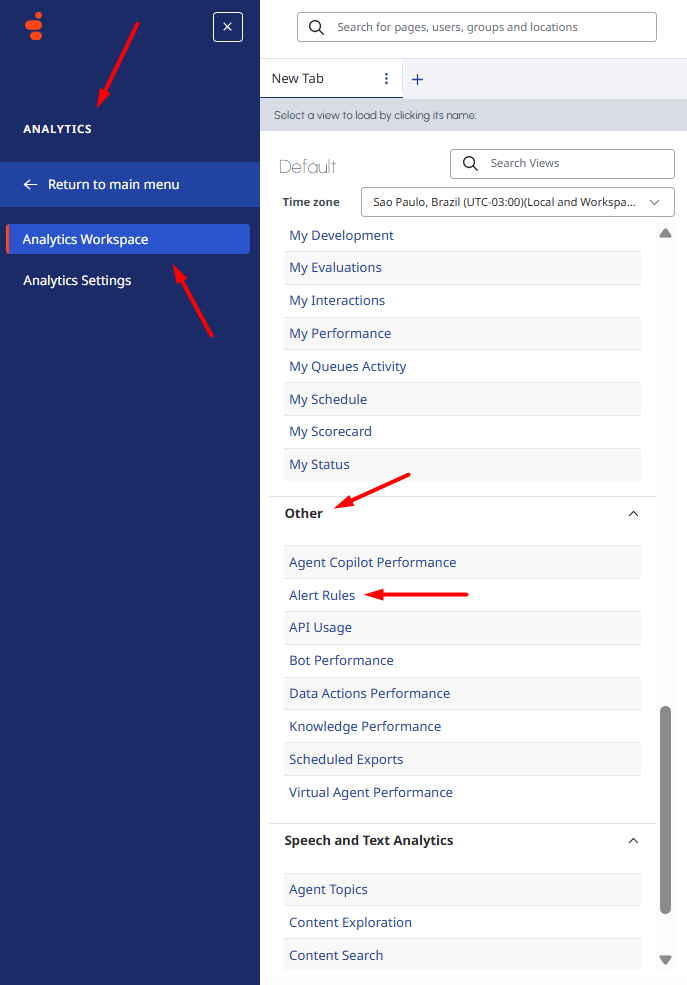
    The path you referenced appears to be the old path, which has already been discontinued.

    I hope this helps!


    ------------------------------
    Camila Meneghini
    ------------------------------