Genesys Cloud - Developer Community!

 View Only

Sign Up

  • 1.  Salesforce data action - remote endpoint error in testing

    Posted 10-15-2025 04:41

    Hi all,

    Wondering if anyone has encountered this and if so, knows a solution.

    We're testing setting up a salesforce data action and are getting an error at the execute phase

    "message": "Unauthorized",
      "code": "unauthorized",
      "status": 401,
      "messageParams": {},
      "contextId": "xxx",
      "details": [
        {
          "errorCode": "ACTION.REMOTE_ENDPOINT"
        }
      ],
      "errors": [
        {
          "message": "REST call for action execute failed. Message: Request to backend service failed. Response from web service: [{\"message\":\"This session is not valid for use with the REST API\",\"errorCode\":\"INVALID_SESSION_ID\"}] [xxx]",
          "code": "UNAUTHORIZED",
          "status": 401,
          "messageParams": {},
          "details": [],
          "errors": []
        }
      ]
    }
    We believe this is a problem Salesforce side given the request to backend service note on the failure, but we don't know exactly what we need to adjust to correct.
    Thank you,
    James

    #PlatformAPI

    -------------------------------------------


  • 2.  RE: Salesforce data action - remote endpoint error in testing

    Posted 10-15-2025 12:44

    Hi James,
    This usually happens when the Salesforce session or token is invalid or expired, or when the connected app isn't properly authorized for API use. Re-authenticating the integration user should fix it.
    Hope this helps


    ------------------------------
    Luiz Rosa
    Full stack developer
    ------------------------------


  • 3.  RE: Salesforce data action - remote endpoint error in testing

    Posted 10-15-2025 22:48

    Hello James,

    We have a few methods to evaluate this.

    Which approach are you using for the Data Actions? Are you using Salesforce Data Actions?
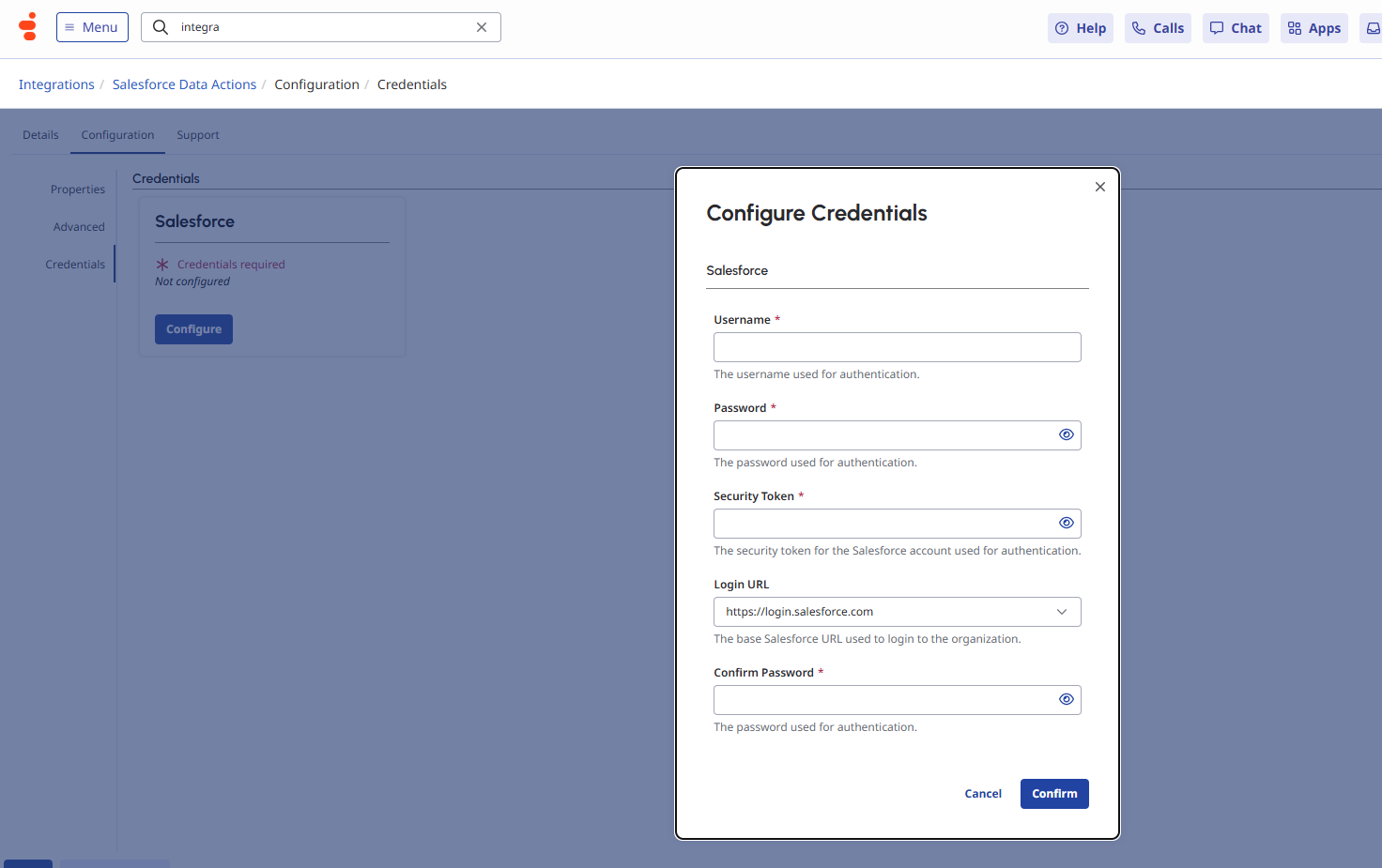
    If so, did you configure a user in the credentials? In that case, you'll need to check the response in Salesforce when executing this Data Action, as it might be related to an unauthorized access issue.

    Type of integration:

    Credential configuration:

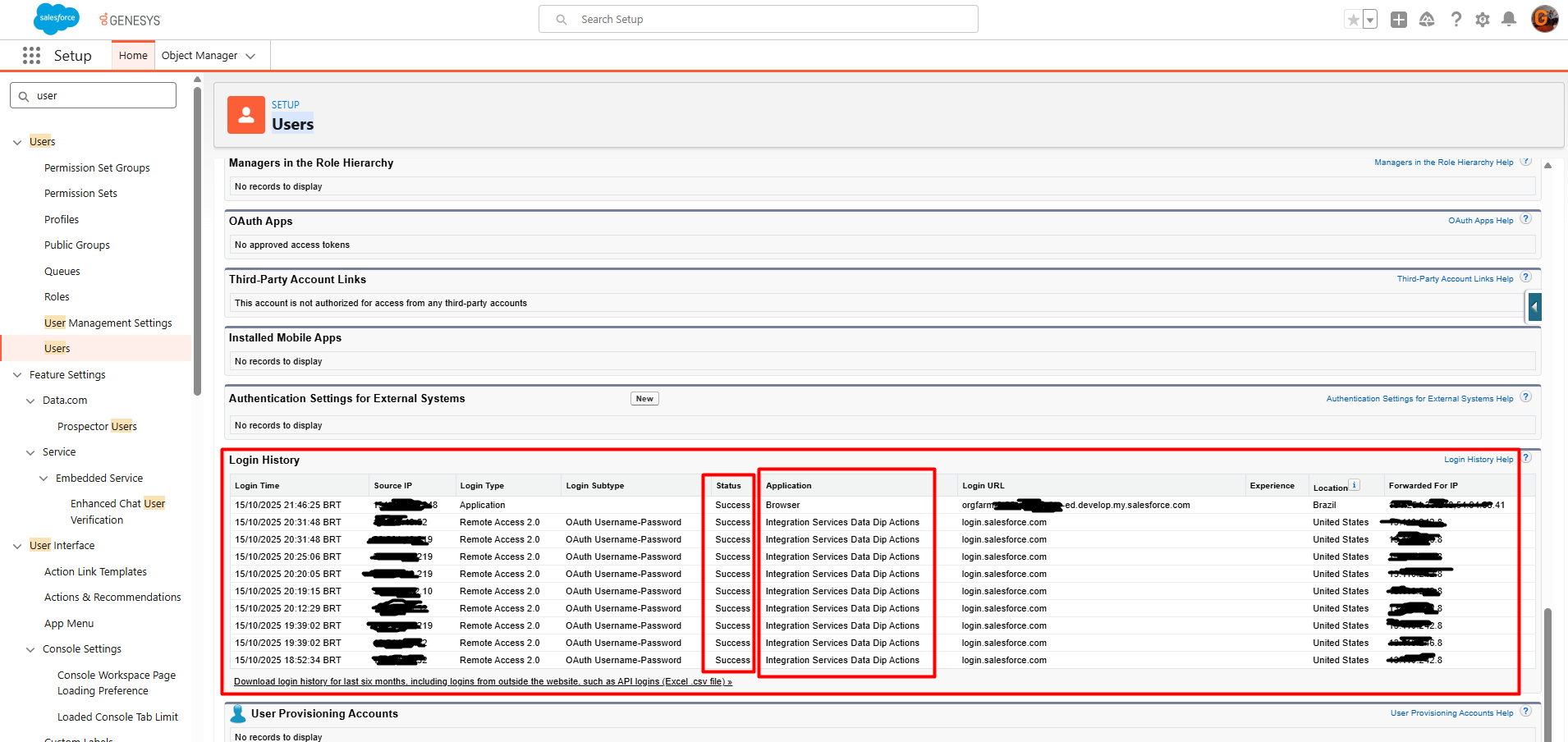
    Now below is where you can validate the user's access response - when accessing the Data Action, it is displayed in this section:

    Users → And click on the user that was used in the integration. → Login History

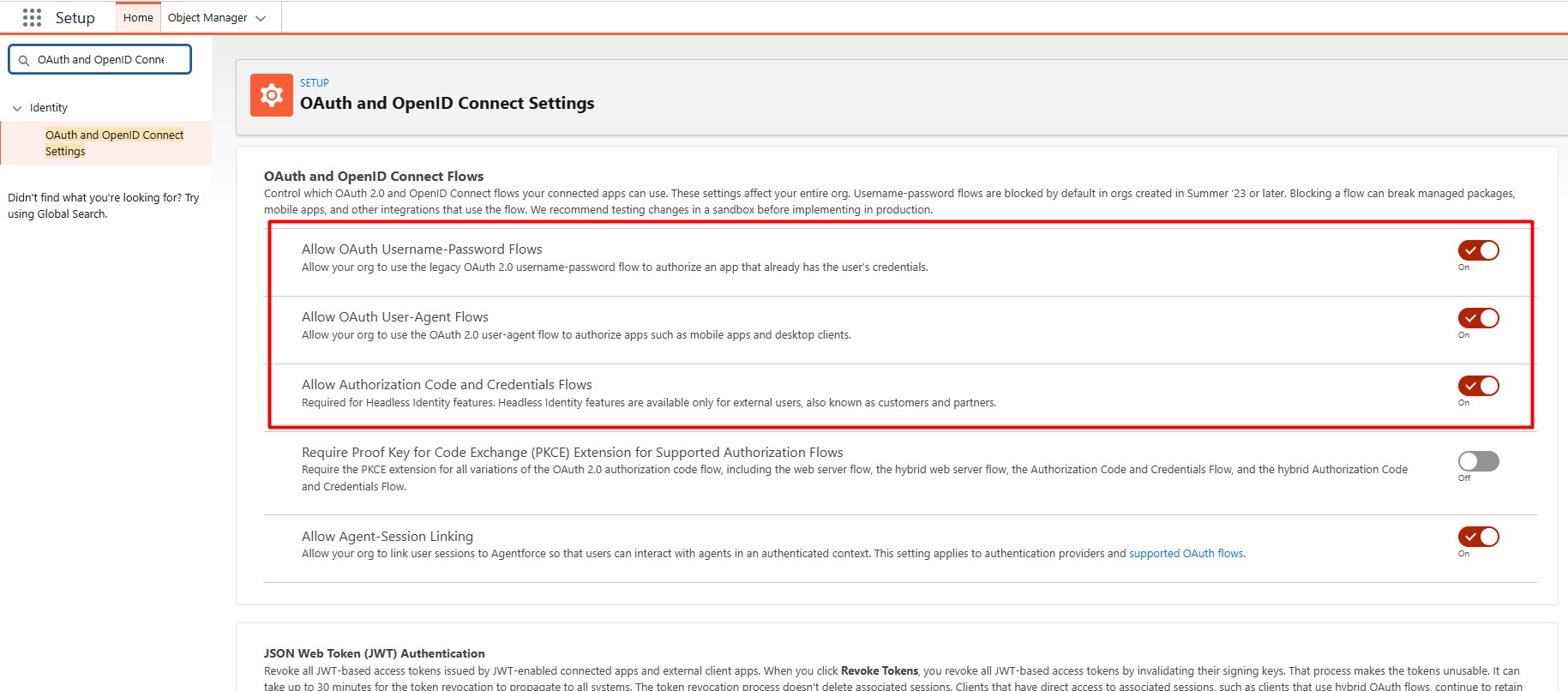
    And to resolve this error when trying to access the Data Action, you need to enable a setting in the following section:

    OAuth and OpenID Connect Settings


    ------------------------------
    Gabriel Garcia
    NA
    ------------------------------


  • 4.  RE: Salesforce data action - remote endpoint error in testing

    Posted 10-16-2025 09:15
    Edited by James Hinojosa 10-16-2025 09:43

    Thanks so much for taking the time to help. It is indeed the Salesforce Data Actions we're testing at the moment. 

    These are the outputs from our attempts, there doesn't seem to be any failures that I can see Salesforce side but Genesys side we're still getting an error.

    Salesforce side:

    Genesys test side:

    {
      "message": "Unauthorized",
      "code": "unauthorized",
      "status": 401,
      "messageParams": {},
      "contextId": "xxx",
      "details": [
        {
          "errorCode": "ACTION.REMOTE_ENDPOINT"
        }
      ],
      "errors": [
        {
          "message": "REST call for action execute failed. Message: Request to backend service failed. Response from web service: [{\"message\":\"This session is not valid for use with the REST API\",\"errorCode\":\"INVALID_SESSION_ID\"}] [xxx]",
          "code": "UNAUTHORIZED",
          "status": 401,
          "messageParams": {},
          "details": [],
          "errors": []
        }
      ]
    }


    ------------------------------
    James Hinojosa
    ------------------------------


  • 5.  RE: Salesforce data action - remote endpoint error in testing

    Posted 10-16-2025 13:50

    Hi James

    Which API are you trying to access? Is it a customizable one?


    ------------------------------
    Gabriel Garcia
    NA
    ------------------------------


  • 6.  RE: Salesforce data action - remote endpoint error in testing

    Posted 10-17-2025 03:12
    Edited by James Hinojosa 10-17-2025 03:13

    Hi Gabriel,

    No we've not gone that exotic yet, we're just trying to get the out of the box bits working first. 

    These specifically (we're using the get account by phone# to test)



    ------------------------------
    James Hinojosa
    Genesys Cloud Manager
    ------------------------------


  • 7.  RE: Salesforce data action - remote endpoint error in testing

    Posted 10-17-2025 11:39

    Hi James.

    So it seems that the user being used in the integration is missing some permissions.
    Check if this user has the System Administrator role, and also make sure the settings I mentioned in this section are enabled: OAuth and OpenID Connect Settings.


    ------------------------------
    Gabriel Garcia
    NA
    ------------------------------


  • 8.  RE: Salesforce data action - remote endpoint error in testing

    Posted 10-21-2025 17:00
    Edited by Gabriel Garcia 10-21-2025 17:04

    Hello @James Hinojosa,

    O ChatGPT disse:

    I came to bring you an update — we saw on the forum that this Salesforce authentication method via integration will be discontinued. The only supported method going forward will be:

    OAuth 2.0 (Client ID / Client Secret)

    https://help.salesforce.com/s/articleView?id=release-notes.rn_security_replace_username_password_flow_for_special_scenarios.htm&release=240&type=5


    ------------------------------
    Gabriel Garcia
    NA
    ------------------------------


  • 9.  RE: Salesforce data action - remote endpoint error in testing

    Posted 10-23-2025 08:31

    Very helpful Gabriel thank you for all your help. We're using a system admin account with all of the aforementioned oauth & openID connect settings configured as described and we are still getting a 401 error. Unfortunately Genesys support can't figure it out nor can Salesforce support!  I'll look at configuring as per your latest link instead.


    ------------------------------
    James Hinojosa
    Genesys Cloud Manager
    ------------------------------