Hello Christopher,
The behavior you're seeing is actually expected in Genesys Cloud. When a call comes into a queue (inbound) and results in a scheduled callback that's later completed, the callback portion shows as outbound in the session direction. This is documented behavior, callbacks are treated as a separate outbound segment of the overall interaction.
The recommendation is to use a dedicated queue exclusively for callbacks with no other traffic. This allows you to accurately track callbacks by filtering on that specific queue. Since you've already created a unique queue for your trial, you're on the right track.
For tracking which agent a callback belongs to when multiple agents are involved, you can enable agent-owned callbacks for your queue. When enabled:
- Agents can take ownership of their scheduled callbacks;
- The agent owner's name appears in the "Agent Owner" column in the Scheduled Callbacks view (Performance > Workspace > Contact Center > Scheduled Callbacks);
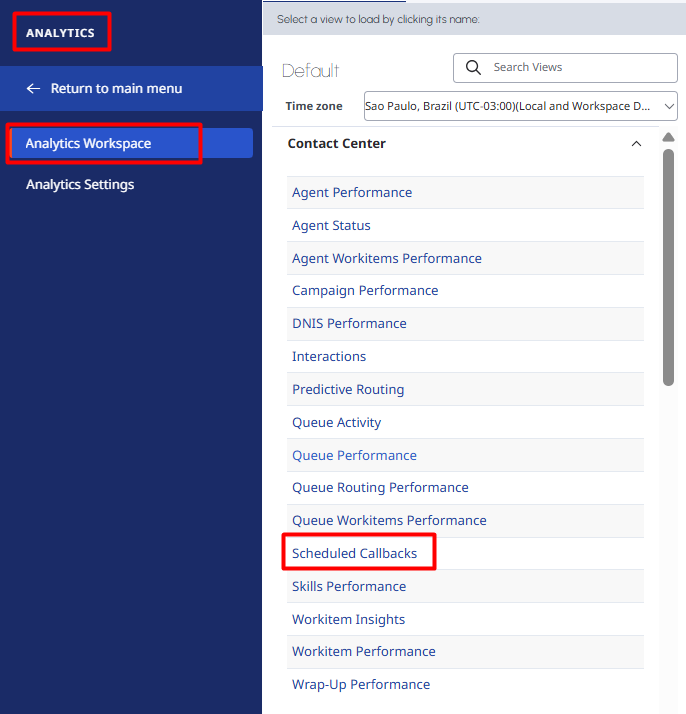
- If agent ownership is not enabled or the agent doesn't take ownership, the Agent Owner column remains blank.
Regarding your concern about callbacks scheduled for the next day continuing as the same interaction, this is the designed behavior. The interaction remains open until the callback is executed. This is why your agent statistics show 37 instead of 40 calls when 3 callbacks are pending.
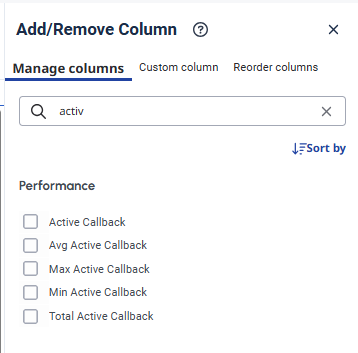
To work around this reporting limitation, you can use the Active Total Callback metrics that were introduced to better capture agent activity during the call portion without inflating handle time metrics. These metrics help separate the initial interaction time from the callback execution time.
I hope this helps you.
------------------------------
Camila Meneghini
------------------------------