Thanks Carl for the response and I apologize on the delay on responding. I actually found a discovery that I just shared with Genesys as I had a ticket opened with this as well. Use Response-Assets and upload the files in there and right click on the images within Response-Assets and copy the image address and reference those into the scripts, they will then load instantly, looks very clean and quick!
If you don't have the Response-Assets, you will need to give yourself the permission to view that option within the admin container of Genesys Cloud. I stumbled on this playing around and was shockingly pleased with the results, give it a shot sometime, they work like a charm for me!
Thanks,
Luke
------------------------------
Luke Murphy
Genesys Cloud Developer
CCS Medical
------------------------------
Original Message:
Sent: 10-03-2023 10:02
From: Robert Wakefield-Carl
Subject: Scripter image files take a while to load
Sorry, missed that in my perusal of the Community. Thanks for bumping up to the top.
Two things to try.
- Make sure image is not larger than what you need. It is loaded on each page load if you are pulling with HTTPS and then has to be reduced before being displayed.
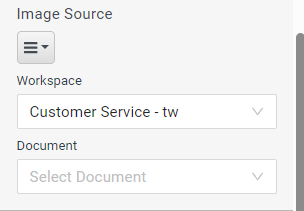
- Try using a document instead. That will keep the image in Genesys Cloud and serve it up through CloudFront instead of over the top to the internet site.
------------------------------
Robert Wakefield-Carl
ttec Digital
Sr. Director - Innovation Architects
Robert.WC@ttecdigital.com
https://www.ttecDigital.com
https://RobertWC.Blogspot.com
------------------------------
Original Message:
Sent: 10-03-2023 08:31
From: Luke Murphy
Subject: Scripter image files take a while to load
Bump
------------------------------
Luke Murphy
Genesys Cloud Developer
CCS Medical