Ok, so no audio path. Which could mean that although the Softphone can reach the Edge for Provisioning, the information passed to the phone during provisioning is not correct for Registration and placing calls.
That could be a problem with the Protocol or Port you have set up in the Softphone Base Settings under you have set up under Signalling.
It could be that you don't have a proper Phone Trunk set up.
Check those settings first to make sure the port/protocol on the phne settings have a matching Phone Trunk.
It could be a firewall issue that doesn't let the phone connect on the registration port and protocol (which is different from the provisioning port and protocol).
I suggest you use Wireshark to do some analysis, unless you are using TLS in which case you will probably need to use Log Lion
http://www.regallogic.com/loglion.html to open and analyse the SIPEngine log for the softphone (normally found under \Windows\Temp\inin_tracting on the computer running the softphone).
------------------------------
George Ganahl CCXP, GCA
Principal Technology Consultant
Genesys
------------------------------
Original Message:
Sent: 04-30-2019 11:18
From: Charaf Eddine Chemlal
Subject: Softphone offline
I hear nothing, it only shows connected
when dialing an extension, the other phone doesn't ring
------------------------------
Charaf Eddine Chemlal
Dimension Data France
------------------------------
Original Message:
Sent: 04-30-2019 11:10
From: George Ganahl
Subject: Softphone offline
What do you hear when it shows Connected?
When you dial an extension, does the other phone ring?
------------------------------
George Ganahl CCXP, GCA
Principal Technology Consultant
Genesys
Original Message:
Sent: 04-30-2019 11:09
From: Charaf Eddine Chemlal
Subject: Softphone offline
When dialing *86
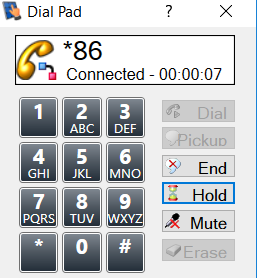
The same behavior when dialing an extension.
yours,
------------------------------
Charaf Eddine Chemlal
Dimension Data France
Original Message:
Sent: 04-30-2019 10:58
From: George Ganahl
Subject: Softphone offline
Once you completed that provisioning on the computer, did you try right-clicking the Softphone icon in the System Tray and selecting Dial Pad, then try placing a call from the Dial Pad to see if it works?
First try *86 to see if you connect to voicemail, then try dialing an extension, then an outbound phone number (which will normally give you an error saying you don't have dialing privileges).
------------------------------
George Ganahl CCXP, GCA
Principal Technology Consultant
Genesys
Original Message:
Sent: 04-30-2019 10:53
From: Charaf Eddine Chemlal
Subject: Softphone offline
Yes exactly !
------------------------------
Charaf Eddine Chemlal
Dimension Data France
Original Message:
Sent: 04-30-2019 10:46
From: George Ganahl
Subject: Softphone offline
When you say "provisioning", do you mean you went through the provisioning of the Softphone on the computer where it is running, and successfully connected it to the Edge from there?
https://help.mypurecloud.com/articles/provision-purecloud-softphone/
------------------------------
George Ganahl CCXP, GCA
Principal Technology Consultant
Genesys