Hi all, just wanted to drop a note in here about three things:
1. If you see "speaker 1" or "microphone 1" in the device settings in PureCloud, this is because we don't yet have access to the device names, because it hasn't been granted. One way to fix this is to "Run Diagnostics" which will trigger a prompt for device permissions. Another way to trigger this is to simply place or receive a phone call while using a WebRTC station.
2. We have some upcoming work to revamp headset and speaker selection, with more intelligent "profiles" of settings, a history of selected device(s) and intelligent prompting when we detect hardware changes. If you have feedback on how you'd like this to work, drop me a note. I will say, however that mixing up device profiles between PureCloud and Windows has a history of causing problems.
3. As for the relationship between headsets and links in the app, I'm still stumped on this one, though I'm doing a deep code investigation to figure out what's going on. Thank you all for your helpful investigation and steps to reproduce the issue so far.
------------------------------
Xander Dumaine
Genesys - Employees
------------------------------
Original Message:
Sent: 08-23-2018 13:26
From: Altaf Gosla
Subject: Supervisor 2 Permission errors...
So they had a revision of Windows 10 that only had the Windows 7 style sound settings.
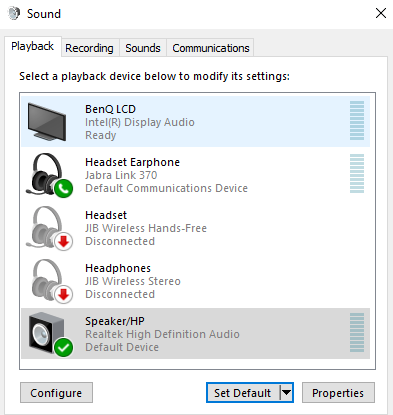
We set the Computer Speakers to Default Device and the Logitech Earphone to Default Communications Device.
On the PureCloud side when we set both speaker and microphone to Logitech - this caused the sound to come out of the computer speakers!
So we had to set the microphone to Default and the speaker to Speaker 2, which works well in our environment.
Thanks to everyone for their help on getting this worked out!
------------------------------
Altaf Gosla
AmeriHome Mortgage Company, LLC
------------------------------
Original Message:
Sent: 08-23-2018 11:59
From: Altaf Gosla
Subject: Supervisor 2 Permission errors...
@Jonathan Jones
Thanks for the additional testing and information! I provided some additional testing to Darlene as well :-)
@Jonas Kristensen
Thank you so much for figuring this out! That makes sense now that you have explained it. We only have the DECT Logitech headsets at one location and that is the only location that is having the issue!
Now - here is the fun part ;-) On our Windows 7 workstations and earlier revisions of Windows 10, the sound settings that you mentioned work great and is what we consider our preferred configuration in order to have call audio go through the headsets and ringing through the computer speakers. However, we started rolling out Windows 10 to the floor and (even though those settings are there) they don't work in the same way. We have been using the settings below in order to get call audio through the headsets and ringing through the computer speakers -
I will check with our folks at that location to see what settings they are using and report back!
------------------------------
Altaf Gosla
AmeriHome Mortgage Company, LLC
Original Message:
Sent: 08-23-2018 06:46
From: Jonas Kristensen
Subject: Supervisor 2 Permission errors...
We have seen exactly the same, but in various places in the platform.
What we discovered was that it was only seen with wireless headsets using the DECT technology.
What we found as a fix, and allows us to use Chrome still, was to configure the headsets in Windows sound manager. For some reason Windows mixed up the default device settings, changing them back, making the headset the default communication device and the pc speakers as default (sound) device, has solved the problem entirely. (see pic below)
------------------------------
Jonas Kristensen
Hi3G Denmark ApS
Original Message:
Sent: 08-22-2018 17:24
From: Kristina Kagramanyan
Subject: Supervisor 2 Permission errors...
You go, Jonathan! <g class="gr_ gr_101 gr-alert gr_gramm gr_inline_cards gr_run_anim Punctuation only-ins replaceWithoutSep" id="101" data-gr-id="101">Now</g> this is the true spirit and meaning of Community!
------------------------------
Kristina Kagramanyan
Genesys - Employees
Original Message:
Sent: 08-21-2018 15:22
From: Jonathan Jones
Subject: Supervisor 2 Permission errors...
------------------------------
Jonathan Jones
Kal Tire, LTD
Original Message:
Sent: 08-21-2018 13:27
From: Altaf Gosla
Subject: Supervisor 2 Permission errors...
@George Ganahl
We haven't done any network analysis yet. The non-working machines and working machines are on the same network segment. And on the non-working machines, Firefox works fine, which leads me to believe Chrome is to blame for this.
@Darlene Oordt
Going to have them try that now and will report back.
Thank you!
------------------------------
Altaf Gosla
AmeriHome Mortgage Company, LLC
Original Message:
Sent: 08-21-2018 11:26
From: Darlene Oordt
Subject: Supervisor 2 Permission errors...
I did some google research on this and there's a lot of threads non-related to PureCloud where people are having similar issues with Chrome. 2 solutions that seemed to work for many people are:
1. type chrome://restart in the URL bar
2. Go to Chrome>About Google Chrome and make sure there's no updates waiting there.
Let me know if any of these help!
Have a great day!
DK
------------------------------
Darlene Oordt
Sr Director, Product Management
Genesys - Employees
Original Message:
Sent: 08-21-2018 02:38
From: George Ganahl
Subject: Supervisor 2 Permission errors...
I am not meaning to be insulting or snarky...have you done any network analysis to see whether the data packets related to that network traffic are getting delayed or lost somehow? Checking things for latency, packet loss and such? That's the only other thing I can think of...are all of those workstations on the same LAN segment when problems happen (e.g., on the same switch)? I am grasping at straws here...until Customer Care comes back with the real answer :-)
------------------------------
George Ganahl
Principal Program Manager
Genesys
Original Message:
Sent: 08-21-2018 01:19
From: Darryn Chang
Subject: Supervisor 2 Permission errors...
Intermittently Agents and Supervisors are experiencing it also.
Had the issue myself last week reported it but they couldn't find anything in the console logs after a day it went away but now I have some agents and supervisors ask me whats up with Purecloud.
------------------------------
Darryn Chang
Stuff Limited
New Zealand
2 Years Purecloud
Original Message:
Sent: 08-20-2018 21:45
From: Altaf Gosla
Subject: Supervisor 2 Permission errors...
@Jonathan Jones You're definitely not alone. I couldn't see anything in the console log that looked different from a working machine but I wasn't able to spend the time to do a detailed analysis. I'll post here if I get anything back from Support.
@George Ganahl Both the app and Chrome are up to date. Its just strange that is not affecting all machines equally. I haven't tried re-installing Chrome though - I'll give that a shot.
Thanks!
------------------------------
Altaf Gosla
AmeriHome Mortgage Company, LLC
Original Message:
Sent: 08-20-2018 17:24
From: George Ganahl
Subject: Supervisor 2 Permission errors...
Sorry, I don't have any other grand ideas. We had some problems today, because Chrome was not updated, but it was mainly just getting past the login screen period - nothing would come up but a blank screen. Updating and restarting Chrome fixed that.
If Chrome is up to date and the Desktop app is up to date, then maybe it's just something with the local computer and Chrome/Chromium (desktop app uses Chromium).
------------------------------
George Ganahl
Principal Program Manager
Genesys
Original Message:
Sent: 08-20-2018 16:24
From: Jonathan Jones
Subject: Supervisor 2 Permission errors...
I did get some console log images from an agent, but I'll get getting my own when I visit the site tomorrow, as the errors were very strange. At least I know I'm not the only one.
------------------------------
Jonathan Jones
Kal Tire, LTD
Original Message:
Sent: 08-15-2018 10:36
From: George Ganahl
Subject: Supervisor 2 Permission errors...
Way back I had problems with the security settings in Chrome blocking the needed sites in AWS. Also my Internet filtering software, until I whitelisted what was needed. If the suspect desktops have taht as an issue, or a Firewall issue, then it should affect anyone logging into PureCloud on that workstation, though.
Did you see any errors under Console in the Chrome Developer Tools that gave a clue? I realize there are probably multiple errors showing there.
------------------------------
George Ganahl
Principal Program Manager
Genesys
Original Message:
Sent: 08-14-2018 19:21
From: Jonathan Jones
Subject: Supervisor 2 Permission errors...
Thanks for the suggestion, I did do the upgrades of Chrome, no effect. We're locked down for installing software so installing Firefox is not an option.
Do you have any suggestions with regards to resetting Chrome or maybe that their local profiles have something that's saved by Purecloud that can be removed and re-created by a fresh logon?
------------------------------
Jonathan Jones
Kal Tire, LTD
Original Message:
Sent: 08-08-2018 16:50
From: George Ganahl
Subject: Supervisor 2 Permission errors...
Two suggestions, I guess...which you may already have tried:
1. Make sure Chrome is updated on the machines having problems (or, first, compare the version of Chrome on a machine where it works vs. one where it doesn't to see if it is the same).
2. Try Firefox as the browser on one of the workstations where it doesn't work and see if it works when Chrome doesn't
You can also press the F12 key when in the Chrome browser, click on the Console tab in the view that pops up in Chrome, and see if it shows any errors when you try clicking on an Agent name, That might give you an idea. It might be something as simple as a Windows Firewall setting (though I doubt it).
------------------------------
George Ganahl
Principal Program Manager
Genesys
Original Message:
Sent: 08-08-2018 15:45
From: Jonathan Jones
Subject: Supervisor 2 Permission errors...
Thanks for the suggestion George, it appears to be a different issue now from the permissions, now the users don't get the permission error, but when they try to click on anyone's name in the performance agent view, it simply doesn't recognize that you've clicked, yet many of the other functions work.
I have the team leads, log out of Purecloud, then clear their Chrome caches, reboot the computer and try again, no effect. Then I had them log into a different computer and it worked fine. Now I thought it may just be a an isolated incident with 1 or 2 agents, but it's 75% of them. So something on those new view reporting pages is buggering up the ability to click on things.
Any thoughts? Anyone else see these symptoms?
------------------------------
Jonathan Jones
Kal Tire, LTD
Original Message:
Sent: 08-03-2018 13:05
From: George Ganahl
Subject: Supervisor 2 Permission errors...
Addition - make sure they log out and back in after adding the permission to the role.
Are you adding it to the PureCloud Supervisor Role (or, since your organization is older if I remember correctly, the Engage Supervisor Role)?
If so, have you opened the settings for that role in recent history and tried the Restore Default Role option? Take note of what permissions are to be removed, match against those to be added, apply the changes and add back the permissions that you may have customized in the past, plus the directory>user>view permission.
------------------------------
George Ganahl
Principal Program Manager
Genesys
Original Message:
Sent: 08-03-2018 12:59
From: Jonathan Jones
Subject: Supervisor 2 Permission errors...
This has no resolved this issue for us. I've tried removing and readding the permission to the role, even adding it to another role and no effect. Are the any other permissions that could also be impacted?
------------------------------
Jonathan Jones
Kal Tire, LTD
Original Message:
Sent: 07-31-2018 17:00
From: maisey harris
Subject: Supervisor 2 Permission errors...
I would like to apologize for the inconvenience and offer an explanation for what happened in this situation.
We don't often have to increase permission requirements for views, but the director > user > view permission is needed for agent performance once one of our upcoming features, ACL (Access Control), is released. We should have used a feature toggle with the new permission check but made an incorrect assumption that all supervisors would have the directory > user > view permission. Had we feature toggled the permission check, the view would have still become inaccessible to users without the directory > user > view permission at the time of the feature release, but it wouldn't have been a sudden inexplicable change. We didn't realize this permission wasn't in the default supervisor role. We have made changes to add it which should land later this week, and we plan to backfill any custom supervisor roles to restore access.
I cannot speak to why this has happened to you before since I am only involved in a subset of our views, but I can say that I am very sorry and will make sure that we are more careful going forward. I will also talk to our release team and see if there is a way we can handle messaging for potentially breaking changes in the future.
------------------------------
maisey harris
Genesys - Employees
Original Message:
Sent: 07-31-2018 15:58
From: Jack Blakey
Subject: Supervisor 2 Permission errors...
We too are back in business! But I have to pose the question, why do permissions change mid-stream by Genesys w/o warning? Everything was fine up until yesterday and we were using the default Permission role for PC2. This is the second time this has happened to our Org.
Thank you for getting back to (us) with a fix. Jack
------------------------------
Jack Blakey
Clearent LLC
Original Message:
Sent: 07-31-2018 15:45
From: George Ganahl
Subject: Supervisor 2 Permission errors...
Thanks, Jordan!
The permission is slated to be added to the default PureCloud Supervisor role as well.
------------------------------
George Ganahl
Principal Program Manager
Genesys
Original Message:
Sent: 07-31-2018 15:07
From: jordan robinson-rucker
Subject: Supervisor 2 Permission errors...
Hi,
The Directory > User > View permission is now needed to see some views, such as the Agent Performance views, or to see and use the user filter in other views.
I hope that helps!
------------------------------
Jordan Robinson-Rucker
Genesys
Original Message:
Sent: 07-31-2018 14:42
From: Altaf Gosla
Subject: Supervisor 2 Permission errors...
Hi George,
Yes - that is the message we are seeing. We have a custom User Admin role and when I gave that permission to one of my Supervisors as a test, that fixed it. I can't give them that role permanently, so, just need to find the permission that is needed. Thanks for your help!
------------------------------
Altaf Gosla
AmeriHome Mortgage Company, LLC
Original Message:
Sent: 07-31-2018 14:22
From: George Ganahl
Subject: Supervisor 2 Permission errors...
I set up a user with the default Engage Supervisor role, which I presume shouldhave the necessary rights...but doesn't.
This is what you all are seeing trying to switch to the new view, correct?
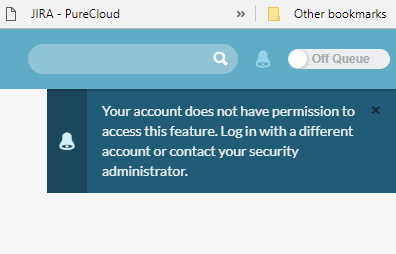
I will do some research.
------------------------------
George Ganahl
Principal Program Manager
Genesys
Original Message:
Sent: 07-31-2018 14:06
From: Altaf Gosla
Subject: Supervisor 2 Permission errors...
We are having the same problem. I first had it reported to me yesterday. As a Master Admin I have access to the view, so it must be something permissions related. We have a custom Supervisor role so I have been tinkering with the permissions assigned to it, but no luck yet :-(
------------------------------
Altaf Gosla
AmeriHome Mortgage Company, LLC
Original Message:
Sent: 07-31-2018 13:37
From: David Goldstein
Subject: Supervisor 2 Permission errors...
Hello - yes, we are experiencing the same exact issue that you described.
------------------------------
David Goldstein
Carestream Dental