I have used the attribute: Call.ConversationId.
And for the phone call interaction it shows as expected.
For webmessaging interaction it shows, Guest, state and queue name.
We are trying to understand, why the attribute is working for phone call and why not for web interactions.
In the interaction panel it only shows the default once, but not the selected attributes.
Original Message:
Sent: 01-05-2026 09:22
From: Steven Alix
Subject: The interaction attributes are not working for Web Messanging.
Firstly, I have my concerns that you are using the salesforce documentation for dynamics.
here is an older guide for interaction sync. Though you may want to reach out to TTEC for the newer one. There are instructions on how to map attributes starting around page 21. https://ipdoc.humanify.com/interactionsync/help/genesys/pdfdocs/InteractionSync_AdministratorGuide.pdf
------------------------------
Steve Alix
EDCi
------------------------------
Original Message:
Sent: 01-05-2026 08:35
From: Sai Shankar
Subject: The interaction attributes are not working for Web Messanging.
Hi Steve,
We're seeing an issue specifically with Web Messaging interaction attributes and wanted to check if there have been any recent changes or known limitations.
Interaction attributes work as expected for Call, Callback, SMS, Facebook, and Email interactions. However, for Web Messaging only, the custom interaction attributes we add do not appear in the interaction panel. Instead, only the default attributes are shown.
This used to work earlier (around Oct/Nov timeframe), which is why we're wondering if something changed or broke recently for Web Messaging.
We're referring to the interaction attribute sync documentation below, but it doesn't clearly call out any Web Messaging–specific limitations:
https://help.mypurecloud.com/articles/synchronize-interaction-attributes-with-salesforce-activity-r…" href="https://help.mypurecloud.com/articles/synchronize-interaction-attributes-with-salesforce-activity-r…" rel="noreferrer noopener" target="_blank" class="fui-Link ___1q1shib f2hkw1w f3rmtva f1ewtqcl fyind8e f1k6fduh f1w7gpdv fk6fouc fjoy568 figsok6 f1s184ao f1mk8lai fnbmjn9 f1o700av f13mvf36 f1cmlufx f9n3di6 f1ids18y f1tx3yz7 f1deo86v f1eh06m1 f1iescvh fhgqx19 f1olyrje f1p93eir f1nev41a f1h8hb77 f1lqvz6u f10aw75t fsle3fq f17ae5zn" title="https://help.mypurecloud.com/articles/synchronize-interaction-attributes-with-salesforce-activity-r%e2%80%a6">https://help.mypurecloud.com/articles/synchronize-interaction-attributes-with-salesforce-activity-r…
Any guidance or confirmation from Genesys would be greatly appreciated.
------------------------------
Sai Shankar
x
Original Message:
Sent: 01-02-2026 09:46
From: Steven Alix
Subject: The interaction attributes are not working for Web Messanging.
I see your queue name as the 3rd line down in the screen shot. Guest is the name of the customer on the other end of communication. This is common in Genesys Cloud Web Messaging. If you were to handle a web messaging interaction in the native UI and the customer record was not available, found, or authenticated Web Messaging it will always show as guest for the customer name. Guest is not the name of the queue. I do not believe it is possible to remove the Guest reference.
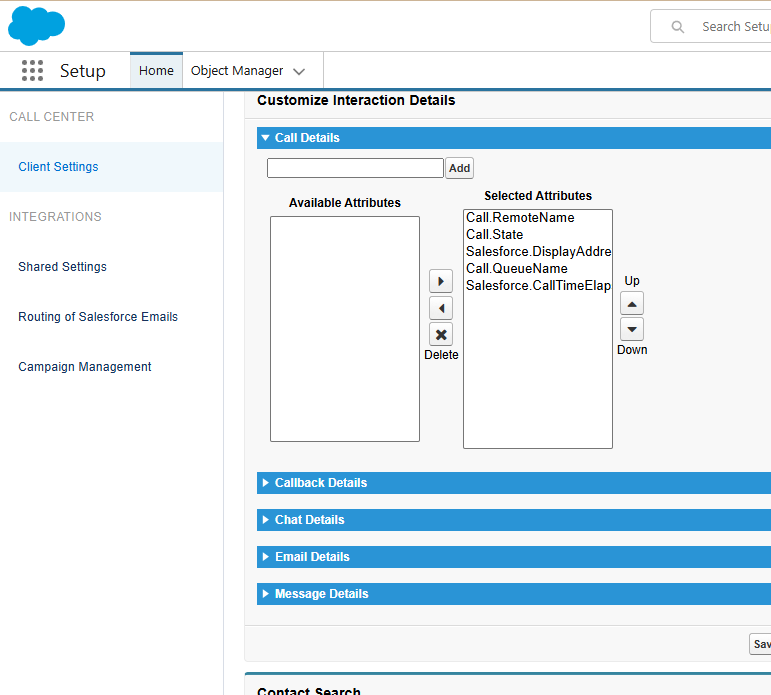
Also the document you reference is for Salesforce and not Dynamics, even though the embedded framework works and looks similar in the various connectors they are different behind the scenes. In the case of the Call.QueueName it is a salesforce attribute mapping to activity records. I've included a screenshot below for ref.
------------------------------
Steve Alix
EDCi