That's a shame, as there's some really cool stuff in the OOB Salesforce integration.
The triggers/workflows are a little temperamental, as observability is admittedly than I'd like it to be (there are some pretty cool things in the works for that though, so stay tuned). The main thing that tends to go wrong is either the filter criteria aren't doing exactly what you think they'd be doing for a specific event (there may be a surprise value in the field returned from the JSONPath), or there is a configuration issue in the flow (either you're referencing a variable that's supplied as an input, but not marked as such, or you're referencing a value that doesn't exist which causes the flow to take its error handling path).
Original Message:
Sent: 04-28-2023 12:59
From: James Dunn
Subject: Trigger an event when a call is answered?
Thanks Richard, we are using a third-party Salesforce integration rather than Genesys Cloud for Salesforce out-of-the-box.
I was able to have some success using the Workflow method, although there are still some obstacles as it is failing now despite working earlier... But I think I just need to dig deeper.
Thanks all.
------------------------------
James Dunn
Pitney Bowes Inc.
------------------------------
Original Message:
Sent: 04-28-2023 11:24
From: Richard Schott
Subject: Trigger an event when a call is answered?
1. The conversationId is an input variable to flow, and is passed in by the trigger when the trigger criteria are met; this is discussed here: https://developer.genesys.cloud/platform/process-automation/
2. Given what you're trying to do, and the fact that you're operating out of Salesforce, I highly recommend that you look at the link I posted above re: events within Salesforce. This is going to be a much more deterministic approach to setting this data, and will include an event that confirms that your update of attributes has been completed.
------------------------------
Richard Schott
Genesys - Employees
Original Message:
Sent: 04-28-2023 11:08
From: James Dunn
Subject: Trigger an event when a call is answered?
Thank you, this seems like it might be exactly what I need. Or at least an avenue to pursue.
I can see that we can set conversation data from the Workflow, which should be ideal.
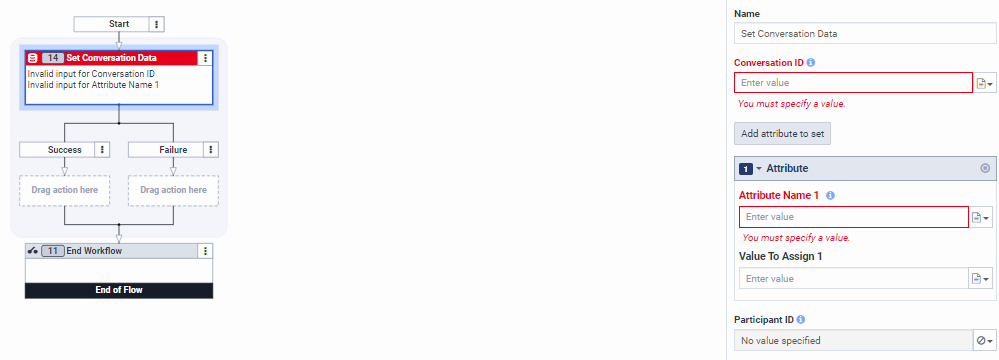
One question though, when the trigger executes the Workflow, how is the Conversation ID passed? It mentions that it is passed in the event message from the trigger but how do I access this when constructing a workflow?
"When a workflow is executed, all the top-level primitive attributes of the event payload are available for a user as input variables to the flow." Do I need to define some data first as Input to Flow?
@Richard Schott I see you discussed it here too.
Is it possible to get conversation ID from Architect Workflow? - Genesys Cloud Applications / Architect - Genesys Cloud Developer Forum
------------------------------
James Dunn
Pitney Bowes Inc.
Original Message:
Sent: 04-28-2023 10:20
From: Jim Crespino
Subject: Trigger an event when a call is answered?
If you are a developer, or don't want to use agent scripts for whatever reason, then you could use our Process Automation Triggers to do this: https://developer.genesys.cloud/platform/process-automation/.
With triggers you can setup a trigger so that when the v2.details.events.conversation.{id}.user.start event occurs then run an Architect Workflow. Within the workflow you could use Genesys Cloud Data Actions to update the participant data of the call with the keys that you want. This would all run in the background automatically for every conversation, or for the ones that you filter on.
------------------------------
Jim Crespino
Senior Director, Developer Evangelism
Genesys
https://developer.genesys.com
Original Message:
Sent: 04-27-2023 14:28
From: Brad Murlin
Subject: Trigger an event when a call is answered?
Additional notes: You'll need to add logic to your script-action to only run the user-info update if the interaction status = connected, otherwise it will post user-data when they are alerted, but do not answer the call.
This can be done with Process Automation Triggers and Workflows as well, but the same caveat applies that the trigger runs when the user is brought into the call, regardless of whether they answer it or not - and then solving for that 'did they answer' becomes more awkward inside a workflow than a script-action.
Attached is a copy of our basic script w/ actions that perform this state-check and run a data action once the call is connected. You'll need to change the file extension from .zip to .script because the forum does not allow upload of Genesys .script files.
------------------------------
Brad Murlin
Zillow, Inc.
Original Message:
Sent: 04-27-2023 11:36
From: James Dunn
Subject: Trigger an event when a call is answered?
Thanks Melissa, that is a great solution, one I didn't actually consider and might be workable.
We have one difficulty, we're in the process of moving to using GC Background Assistant to allow us to screen record embedded framework apps, meaning our agents would only have the Salesforce window open and not the Genesys Cloud UI - so I guess in that instance the script itself never generates.
------------------------------
James Dunn
Pitney Bowes Inc.
Original Message:
Sent: 04-27-2023 09:46
From: Melissa Bailey
Subject: Trigger an event when a call is answered?
You can have a script execute a data action when the page loads, no button click needed.
https://help.mypurecloud.com/articles/set-script-page-load-action/
------------------------------
Melissa Bailey
Genesys - Employees