Workforce Engagement Management

 View Only

Sign Up

  • 1.  📢 Upcoming - 15 minute Granularity for Time Off Limits

    Posted 6 hours ago
    Edited by Tracy Vickers 6 hours ago
    WFM banner
    The Time Off team are excited to be releasing staff-based 15-minute granularity to Time Off Limits, this will be rolled out from the 15th June 2026.

    Why this matters

     
    This gives teams more control over how Time Off Limits reflect the shape of the day. Limits can now be set around demand profiles, shift start times and different shift types, rather than relying only on a single daily limit. This should make it easier to stagger approval levels through the day and provide a fairer approval pattern across different agent groups, teams and working patterns.

    So what's new?

    New configuration steps:

    When clicking +add to create a new Time Off Limit, you will now be presented with an initial configuration modal:
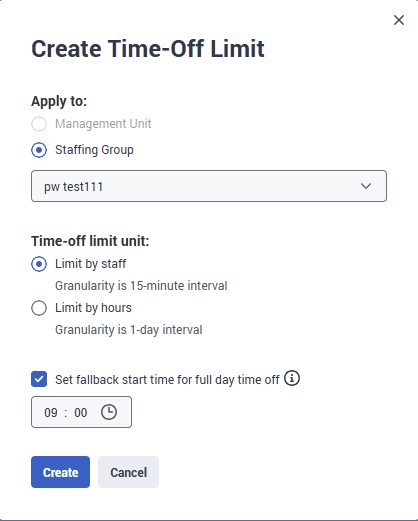
    The initial configuration set will allow you to select the type of Time Off Limit you are creating:
    • Select if the limit is Applied to the Management Unit or Staffing Group
    • New Time-Off Limit Unit:
      • Limit by Staff - this enables the limits to be configured by permitted staff count per 15-minute interval.
      • Limit by hours - this is the traditional daily limit of X working hours
    • Fallback start time - this is the default time that will be used when it has not been possible to estimate the requested Full day Time Off Request's Shift Start time so that request is evaluated against the limits for a reflected period of the day and not the whole day/all intervals.

    Update Filter Options for 15 Minute Granularity Limits:

    To help enter, review and edit the increase limit data, we have added a new set of filter options:

    • Expand/Collaps all quick select
    • Separate Date and Time ranges
    • Min and Max column Values 

    Import and Export options for 15 Minute Granularity

    • Export - this will create a CSV file of the data currently on screen.
      • ISO date-time, Date, Time, Staff Required ("for the limit")
    • Import - using the same format as the export, you can import CSV files up to 5MB with interval-level limits. 

    Time Off Limit Conversion:

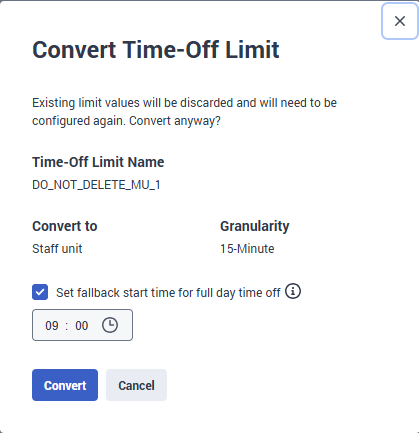
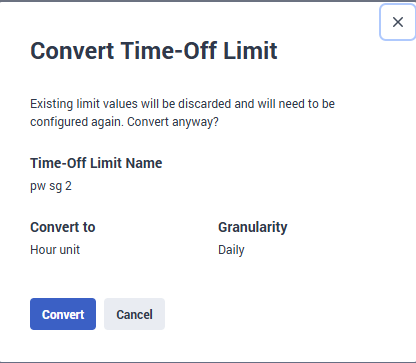
    When clicking on the ellipsis at the end of the Time Off Limit list row. You can select to convert the granularity from Daily to Interval or vice-versa.

    Daily to Interval change:
    Interval to Daily change:

    #TimeOff,AbsenceManagement

    ------------------------------
    Paul Wood
    Genesys - Employees
    WFM Product Manager
    ------------------------------


  • 2.  RE: 📢 Upcoming - 15 minute Granularity for Time Off Limits

    Posted 6 hours ago

    Tks Paul Wood, i am happy with amount of news about WEM.


    ------------------------------
    David Betoni
    Principal PS Consultant – Workforce Engagement Management
    ------------------------------