Clarifying partial day off requests would be great. We, also, get plenty of confusion between someone using partial day to ask for 8 hours off, versus using full day to request their entire 8-hour shift off. If they use partial day when they mean full, Genesys factors in the lunch break differently, and the results don't look right on the schedule. And it's pretty common for someone to create a request that says they'll be out from 9-1, when they actually mean they'll work from 9-1, and then be out from 1-6. They don't understand how to create the time request accurately.
While you're talking about enhancements, please do consider the option to have someone enter flex time requests in their time off request - where you take time off one day, and make up the hours on a different day that week. Currently we have to notate that in the "notes", and remember weeks or months later to add in the make-up hours when that week's schedule is created. If we could just have the Genesys time off request take care of it all - put 2 hours of time off on Tuesday afternoon, and add 2 hours of extra time to Wednesday's shift to compensate - that would be amazing.
------------------------------
Joann Smith
Workforce, Data Management
------------------------------
Original Message:
Sent: 04-30-2025 11:49
From: Eric Hagaman
Subject: Upcoming Accessibility Enhancements to the User Interface Activity - Schedule Screens
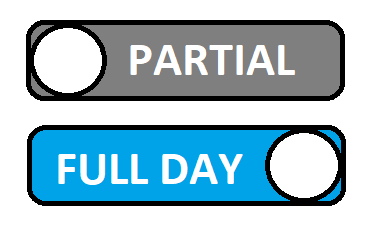
Thanks! a picture is worth 1000 words. So rather than 'full day' on | off, having the words full day, partial day present and some UI control that makes it clear this is mutually exclusive choice would help.
------------------------------
Eric Hagaman
Product Management Director
Genesys - Employees
------------------------------
Original Message:
Sent: 04-29-2025 16:40
From: Gene Gutierrez
Subject: Upcoming Accessibility Enhancements to the User Interface Activity - Schedule Screens
This is actually a different issue than what I was talking about, but this enhancement would definitely be an improvement as well!
I'm thinking something closer to this, pardon the poor Paint image
------------------------------
Gene Gutierrez | Workforce Analyst
Presbyterian Workforce Management
Albuquerque, NM
Original Message:
Sent: 04-29-2025 16:14
From: Eric Hagaman
Subject: Upcoming Accessibility Enhancements to the User Interface Activity - Schedule Screens
Thanks. We are considering enhancing Time-Off Request partial day input to start time, end time instead of length and start time for clarity and consistency with Shift Trades, would this help?
------------------------------
Eric Hagaman
Product Management Director
Genesys - Employees
Original Message:
Sent: 04-29-2025 11:54
From: Gene Gutierrez
Subject: Upcoming Accessibility Enhancements to the User Interface Activity - Schedule Screens
Hello,
As we reviewed the planned changes, especially around the Time-Off Request area, a couple of thoughts came to mind based on how our agents use the system daily:
- The "Full Day" versus "Partial Day" selection is a recurring point of confusion for some agents, even after training. It often results in incorrect requests, and due to the lack of WFM options to change this Full or Partial Day status, the request must be resubmitted either by the agent or WFM. We think there might be room for exploring UI designs here that make the distinction even clearer, perhaps moving towards something like a dedicated "Partial Day" option or a toggle that explicitly changes the mode instead of the current slider.
- For accessing Time-Off Request details, while making the links clickable is good, we've found that icons or simple links like '>' aren't always immediately obvious to users. Explicit buttons like "Edit" or "View Details" seem to work much better in terms of discoverability and making it clear that there's more information or action available.
We've definitely seen during training that explaining less explicit interactive elements can take time, so anything that makes the interface more intuitive upfront is a big win. While we understand that using text might increase translation considerations compared to icons, we believe the usability gains would significant enough to warrant this approach.
------------------------------
Gene Gutierrez | Workforce Analyst
Presbyterian Workforce Management
Albuquerque, NM