Hi everyone,
We're pleased to share some upcoming enhancements to how Coaching and Learning appointments are scheduled in Genesys Cloud. These changes aim to give you more control, greater transparency, and a closer alignment to Workforce Management (WFM) priorities, while still offering the flexibility your teams need day to day.
Why We're Making This Change
Many of you have told us that while today's slot-based scheduling uses staffing difference to suggest the ten least disruptive time slots, it often lacks the nuance required for more complex operational realities.
For example, staffing difference is a broad, averaged metric. A time slot may appear viable overall but could hide pressure points in specific teams. A small team of French-speaking agents might be stretched thin, even though the wider English-speaking queues are well staffed. This kind of nuance is important, and the current model can miss it.
To address this, we're introducing a new algorithm that works with your defined WFM service goals. This creates a more intelligent view of availability, better reflecting the real-world conditions of your operation.
We're also expanding the ways you can book, offering three methods to suit different needs.
Three New Booking Methods
1. Optimal Slots(Recommended)
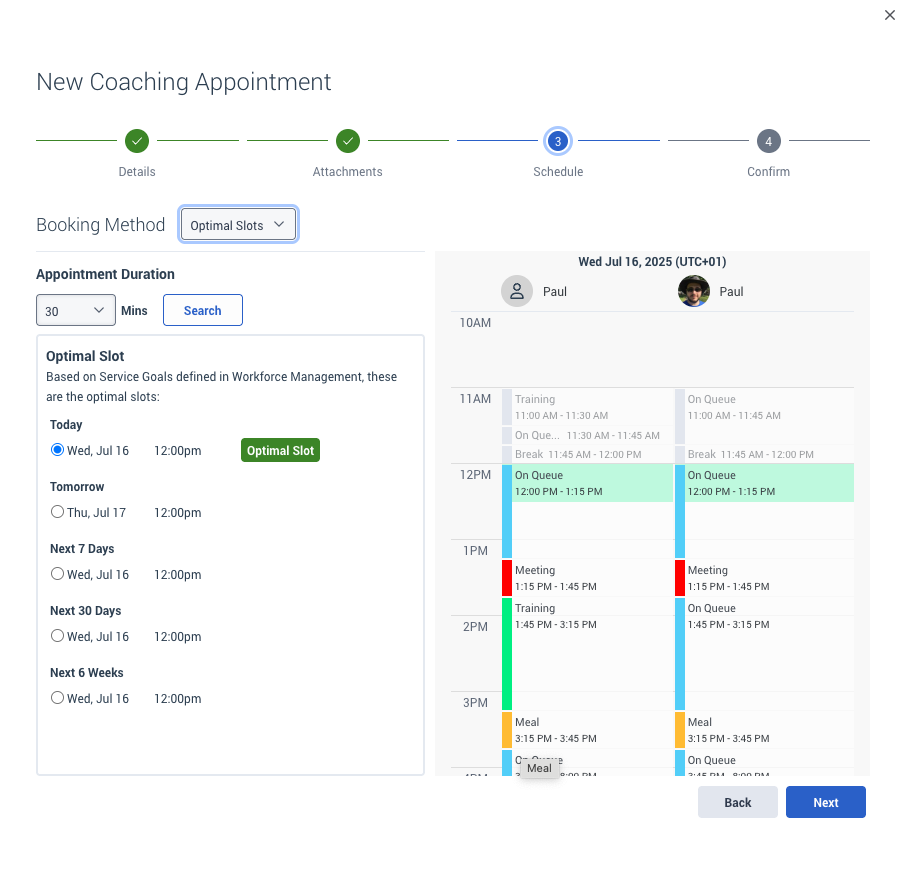
This is the default method when booking Coaching or Learning appointments manually. It uses WFM service goals to search across a six-week window and identify the single most optimal time slot. We also include a second slot for "tomorrow" since next-day bookings are a common pattern.
The interface groups results like this:
This might look like five different suggestions, but it's actually the same optimal slot shown consistently across each time window, plus an additional recommendation for tomorrow. This design makes it easy to see at a glance where the optimal time falls - whether it's sooner or further out - helping you make decisions that align with your own priorities. The goal is to keep things simple, reduce decision fatigue, and allow quick booking while still honouring your WFM planning.
Why use this: It's the easiest and most accurate way to find a time that supports both development and service goals. No configuration is needed from the supervisor side.
2. Custom Slots
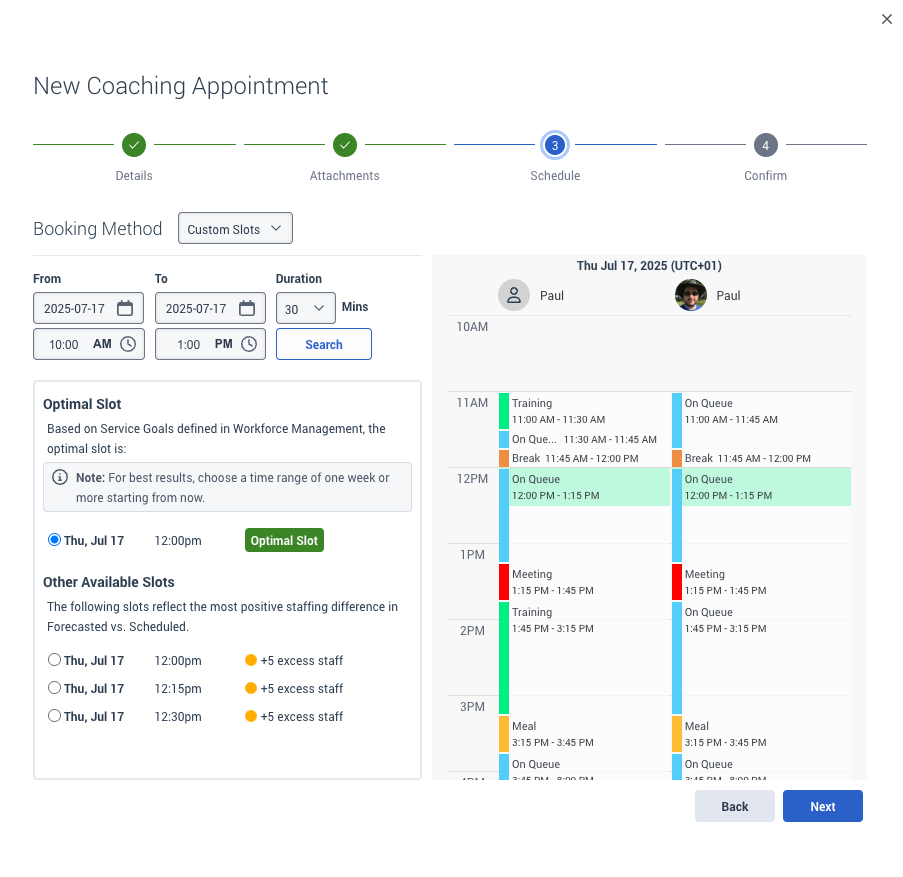
If you want more control over when the session takes place, Custom Slots let you define a specific time range. For example, you might want to check availability on July 17 between 10:00 and 13:00. If there's a time available that meets your WFM-defined service goals, we'll show it.
This view also includes the older staffing difference logic under a new label, Other Available Slots, using the first week of your selected time range. These legacy slots are clearly marked with explainer text:
The following slots reflect the most positive staffing difference in Forecasted vs. Scheduled.
We also continue to highlight the optimal slot from the new algorithm (using your time window), so you can compare easily.
Why use this: You want to work within a specific date or time range. Maybe you need more flexibility, or you know something about your team's availability that WFM doesn't.
3. Off Schedule
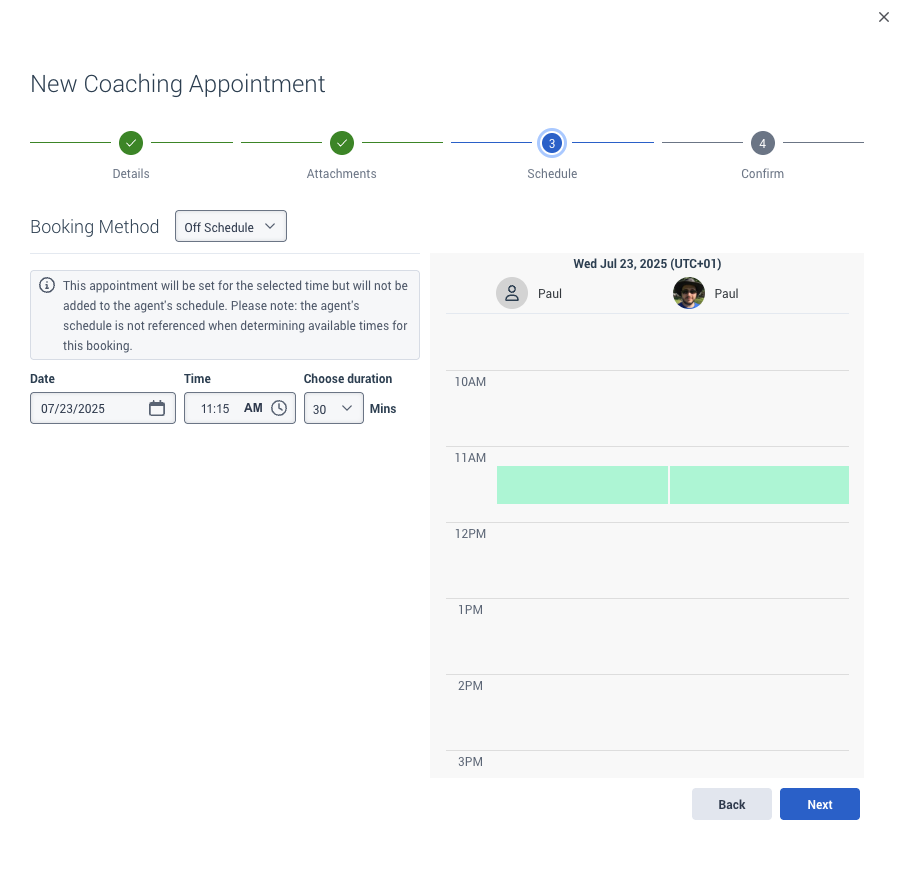
Previously, you could turn off scheduling with a toggle. We've now moved this into its own dedicated booking method, renamed to Off Schedule to improve clarity.
This method allows you to set a session time that is not added to the agent's schedule. The agent's schedule is not considered when offering availability.
Explainer text now reads:
This appointment will be set for the selected time but will not be added to the agent's schedule. Please note: the agent's schedule is not referenced when determining available times for this booking.
We know this approach isn't popular with everyone. Some customers would prefer to disable it entirely. However, we've kept it in response to use cases where urgency overrides adherence. It's now only ever shown by default when WFM is turned off. We will continue to monitor and iterate over this feature in the future.
Why use this: You need to run a session urgently, regardless of scheduling or adherence considerations. Best used sparingly.
In Summary
These updates are designed to give you:
-
Smarter recommendations that respect WFM service goals
-
Flexible tools when you need more control
-
Clear labelling and explanations to avoid confusion
We'll begin rolling out these changes next month. You'll see updated interfaces within Coaching and Learning appointments, and we'll also share documentation to support the transition.
We'd love to hear your thoughts early, so feel free to drop any questions or feedback in the comments below.
Cheers,
#Learning/Coaching
------------------------------
Paul Turner
Senior Product Manager
Genesys - Employees
------------------------------