Ola @Fernando Sotto dos Santos.
How are you today?
Thank you very much for responding. We have actually found a bug both within the UI and this appears to have an impact when its used within the Python Script.
We have found if you attempt an Bulk Import via the GUI using the 2 default settings as highlighted, and leaving all other options as default.
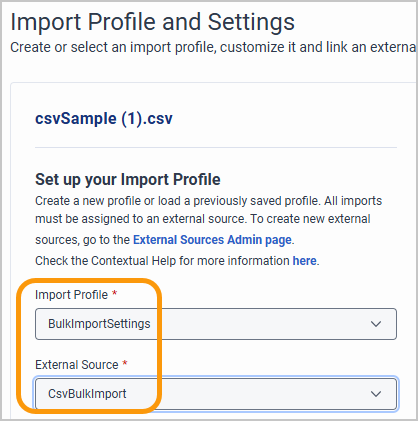
The import will "succeed" however the contact is not imported. 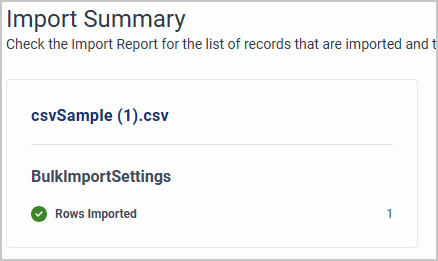
Similarly, if you followed the steps as shown in Developer Bulk Import External Contacts APIs
3.4 Create an External Source
external_source = ExternalSource()
external_source.name = "CsvBulkImport"
external_source.active = True
external_source_response = external_contacts_api.post_externalcontacts_externalsources(external_source)
3.5 Configure Import Settings
contact_import_settings = ContactImportSettings()
contact_import_settings.external_source_id = external_source_response.id
contact_import_settings.import_fields = import_fields
contact_import_settings.matching_criteria = ["Email", "Phone"]
contact_import_settings.merge_contacts = True
contact_import_settings.name = "BulkImportSettings"
Leaving these two with the default will also see it "succeed" but fail to import the contact.
Only by creating and replaced those values with a new External Source and Import Settings in both GUI, and Python script does it work successfully.
We have tested this internally and can confirm that is the issue, and we are currently awaiting an update from our customer for their validation and confirmation.
------------------------------
Bernard
CALLSCAN AUSTRALIA PTY. LTD.
------------------------------
Original Message:
Sent: 01-21-2026 12:54
From: Fernando Sotto dos Santos
Subject: Using Python SDK to upload Bulk Import External Contacts
Olá @Bernard Soh!
One common reason for this behavior is Division configuration. In External Contacts bulk import, the division is defined in the Import Settings. If the contact was imported into a division that the searching user does not have access to (or if the UI is filtered by another division), the import will show as Completed with success, but the contact will not appear in search results.
I'd recommend checking:
which Import Settings were used by the job,
which division is configured in those settings,
and whether the user searching for the contact has access to that division (and no division filter applied in the UI).
I think this could be the begning of the investigation. Share the import settings, to see if could be that.
------------------------------
Fernando Sotto dos Santos
Consultor Grupo Casas Bahia
------------------------------