Workforce Engagement Management

 View Only

Sign Up

  • 1.  Using the Capacity Planning Tool

    Posted 10 days ago

    Hi Everyone,

    We've been capacity planning in Excel for a while which works well but I'd like to see how we can best leverage the native Capacity Planning tool in Genesys. I think I have a decent grip on how to configure it but it doesn't seem to be providing any value. I'd love to hear from some of you about how you use the tool. Thanks!


    #CapacityPlanning

    ------------------------------
    Dave Lottman
    Workforce Manager
    ------------------------------


  • 2.  RE: Using the Capacity Planning Tool

    Posted 10 days ago

    Hi! I'm not usually part of the workforce planning team, but during WFM implementations these are the main capabilities I typically present to the teams that will be responsible for Capacity Planning.

    I usually focus on features such as long-term workforce planning (up to two years with ABM), Business Unit and Planning Group visibility to identify staffing gaps, multi-skill planning, and especially the ability to build multiple "what-if" scenarios to evaluate different staffing strategies before making decisions.

    I'm not sure if you've already configured these features or explored these use cases in your environment, but hopefully this gives you a few ideas on where the tool can provide more value.

    I'd also be interested in hearing from people who use Capacity Planning on a daily basis, as I'm sure they can share practical experiences and best practices from an operational perspective.


    ------------------------------
    Raphael Poliesi
    ------------------------------


  • 3.  RE: Using the Capacity Planning Tool

    Posted 8 days ago

    Hi Raphael,

    In your case, as a general rule, is the long-term forecast accurate or is there a need for manual adjustments for volumes/AHT? 

    Would you be able to help us with some more details like: 

    • is there any seasonality present in the forecast?
    • what type of support you offer? 24/7? 
    • the PGs have low/very low or high/very high volumes?

    Also, if it is not too much trouble, it would help to know what type of "what if'" scenarios you have been able to build so far in Genesys Cloud.

    Thank you,

    Daniela Iordache


    ------------------------------
    Daniela Iordache
    NA
    ------------------------------


  • 4.  RE: Using the Capacity Planning Tool

    Posted 3 days ago

    Daniela,

    We also need help with adjusting for season peak volume.  We can adjust the forecast to increase call Volume% but what I see it increase the entire forecast period.  We only want to increase it for the first week of the month.  So for long forecasting is there a way to just increase volume just for the first week of the month and not the entire forecast?


    ------------------------------
    Roxanne Tieman
    Call Center Operations Manager
    ------------------------------


  • 5.  RE: Using the Capacity Planning Tool

    Posted 4 hours ago

    Hi Roxanne,

    You can go to Forecasts, select the Forecast you want then go to Short-Term Forecast, select Planning Group and week you want to adjust. Click on Modifications - Add and from here you can add Volumes and/or AHT and adjust them as per your needs - this will adjust only the week you have selected, not the entire forecast. I have "Set value over range" to 200 and this changed my forecasted volumes to 200 for that week, 1-8 September, only:
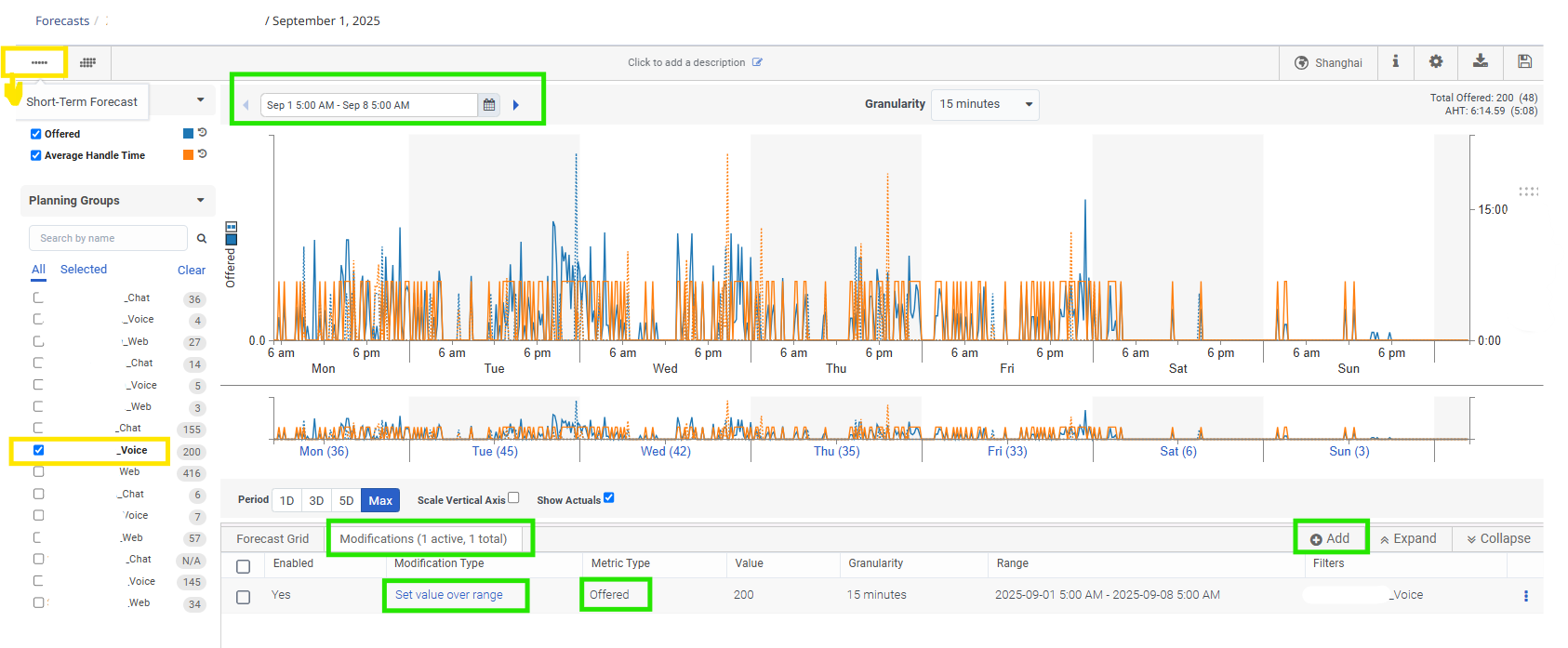
    Unfortunately, I have not found a more automated way to adjust only the first week of every month in a 3-6 month's forecast.

    Regards,

    Daniela


    ------------------------------
    Daniela Iordache
    NA
    ------------------------------


  • 6.  RE: Using the Capacity Planning Tool

    Posted 8 days ago
    Edited by Robert Tonyka 8 days ago

    Hi Dave,

    Genesys Cloud Capacity Planning is most helpful for long-term workforce planning, where the objective is to understand whether the organization will have sufficient capacity over the coming months and when action must be taken.

    I normally separate WFM planning into three levels:

    • Operational planning: Intraday management, including monitoring service levels, managing adherence, and responding to unexpected changes in demand or staffing.
    • Tactical planning: Forecasting and scheduling for the coming weeks or months, determining shift requirements, and producing employee schedules.
    • Long-term planning: Evaluating workforce requirements over a longer horizon and deciding when to recruit, train, cross-skill, transfer, or reduce staffing.

    Short-term scheduling answers: "Which employees should work at each interval?"

    Capacity Planning answers: "Will we have enough appropriately skilled employees in the future, and when do we need to act?"

    The main benefits of Capacity Planning include:

    • Identifying future understaffing and overstaffing
    • Comparing required staffing with available staffing
    • Modelling changes in contact volume, AHT, shrinkage, and workload
    • Accounting for attrition, recruitment, training, and employee availability
    • Evaluating alternative hiring and cross-skilling scenarios
    • Understanding when recruitment or training activities must begin
    • Supporting budget and headcount discussions with operations, HR, and finance
    • Providing a consistent planning process across planning and staffing groups
    • Highlighting potential capacity risks before they affect service levels
    • Comparing multiple scenarios before committing to a workforce strategy

    The feature provides the most value when the planning groups, staffing groups, and assumptions accurately represent the operation. It should be used as a decision-support tool for future workforce strategy rather than as a replacement for forecasting, scheduling, or intraday management.

    Thanks,

    ------------------------------
    Robert Tonyka
    Sr. Principal PS Consultant
    ------------------------------


  • 7.  RE: Using the Capacity Planning Tool

    Posted 7 days ago

    Thanks for the responses. I understand the reason and the use for the Capacity Planning tool. I am just not getting any useful output. We are a 24/7 contact center with about 150 agents across 4 MUs (2 queues). I would love to run the tool and be able to have the system tell me the long-term outlook for headcount, as well as provide opportunities for what-if analysis (+/- volume, AHT, Headcount) so I can get out of Excel. Thanks


    ------------------------------
    Dave Lottman
    Workforce Manager
    ------------------------------


  • 8.  RE: Using the Capacity Planning Tool

    Posted 6 days ago

    Hi Dave,

    Can you elaborate a little on what you mean by not getting any useful outputs?  What you described wanting to get out of the tool is exactly what it's meant to provide.  What specifically are seeing for your outputs that you feel are not useful?

    Thanks,


    ------------------------------
    Belinda Herrera
    Genesys, Staff Product Manager
    ------------------------------


  • 9.  RE: Using the Capacity Planning Tool

    Posted 4 hours ago

    Hi Belinda,

    I think Dave is referring to the fact that sometimes, most of the times for low volume PGs (in my case), Genesys Staffing requirement is far off reality. Example: it returns 3 FTEs instead of 0.5 FTEs (so no useful output). I had several cases opened with Genesys Support on this and so far, the only "solution" I received was to reforecast, readjust the forecast, change service goal templates.

    Regards,

    Daniela


    ------------------------------
    Daniela Iordache
    NA
    ------------------------------