Hi Adnan,
From my understanding, I think the behaviour you're seeing is because you're using the built-in Date slot.
The built-in Date slot is designed to interpret the customer's input as a date and normalise the result, rather than validate that exactly 8 digits were entered. So if Genesys can interpret an incomplete numeric input as a date, the slot may still be populated instead of re-prompting based on length.
Since your requirement is specifically to collect exactly 8 digits in DDMMYYYY format, I think capturing it as a numeric sequence/string would be a better fit than using the built-in Date slot.
If you have Virtual Agent enabled, one option is an AI-powered Numeric Sequence slot, which allows you to configure an exact character length of 8. Alternatively, for a standard Bot Flow, a custom RegEx slot such as:
^\d{8}$
could be tested to accept exactly 8 digits and re-prompt when the input doesn't match.
Once the 8 digits are captured, you could then separately validate that they represent a valid date.
So I think the Date slot is behaving as a date parser here; it just may not be the right slot type when the requirement is strict 8-digit DOB collection.
------------------------------
Phaneendra
Technical Solutions Consultant
------------------------------
Original Message:
Sent: 08-10-2026 05:00
From: Adnan Hassan
Subject: Validate 8-digit Date of Birth slot length in Genesys Cloud Voice Bot
Hi Francis,
I am using the slot with slot buildin: date but unfortunately when i enter or speak like this 13011/13 feb slot automatically convert the date correct format.
I am attching the snapshot.
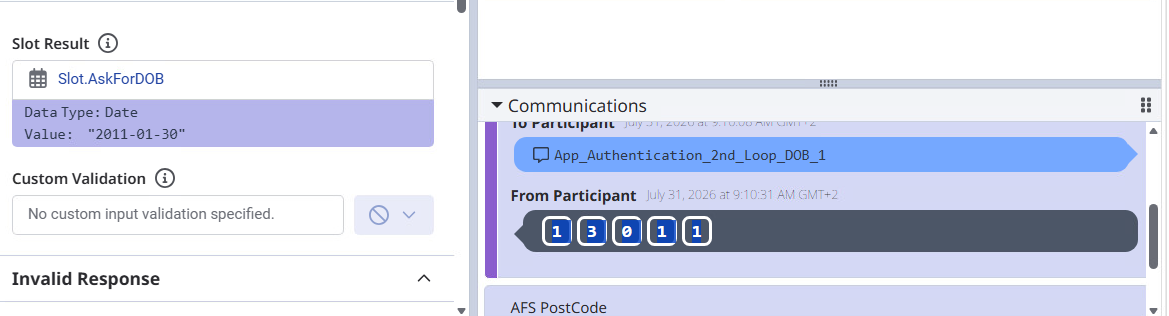 Is there any thing i missed in Slot?
Regards,
Adnan
------------------------------
Adnan Hassan
Senior Solution Consultant
------------------------------
Original Message:
Sent: 08-08-2026 18:12
From: Francis Guo
Subject: Validate 8-digit Date of Birth slot length in Genesys Cloud Voice Bot
You can create a Slot : DataOfBirth with Slot Type: buildin: date
When you collect this slot, it will automatically check if the slot is a valid date.
------------------------------
Francis Guo
NA
------------------------------