Hi Sathish, apologies I've made a mistake. You do need to use Set Participant Data and set the Attribute Name to name. Sorry for the confusion, been a while since I did this.
Original Message:
Sent: 01-16-2026 08:51
From: Sathish Mohanakrishnan
Subject: Web Messenger
Hi Savino,
Thanks for the response. I tried the update data option, however I am still not able to replace the "Participant" with the actual name. I am only getting the email address from the users from our website which they enter. using that I do a data actions to get their first name and last name. I am successful until here. when I update the data it still not update the participant.. Not sure if I am missing something,
------------------------------
Sathish Mohanakrishnan
Principal Systems Engineer
------------------------------
Original Message:
Sent: 01-14-2026 09:55
From: Savino Ricci
Subject: Web Messenger
Hi Sathish , it needs to be a string variable in an Update Data block, not Set Participant Data. Or you can use Get Participant Data and set the Variable to Assign to Flow.name
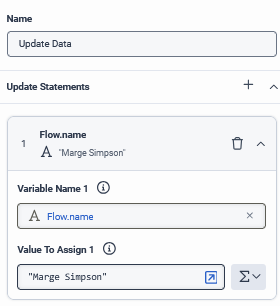
or
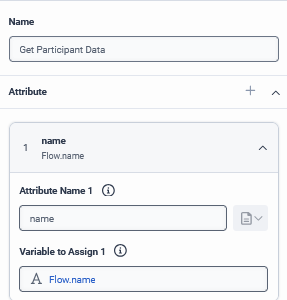
------------------------------
Savino Ricci
Senior Technical Consultant
Original Message:
Sent: 01-14-2026 09:45
From: Sathish Mohanakrishnan
Subject: Web Messenger
Hi Savino,
Thanks, I tried it. My architect is not taking the flow.name. It takes only flow.custname. However that does not fix the problem
------------------------------
Sathish Mohanakrishnan
Principal Systems Engineer
Original Message:
Sent: 01-12-2026 10:31
From: Savino Ricci
Subject: Web Messenger
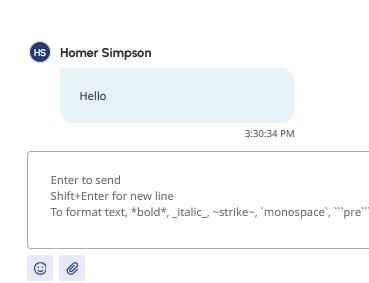
In your flow, save the name to the variable flow.name. This should update the participant name.
------------------------------
Savino Ricci
Senior Technical Consultant
Original Message:
Sent: 01-12-2026 10:23
From: Sathish Mohanakrishnan
Subject: Web Messenger
HI Cameron,
Thanks for the response. We are already passing the email address and we are able to see it in the message conversation. What we are umable to do is change the participant name into the passed email. Infact I can get the first name and last name of the client by sending the email to SNOW and get the values back using data actions, however I dont see any attribute in which I can replace the "Participant" into the identity what I want. please check the circled in the attached pic. This is what I am looking to replace with the data I am receiving.
------------------------------
Sathish Mohanakrishnan
Principal Systems Engineer
Original Message:
Sent: 01-09-2026 08:12
From: Cameron Tomlin
Subject: Web Messenger
Hello Sathish,
I believe you can address it by implementing custom participant id by using the messenger SDK deployment configuration. WHen initializing the Messenger, you can pass the user's information using the deploymentId configuration. This also allows you to add custom attributes object that includes the user's id info.
Here is an example:
Genesys("messenger", { deploymentId: "your-deployment-id", customAttributes: { firstName: "User's First Name", lastName: "User's Last Name", email: "user@example.com" }});
Hope this helps!
------------------------------
Cameron
Online Community Manager/Moderator