
We're excited to announce a number of enhancements to Activity Plans that will be available this month. These updates make Activity Plans more powerful, flexible, and easier to manage when scheduling activities across your organisation.
What's New
- Sync manual schedule edits with Activity Plan occurrences - Available this week
- Assign Activity Plans using user rules - Available Mid June
- More flexible edit options within Activity Plans - Available Mid June
- New deletion options for Activity Plans - Available End of June
1. Sync Manual Schedule Edits with Activity Plan Occurrences
Activity Plans can now detect and reflect changes made directly from the Schedule Editor. This means you can manage activities with confidence, knowing that Activity Plans always reflects the latest version of your schedule.
Let's take a look at an example.
Here we have an activity that has been planned and is ready to go. As the day approaches, we learn that a fire drill is scheduled and will overlap with the session.
As a proactive scheduler, I decide to move the session out by 30 minutes in the scheduling view to avoid the disruption. Once that change is published, Activity Plans is automatically notified.
When I return to Activity Plans, I can immediately see that the session has been manually edited.
In this example, the change was straightforward and still aligned with the original Activity Plan configuration. But what happens if the manual edit no longer matches the plan's intended rules?
Let's say that instead of moving the activity, I shortened its duration.
Activity Plans handles that scenario too.
The session is flagged as having been manually edited, and Activity Plans identifies the specific configuration rule that has been violated. In this case, the warning relates to the intended session length.
These warnings are informational only. You don't need to take any action, but you now have visibility into where the schedule has drifted from the original plan.
You may also have noticed a new field for Occurrence Violations.
While the previous examples relate to an individual session, occurrence-level violations highlight situations where the overall occurrence no longer complies with its configuration. Examples include:
- Exceeding the maximum number of simultaneous sessions
- Exceeding the maximum number of sessions
- Sessions scheduled beyond the recurrence end date
- Violations of minimum time-between-occurrence requirements
No schedule survives contact with reality unchanged. These enhancements acknowledge that activity plans often need to adapt as operational priorities shift throughout the day.
By surfacing manual edits and configuration violations directly within Activity Plans, you gain greater visibility into how real-world scheduling decisions impact your plans, helping you make informed adjustments when needed.
2. Assign Activity Plans Using User Rules
If you're already using Activity Plans, you'll be familiar with assigning users through Business Unit rules.
You may have already noticed two new tabs at the top of the assignment screen: BU Rules and User Rules.
The assignment options you're already familiar with haven't gone anywhere. They're now grouped under BU Rules, and any existing Activity Plans will continue to work exactly as they do today.
What is new is the introduction of User Rules, which provide a much more flexible way to define who should be included in an Activity Plan.
When you select Add Rule, you'll first see a list of rules that already exist and are available within your Business Unit.
This makes it easy to reuse rules that have already been created elsewhere rather than starting from scratch every time. You can also see useful information such as when a rule last ran and how many other objects currently depend on it. In the example below, the Group One rule is already being used by three other Activity Plans.
Selecting a rule displays its configuration.
At the top, you'll see the locked criteria that define the scope of the rule. These values can't be changed within the Activity Plan and help ensure the rule remains appropriate for its intended purpose.
Below that are the configurable elements. In this example, the rule targets users who belong to either Directory Group 1 or Directory Group 2. If the rule meets your requirements, simply add it to the Activity Plan.
Once applied, you can preview the resulting user list to validate that the correct employees are included.
In this example, the groups are relatively small, so let's create a new rule instead.
When creating a rule from within an Activity Plan, the rule automatically inherits the locked criteria associated with that plan's permissions. This helps keep rule creation focused on the users that matter for your specific Activity Plan.
From there, you can begin building your own logic.
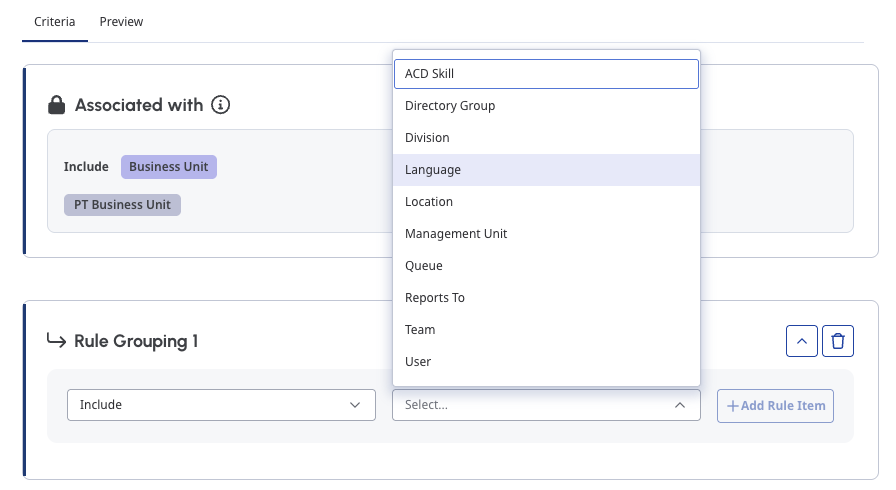 Compared to traditional assignment rules, User Rules provide significantly more options for identifying employees. You can build rules using organisational attributes such as groups, divisions, languages, management units, queues, and more.
Even more powerful is the ability to combine conditions together.
For example, you might want to target:
- Employees who speak English or French
- And belong to a specific management unit
- Employees in the Home division
- Who are assigned to a particular development queue
Complex scenarios like these can now be represented within a single rule.
As rules become more sophisticated, Activity Plans tracks their complexity using the complexity score displayed in the lower-right corner of the editor.
This score helps you understand how close a rule is to the supported complexity limits. These limits ensure rules continue to perform efficiently, even in organisations with very large employee populations.
As you can see, even the example above only uses around half of the available complexity budget.
As mentioned earlier, BU Rules remain fully supported and can still be used if they meet your needs. We also preserve their configuration even after switching to User Rules, making it easy to return to them later if required.
However, only one assignment method can be active at a time. Saving a BU Rule removes any User Rules associated with the Activity Plan, and vice versa.
For most customers, User Rules will provide the greatest flexibility. They allow you to define employee inclusion criteria once and have Activity Plans automatically adapt as people move between teams, groups, queues, and organisational structures over time.
Instead of continually updating Activity Plan memberships manually, you can let the rules do the work for you.
3. More Flexible Editing Options in Activity Plans
One of the most common pieces of feedback we've heard about Activity Plans is that planners want more flexibility after a plan has been created.
At the same time, we've also spoken to customers who were unsure whether Activity Plans was the right solution for their scheduling needs, or who found the number of configuration options intimidating when getting started.
This release addresses both of those concerns by making Activity Plans easier to learn, easier to configure, and more flexible to maintain over time.
A Better Starting Point
If you're new to Activity Plans, the experience now starts with a guided introduction.
Rather than immediately presenting every available configuration option, Activity Plans now provides an overview of what the feature is designed to do, links to supporting documentation, and guidance on when other scheduling approaches may be a better fit.
Existing users can revisit this experience at any time by selecting Show Guide from the Activity Plans page. This can be particularly useful when onboarding new planners.
Once you're ready to create a plan, you'll notice that the setup experience has been reorganised.
We've restructured the configuration flow around the way planners naturally think about scheduling activities:
- What is my activity?
- Who should attend?
- When should it happen?
What Is My Activity?
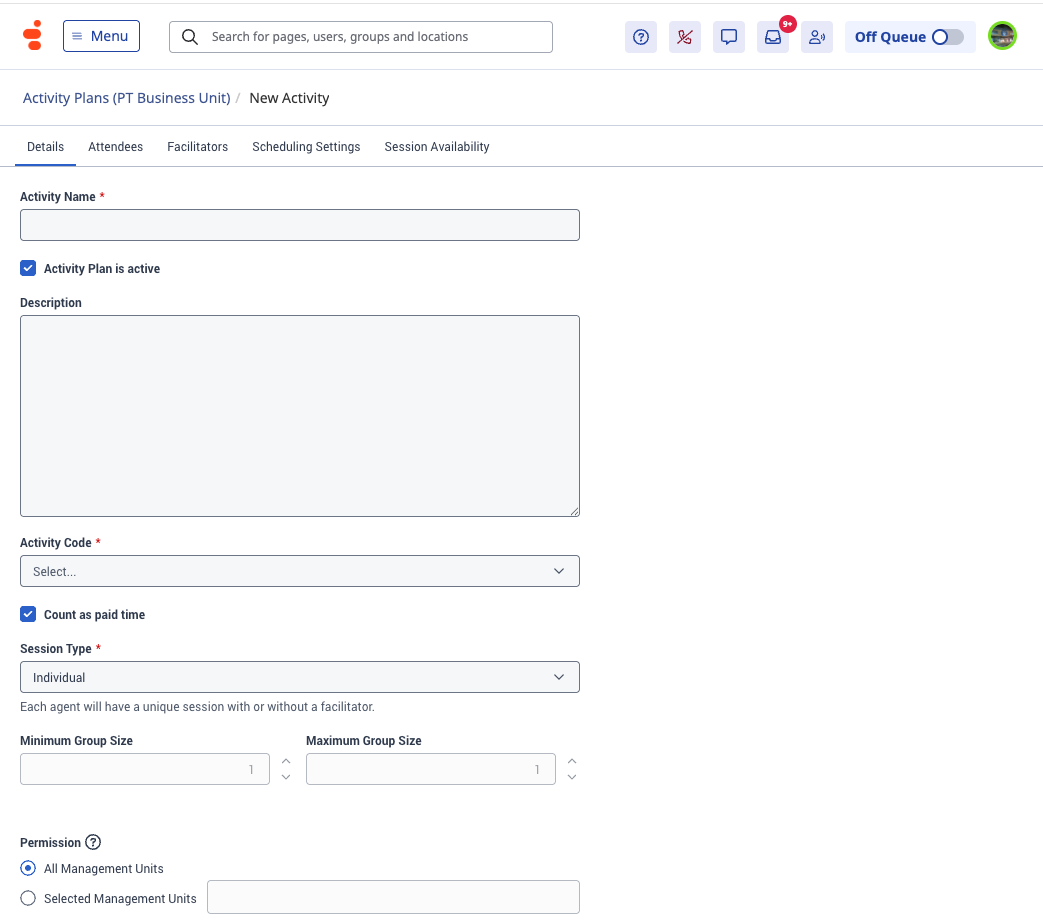
The previous General tab has been renamed Details.
This section now contains all information related to the activity itself. You'll also notice that Plan Type has been renamed to Session Type, which more accurately reflects the outcome of the configuration.
Everything within this section focuses on defining the activity you want to schedule.
Who Should Attend?
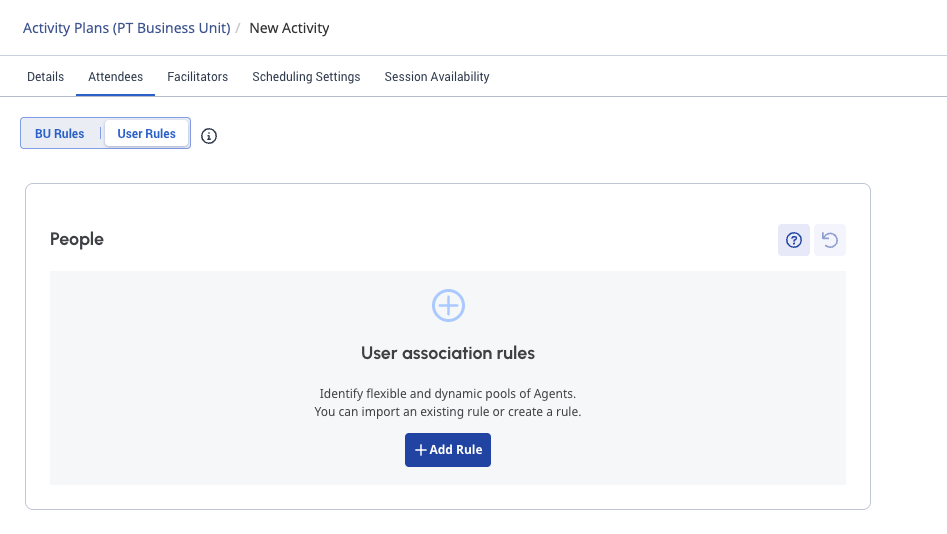
The Attendees and Facilitators tabs now sit together and focus exclusively on participant selection.
As discussed in the previous section, these tabs now default to User Rules, providing a more flexible way to define who should be included in an Activity Plan. If preferred, you can still switch back to BU Rules at any time.
Together, these tabs answer the question: Who should participate in this activity?
When Should It Happen?
The former Service Goal Override tab has been renamed Scheduling Settings.
This section contains everything related to scheduling decisions, including:
- Activity duration
- Recurrence settings
- Service goal behaviour
- Scheduling constraints
Service Goal Overrides remain available, but the associated configuration options are now only displayed when Customise Service Goals is selected. This makes it much clearer which scheduling approach is currently being used.
More Fields Can Now Be Updated
While improving the overall experience, we've also expanded the number of settings that can be edited after an Activity Plan has been created.
The following fields can now be updated on an existing Activity Plan:
- Activity Code
- Count as Paid Time
- Length in Minutes
- Recurring Activity End Date
We carefully evaluated which settings could safely be modified without disrupting existing scheduled sessions. These fields represent common adjustments that planners may need to make throughout the life of an Activity Plan while minimising the impact on already scheduled activities.
As discussed earlier in this article, Activity Plans now tracks configuration violations. If a change causes existing sessions to diverge from the current configuration, the appropriate violation warning will be displayed.
You'll also see a reminder when saving an updated Activity Plan so you're aware of any potential impact.
In the same area, you'll find a new option to immediately rerun the Activity Plan after saving. Simply select the checkbox and Activity Plans will begin evaluating published sessions using the updated configuration.
Even More Scheduling Flexibility
Alongside these editing improvements, we've introduced several enhancements to Activity Plan scheduling controls.
A new Start Time Increment setting allows planners to define when activities can begin within the hour. Supported increments include:
- 5 minutes
- 10 minutes
- 30 minutes
This provides greater flexibility when fitting activities into busy schedules.
Expanded Recurrence Controls
Minimum days between occurrences can now be configured up to recurrence period minus one.
For example, if an activity recurs every two weeks, you can now require up to 13 days between occurrences.
Shorter Session Durations
Activity durations can now be configured as low as five minutes, making Activity Plans suitable for very short tasks that still need to find space within the schedule.
Bringing It All Together
These enhancements work together to make Activity Plans easier to understand and significantly more flexible to manage.
Need to expand participation in a recurring activity? Update the User Rules.
Need to accommodate additional attendees? Adjust the session duration and extend the recurrence period.
Need to understand how those changes affect existing sessions? Activity Plans now highlights any resulting violations so you can make informed decisions.
The goal of these changes is simple: make Activity Plans easier to adapt as your operational needs evolve.
And if you decide an Activity Plan is no longer needed at all, our next enhancement can help with that too.
4. New Deletion Options for Activity Plans
Availability: End of June
Every Activity Plan has a lifecycle. Some plans run for months, some support one-off initiatives, and others eventually need to be retired as priorities change.
To help manage that lifecycle, we've introduced new ways to view, retire, and remove Activity Plans and their associated schedule items.
Improved Visibility Into Plan Status
The Activity Plans list now provides a clearer view of the state of your plans.
Active and Inactive plans are now grouped into dedicated tabs, making it easier to focus on the plans that currently matter to your organisation.
We also now surface additional information, including:
- Expired status for plans that have passed their configured end date
- Last Run Date information
- A more unified management experience across all plans
These additions make it easier to identify plans that are still actively being used and those that may be ready for retirement.
Retiring and Deleting Activity Plans
Activity Plans can be made inactive either through the Actions menu or by clearing the Activity Plan is Active checkbox while editing a plan.
Once inactive, a plan moves to the Inactive tab where it can be retained for future use or permanently removed if no longer required.
We've now added dedicated deletion options directly from the Activity Plan actions menu.
After confirming the deletion request, Activity Plans begins removing the plan and its associated future schedule items.
Depending on the size of the Activity Plan and the number of associated schedule items, deletion operations may take some time to complete. Progress indicators are displayed throughout the process, and you can continue using other areas of Genesys Cloud while Activity Plans completes the request in the background.
- The Activity Plan is removed
- Future scheduled sessions associated with the plan are removed
- Historical sessions remain in the schedule for reference purposes
Historical sessions will no longer display a link back to the Activity Plan because the plan itself no longer exists.
Removing Future Occurrences
Sometimes you don't want to delete an entire Activity Plan. Instead, you may want to update the configuration and allow future sessions to be recreated using the new settings.
To support this workflow, you can now select and delete multiple occurrences directly within Activity Plans.
The system will process the selected occurrences and remove any associated future sessions.
As with Activity Plan deletion, larger operations may take some time to complete. Progress indicators are displayed throughout the process, and you can continue using other areas of Genesys Cloud while Activity Plans completes the request in the background.
Removing Individual Sessions
The same capability is now available at the session level.
If specific sessions are no longer required, they can now be removed directly from Activity Plans without needing to switch to the Schedule Editor.
Managing Individual Attendees
We've also extended this approach to attendee management.
Within a session, you can now select individual attendees and remove them directly from the participant list.
This can be particularly useful when someone becomes unavailable but the remainder of the session should still proceed as planned.
As with the other enhancements discussed throughout this article, Activity Plans continues to monitor for any resulting violations. For example, if attendee removals cause a session to fall below a configured minimum group size, the appropriate warning will be displayed.
Bringing It All Together
Taken together, the enhancements in this release make Activity Plans significantly easier to manage throughout their entire lifecycle.
Plans can now adapt to schedule changes, dynamically update membership through User Rules, support more flexible configuration changes, and be retired or cleaned up when they are no longer needed.
The goal is simple: provide planners with more control while keeping Activity Plans as the central place to manage recurring activities.
These improvements have been heavily influenced by feedback from customers and the wider community, and we're excited to continue building on that foundation. We already have additional enhancements planned, including greater visibility into unscheduled users and expanded options for updating sessions.
As always, I would like to say thank you to our passionate community for your feedback and for helping shape the future of Activity Plans.
#ScheduleManagement------------------------------
Paul Turner
Senior Product Manager
Genesys - Employees
------------------------------