Workforce Engagement Management

 View Only

Sign Up

  • 1.  Activity Plans Terminology Assistance

    Posted 7 hours ago

    Hi there, 

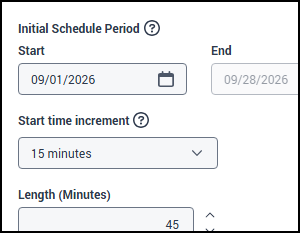
    I've searched the resource center, and have not been able to find the answer. Could someone put it into laymen's terms what this means within an activity plan under schedule settings & what it does? 

    Start time increment

    The selected increment determines a valid start time when selecting sessions.

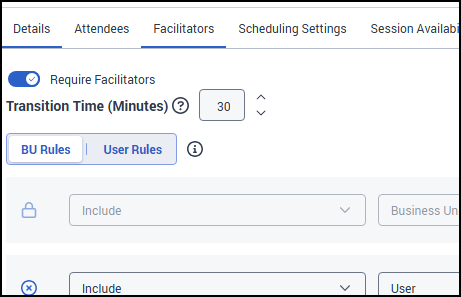
    In addition to the above question, could someone explain the difference between start time increment and the transition time under Facilitators setting? Is this and the start time increment the same thing? 

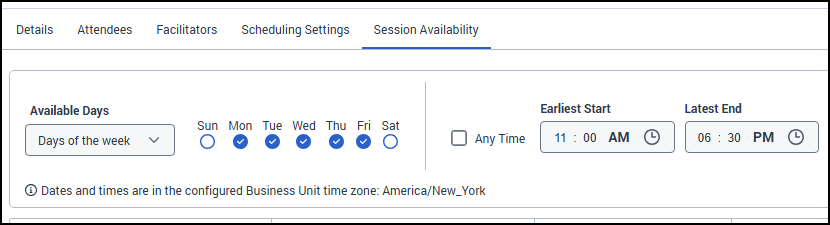
    In order to avoid scheduling meetings for my Supervisors at their start & end times, I adjust the earliest start & latest end times under the Session Availability tab.

    For example: a Supervisor's shift is M-F 10:30am to 7:00pm. I choose 11:00am as earliest start & 6:30pm as latest end.  Are all of these options the same? 

    #ScheduleGeneration
    #ScheduleManagement

    ------------------------------
    Jacqueline Turner
    Workflow Coordinator
    NYCM Insurance
    ------------------------------


  • 2.  RE: Activity Plans Terminology Assistance

    Posted 5 hours ago

    Hi Jacqueline, 

    Here's what I was able to find:

    1. Start Time Increment (Schedule Settings): This controls what times sessions can START at.
      For example, if you set it to 15 minutes, sessions can only begin at times like 10:00, 10:15, 10:30, 10:45, etc. If you set it to 30 minutes, sessions can only start at 10:00, 10:30, 11:00, etc. The default is 5 minutes. This is basically setting the "time increments" on which the system is allowed to schedule the beginning of sessions.
    2. Transition Time (Facilitators Setting): This is completely different! Transition time is a buffer period FOR THE FACILITATOR to move between sessions. If a facilitator has back-to-back sessions and you set 15 minutes transition time, the system will automatically leave 15 minutes between when one session ends and the next begins, giving the facilitator a break to prepare for the next session.
    3. Earliest Start / Latest End (Session Availability Tab): These are also different from the above! These settings define the TIME WINDOW during which sessions can be scheduled. Using your example, by setting earliest start to 11:00am and latest end to 6:30pm (even though the supervisor works 10:30am-7:00pm), you're creating a 30-minute buffer at the beginning and end of their shift so they don't have meetings scheduled right at shift start/end times.

    In Summary - They're not the same:

    • Start Time Increment = What time intervals sessions can begin on (e.g., every 15 minutes)
    • Transition Time = Buffer time between sessions for facilitators to transition
    • Earliest/Latest Times = The overall time window when sessions are allowed to occur

    I hope this helps you ☺️


    ------------------------------
    Camila Meneghini
    ------------------------------