Hi Dave,
Thanks for confirming - if the setting is reverting immediately it is most likely a permissions issue. To save Analytics Data Masking settings the user making the change needs the Analytics > Data Masking > Edit permission assigned to their role. Without this permission the change appears to save but reverts as soon as the page is revisited.
Worth checking the role assigned to the user making the change and confirming that specific permission is included.
Hope this helps!
------------------------------
Phaneendra
Technical Solutions Consultant
------------------------------
Original Message:
Sent: 07-20-2026 12:18
From: Dave Lottman
Subject: ANI Redaction from Interaction list
Hi,
It reverts back immediately when the page is revisited.
------------------------------
Dave Lottman
Workforce Manager
------------------------------
Original Message:
Sent: 07-19-2026 06:06
From: Phaneendra Avatapalli
Subject: ANI Redaction from Interaction list
Hi Dave,
Just to help narrow this down - when you uncheck the box and save, does the setting revert back to checked immediately when you revisit the page, or does it save correctly but the ANI remains masked in the Interactions view regardless?
Hope this helps!
------------------------------
Phaneendra
Technical Solutions Consultant
------------------------------
Original Message:
Sent: 07-17-2026 15:34
From: Dave Lottman
Subject: ANI Redaction from Interaction list
Hi Jason -
Thanks for the reply. I took those steps, unchecked the box and saved. However, when I return to Analytics Settings, the box is checked again, and ANI is still masked in Interactions. I'd appreciate more guidance if possible. Thanks!
------------------------------
Dave Lottman
Workforce Manager
------------------------------
Original Message:
Sent: 07-17-2026 15:06
From: Jason Kleitz
Subject: ANI Redaction from Interaction list
Hello Dave,
There are a few places where this data can be redacted. The first place that you will want to check is in the Data Masking section. To check those settings:
- Navigate to Menu > Analytics > Analytics Settings > Settings
- Under Data Masking, uncheck: "Mask phone numbers and email addresses in Content Search, Dashboards, Interaction Views, Scheduled Callbacks, and Queue Activity Detail"
- Select Save to apply the changes
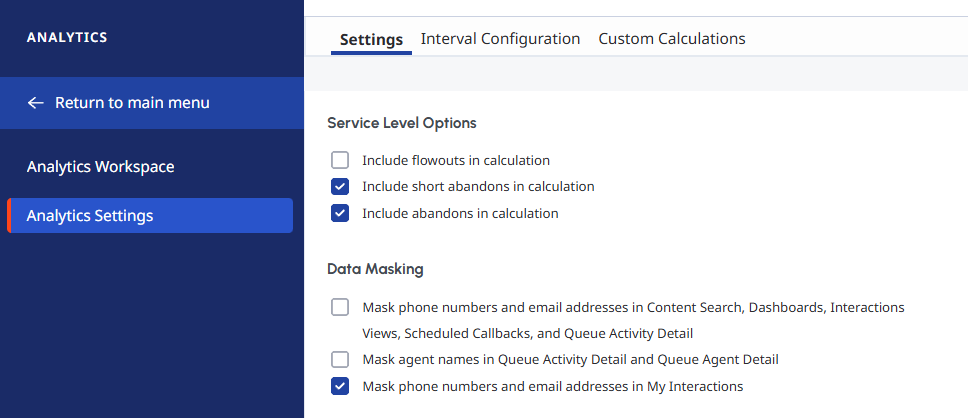
Since you're specifically seeing the issue in the Analytics interaction list, the Analytics Data Masking setting is the one you'll want to adjust. This will restore your ability to identify caller geography and track repeat callers based on ANI directly from the interaction list view.
------------------------------
Jason Kleitz
Online Community Manager/Moderator
------------------------------