Hi,
What would be the prefixed number you are planning to dial from the Architect flow?
Maybe RegEx - ^(999)(\d{10})$ is what you are looking for.
Normalized Number Expression $2 or +1$2 ( Depends if you simply want the 10-digit or E.164 formatted number)
Based on what I learned each () constitutes $n where "n" stands for the N th parenthesis. Again, that is what I observed and I could be wrong.
I followed the link below to understand the RegEx. very simplified instructions.
https://github.com/ziishaned/learn-regex/blob/master/README.md
NOTE: You can simulate a call and see if your RegEx is working and taking the path of your new trunk created.
------------------------------
Ajay Reddy
VoiceXnet
------------------------------
Original Message:
Sent: 12-15-2023 11:33
From: Grignon Arnaud
Subject: Architect transfert with another/different trunk
Thank you for your answers, which have guided me well. I can now use the desired route with a prefix. However, it works directly via the dialpad/softphone, but I have a failure when using it on my flow architect. There is a good chance that my problem is with the regex.
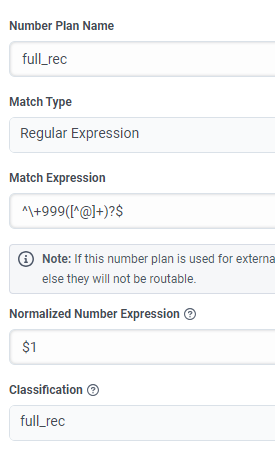
Can you help me ? or how can I obtain routing logs with the call ID intercation on the flow?
------------------------------
Arnaud
------------------------------
Original Message:
Sent: 12-13-2023 08:33
From: Max Hernandez
Subject: Architect transfert with another/different trunk
Yes, you need to create a new new Outbound Route en the default site.
Take a look in the new combo box for select the default site in the trunk.
------------------------------
Max Hernandez