You can't use the built-in company directory in a bot flow but you can replicate it using a list slot type. Lists are limited to 2000 items, so if you have more users (that you want included) this trick won't work. One benefit though is that you get to exclude users; a popular complaint about the company directory is that you can't exclude c-level or back office type people.
So create a list slot type and add entries for the people you want include. Add synonyms for nicknames or other names people might be known as.
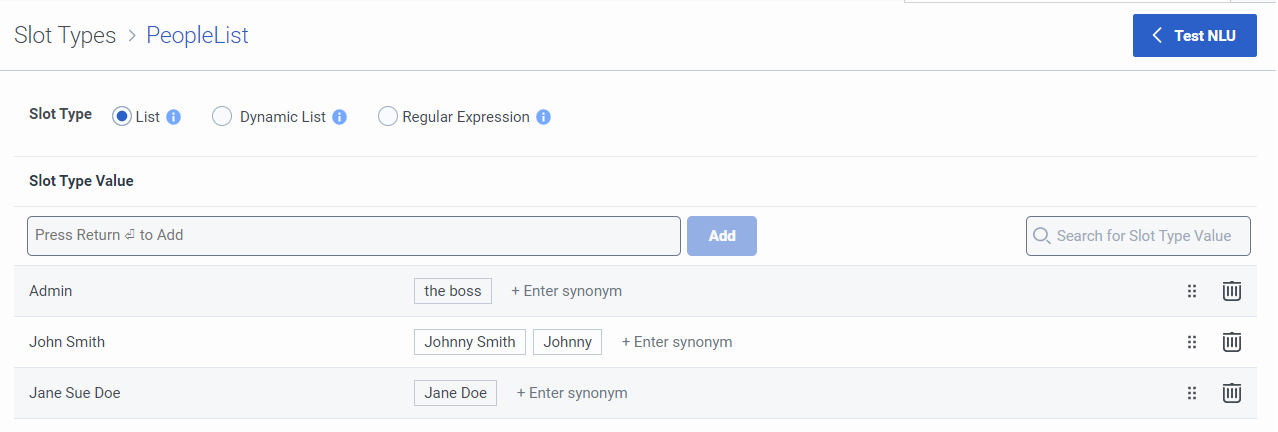
In your inbound call flow call this bot flow. The tricky part will be converting the name to a User variable. A popular pattern for emails is firstname.lastname@yourcompany.com. If you follow this pattern you can use an expression like this to turn the name into an email.
Append(Replace(Task.personName, " ", "."), "@yourcompany.com")
If not, you could use a data action to look it up from your own data source, or a data action that uses the genesys api to do a search, use the parallel arrays approach, or some other logic.
Once you've got the email figured out, use a Find User action then a Transfer to User with that user variable. Don't forget to do something useful with the find user not found path.

https://help.mypurecloud.com/articles/use-custom-list-slot-types-in-a-bot-flow/
https://help.mypurecloud.com/articles/find-user-action/
https://help.mypurecloud.com/articles/convert-string-value-typed-value/
------------------------------
Melissa Bailey
Genesys - Employees
------------------------------