Genesys Cloud - Developer Community!

 View Only

Sign Up

Expand all | Collapse all

Disable barge-in for audio in the menu using AudioPlaybackOptions when multiple audios are used in expression

  • 1.  Disable barge-in for audio in the menu using AudioPlaybackOptions when multiple audios are used in expression

    Posted 04-11-2025 10:25
    Edited by divya ankam 04-11-2025 11:03

    The barge-in disabled option in the menu isn't working when using the to audio (prompt) alone. It was suggested to use AudioPlaybackOptions to disable it, but I could only find information on single prompt expressions. Is there a way to use this for multiple audio expressions? Like for 

     If(Flow.schedule == "open", ToAudio(Prompt.Welcome), ToAudio(Prompt.default)) 


    #Architect #Barge-In #AudioPlaybackOptions


    ------------------------------
    divya ankam
    ------------------------------


  • 2.  RE: Disable barge-in for audio in the menu using AudioPlaybackOptions when multiple audios are used in expression

    Posted 04-11-2025 14:26

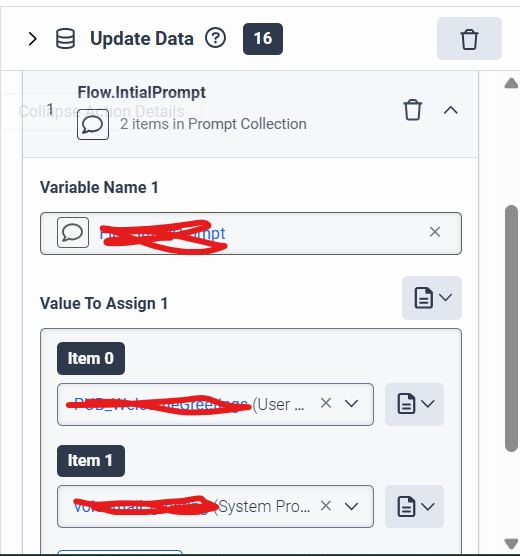
    Try like this create a collection of prompt using the Update data block and use expression like below in the custom expression place.

    You will store the prompts in the collection and then use that in the custom expression
    If(Flow.SSNorPINCountREE == 1 and Task.GetSSNorPINLoop == 0, Flow.GetSSNOrPinPrompts[3], 
    If(Task.GetSSNorPINLoop == 1, Flow.GetSSNOrPinPrompts[1], 
    If(Task.GetSSNorPINLoop == 2, Flow.GetSSNOrPinPrompts[2], Flow.GetSSNOrPinPrompts[0])))


    ------------------------------
    Thanks!

    Ganesh S
    ------------------------------