Original Message:
Sent: 03-10-2026 15:15
From: Subhajit Podder
Subject: Error in passing a dynamic array of JSON objects using Data Action
Hi Marcello,
Finally got it working - and I'm glad to justify the efforts you put into explaining it.
Thank you for the incredibly detailed explanation and the step-by-step screenshots for each configuration item. These made the whole approach much clearer and helped me implementing the solution successfully.
Honestly, I didn't expect someone to invest this much time and effort to help solve a problem for a fellow community member. That kind of dedication truly reflects the spirit of a real techie.
Really appreciate your help - you're a true gem of this community.
------------------------------
Subhajit Podder
NA
------------------------------
Original Message:
Sent: 03-05-2026 15:41
From: Marcello Jabur
Subject: Error in passing a dynamic array of JSON objects using Data Action
Hi Subhajit,
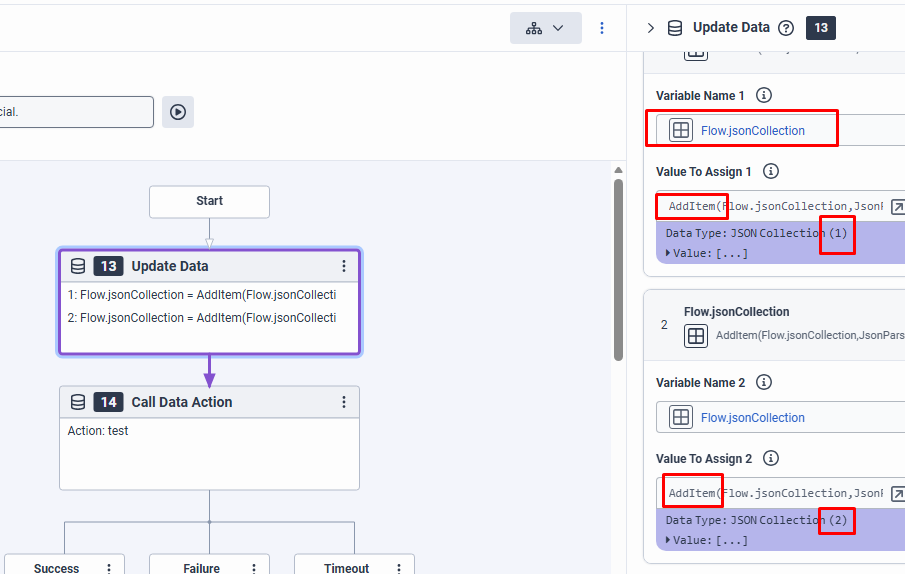
Just tried using a JSON Collection variable (after adding 2 items on it) and it didn't work at first. But it's fixable.
It doesn't work because the value that this variable returns and sends to the data action is basically:
"{\"type\":\"dimension\",\"dimension\":\"conversationId\",\"operator\":\"matches\",\"value\":\"xxxxxxx\"}\n{\"type\":\"dimension\",\"dimension\":\"direction\",\"operator\":\"matches\",\"value\":\"outbound\"}"
Notice that:
1) It doesn't have the [ ] on the outside, to make the array
2) It also doesn't have comma separating each object, and instead has a "\n" to break line
----------
So you just have to fix the issues above, and make sure your string has the correct JSON formatting, that's all. You might have to fix other things depending on the structure of your data, or whatever else, but as long as you manage to build the correct JSON format and send that as a string to your data action, it should work.
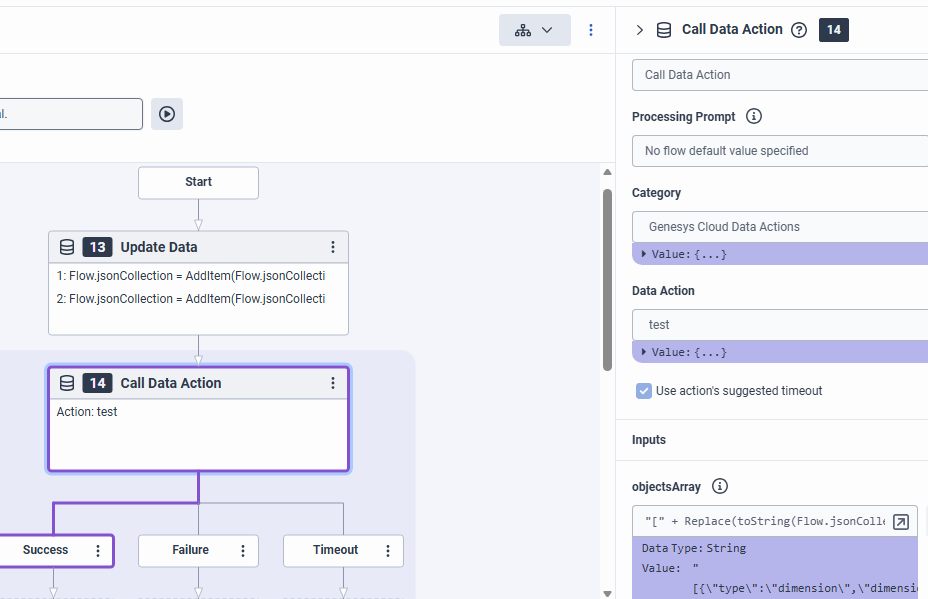
In my case, I just had to fix the string to include [ ] on the outside and replace the "\n" for "," (comma).
So I did the following:
"[" + Replace(toString(Flow.jsonCollection),"\n",",") + "]"
With that, the Data Action worked again.
------------------------------
Marcello Jabur
Original Message:
Sent: 03-05-2026 15:11
From: Subhajit Podder
Subject: Error in passing a dynamic array of JSON objects using Data Action
Hi Marcello,
Can you try to store the JSON objects in a JSON Collection and check?
Regards,
Subhajit Podder
------------------------------
Subhajit Podder
NA
Original Message:
Sent: 03-05-2026 14:48
From: Marcello Jabur
Subject: Error in passing a dynamic array of JSON objects using Data Action
Hello again Subhajit,
I just created a Data Action to showcase this, I believe it should be what you need.
The only thing I had to change on the request body was actually removing the [ ] for the array, since this is already part of the Json variable in the architect flow, so this might be what is causing your issue. But anyway, take a look below and see if that helps you:
Here is the Data Action:
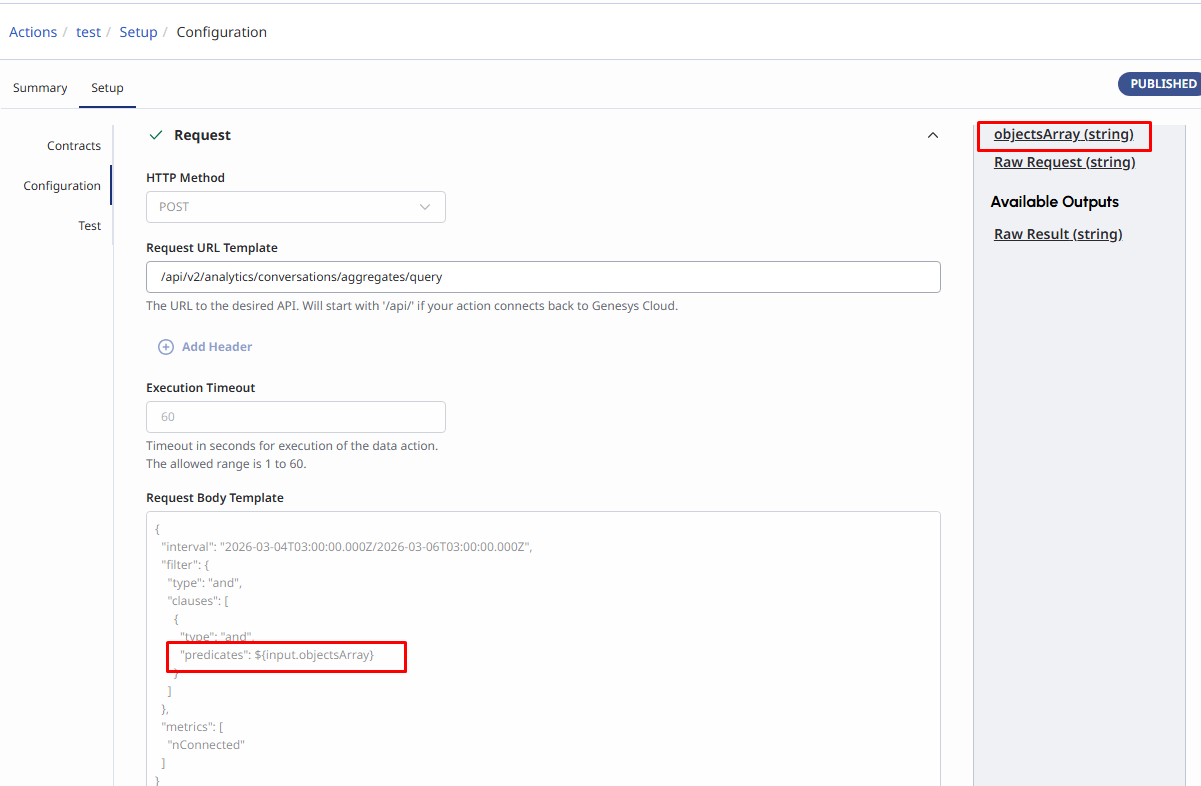
I'm using a Genesys Cloud API (Analytics Aggregates Query) as an example.. Notice that the "predicates" attribute is supposed to be an array of objects.
So the actual raw body should look something like this:
{
  "interval": "2026-03-04T03:00:00.000Z/2026-03-06T03:00:00.000Z",
  "filter": {
    "type": "and",
    "clauses": [
      {
        "type": "and",
        "predicates": [
          {
            "type": "dimension",
            "dimension": "conversationId",
            "operator": "matches",
            "value": "xxxxxxxxxxxxxxxxxxxx"
          },
          {
            "type": "dimension",
            "dimension": "direction",
            "operator": "matches",
            "value": "outbound"
          }
        ]
      }
    ]
  },
  "metrics": [
    "nConnected"
  ]
}
----------
Now, I used a string input variable where that whole array should be (objectsArray being that variable).
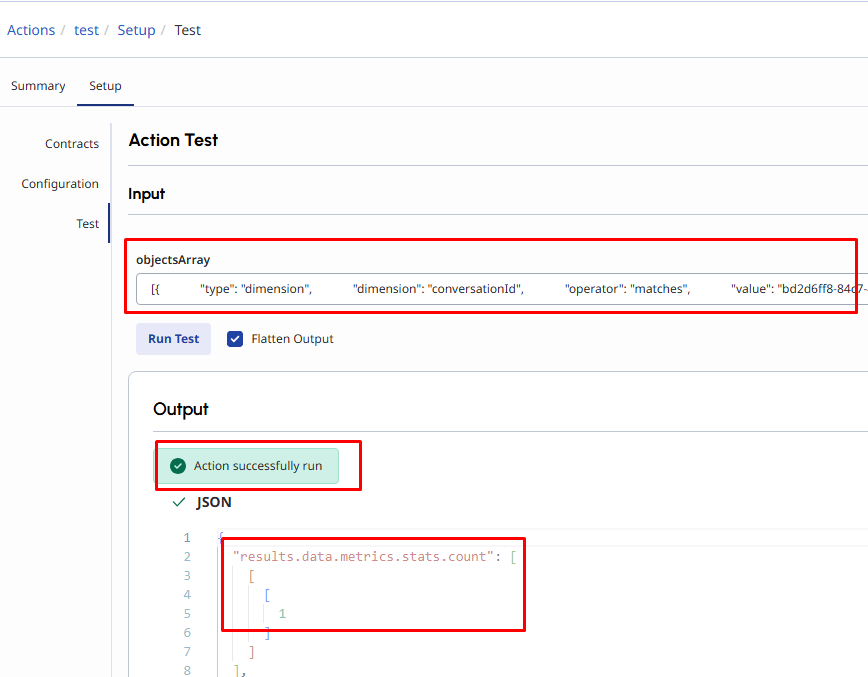
I can just use the whole array (as a string) in that input, and it works.
So the value of my input in this case is something like:
[
{
            "type": "dimension",
            "dimension": "conversationId",
            "operator": "matches",
            "value": "xxxxxxx"
          },
          {
            "type": "dimension",
            "dimension": "direction",
            "operator": "matches",
            "value": "outbound"
}
]
See the results being succesful here:
-------------------
Now, just to show you an example on Architect, I create a JSON variable, and put all that information in there (using JsonParse() function):
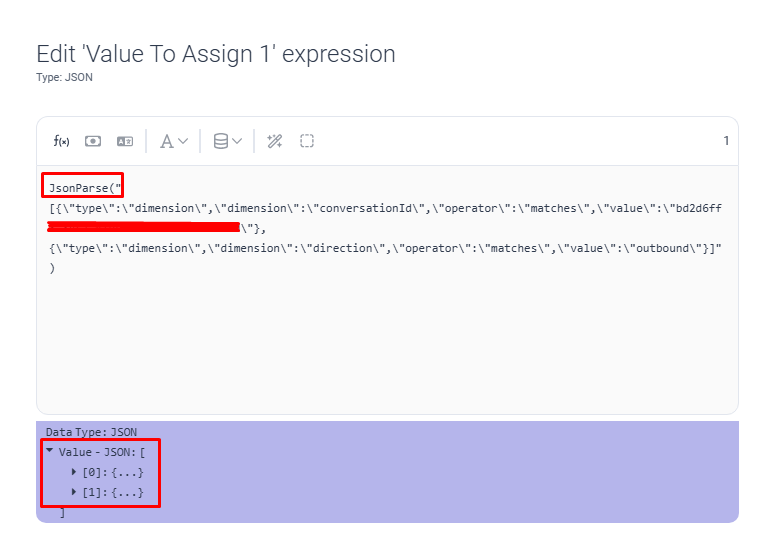
And then on the next action, I just executed that Data Action, without issues:
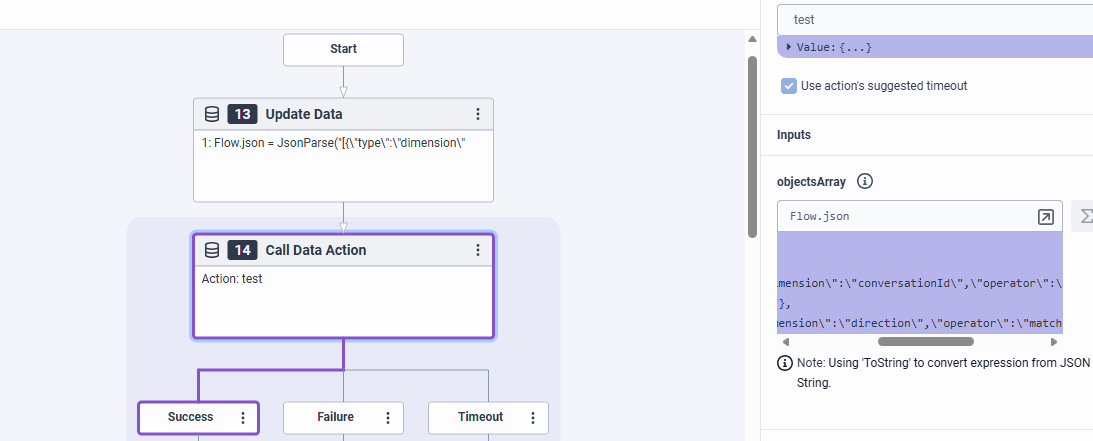
---------------
I'm not sure if all of that helps you, or if I'm misunderstanding what you want to do... But if what you want is to pass an Array of objects as an input variable into a Data Action (from an Architect Flow), I believe this should help you.
Just make sure you create a variable as a string, and that the value on your JSON on the architect variable matches what should be placed in the request body where you have your input variable.
Try to run a test in the data action itself first (without going to architect). If it works there, it should work on the flow as well.
------------------------------
Marcello Jabur
Original Message:
Sent: 03-05-2026 13:53
From: Subhajit Podder
Subject: Error in passing a dynamic array of JSON objects using Data Action
Hi Marcello,
As per your suggestion, When I am converting the JSON collection to string for passing as a string input, it's structure is going to be like this.
Raw JSON Collection - [{"id":1,"value":"FTSM"}, {"id":2,"value":"C4D2"}]
Converted to String - "{\"id\":1,\"value\":\"FTSM\"}\n{\"id\":2,\"value\":\"C4D2\"}"
This is a string format of JSON array. In the Data Action there is no option to convert it to JSON collection again before passing in request body. Also, In back end there is no option to handle this string as of now. That's why error message is coming. ""Processing the Request Body Template resulted in invalid JSON.""
I feel you created an array with string literal. That's what I can think from your approach.
------------------------------
Subhajit Podder
NA
Original Message:
Sent: 03-05-2026 12:45
From: Marcello Jabur
Subject: Error in passing a dynamic array of JSON objects using Data Action
Hi Subhajit, I'm pretty sure that is possible. I remember having done that in the past.
Unfortunately I don't have access to any examples right now that I could actually export and show you.
But the important part is that you make sure the request body in the data action actually forms your whole Json body from your request.
Sometimes it might fail because you might have added something extra somewhere (a double quote -> ", or some of those: { }..[ ].... or a comma somewhere, etc.)
After you made this previous change, what is the error that you are getting now?
If you want, share here again how your Data Action is looking like right now, what error you're getting, etc., let's keep trying to look at it!
------------------------------
Marcello Jabur
Original Message:
Sent: 03-05-2026 11:00
From: Subhajit Podder
Subject: Error in passing a dynamic array of JSON objects using Data Action
Hi Marcello,
It didn't work. I passed the JSON Collection as a string inside the Array [] in request body but it failed. Is it really possible to send an array input in Data Action?
Or I have to pass the array as string and handle that in back end?
------------------------------
Subhajit Podder
NA
Original Message:
Sent: 03-04-2026 15:32
From: Marcello Jabur
Subject: Error in passing a dynamic array of JSON objects using Data Action
Hi Subhajit,
I believe in this case you just create an input contract of type string, let's say "responses" could be the name (as a string type).
Then on your request body for the data action you just place that input where your whole response array should be.
So let's take a look at your sample as an example.. You have this:
{
"payload": {
"interaction_id": "23e4ee90-aacc-44b8-9f07-4df887713deb",
"responses": [
{
"id": 1,
"value": "FTSM"
},
{
"id": 4,
"value": "C4D2"
}
]
}
}
Now, on your request body for the Data Action, you should be able to build something like this:
{
"payload": {
"interaction_id": "${input.interactionId}",
"responses": [
${input.responses}
]
}
}
It might not look EXACTLY like that, but that should be the idea, have your whole JSON array in a variable on your Architect Flow, and just input everything into the request body of your data action.
------------------------------
Marcello Jabur