Genesys Cloud - Main

 View Only

Sign Up

Expand all | Collapse all

Genesys Cloud SSO Certificate Expiry 10Dec2025

  • 1.  Genesys Cloud SSO Certificate Expiry 10Dec2025

    Posted 22 days ago
    Edited by David Murray 7 days ago

    On Wednesday December 10, 2025, Genesys Cloud will update its single sign-on certificate ahead of the current certificate's expiration on January 1, 2026.  Genesys chose this date to minimize disruption during the holiday period and also because nobody likes working on Jan 1st!

    I've received a few questions about this topic so have created this article to answer some of the questions I've received in relation to the announcement

    We have an SSO integration configured.  Does this affect us?

    There are 2 features that use the Genesys Cloud SSO certificate.  If your org use either of these features, you need to update the certificate in the Identity Provider configuration. The 2 features are as follows.  Review the Genesys Cloud configuration settings to confirm whether these features are being used.

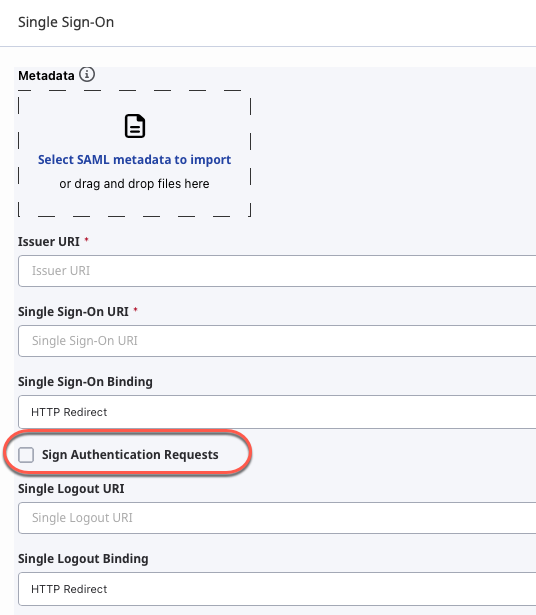
    Sign Authentication Requests
    This is by far the more significant of the 2 features, from an impact perspective.  This feature enhancement was only introduced in July this year, so it is possible that your org is not using this feature.  In the Genesys Cloud admin UI (IT and Integrations > Single Sign-on), there is a checkbox, as shown below.  If this is checked, then this feature is being used and the certificate is being used by the Identity Provider to validate the authentication requests.  If the Identity Provider doesn't have the correct certificate, then they can't validate these requests.  So, getting the certificate changed out at the correct time (as outlined in the announcement) is really important. 
    If this checkbox is not checked, then you don't need to be concerned with the cert changeover for this feature.  
    Single Logout
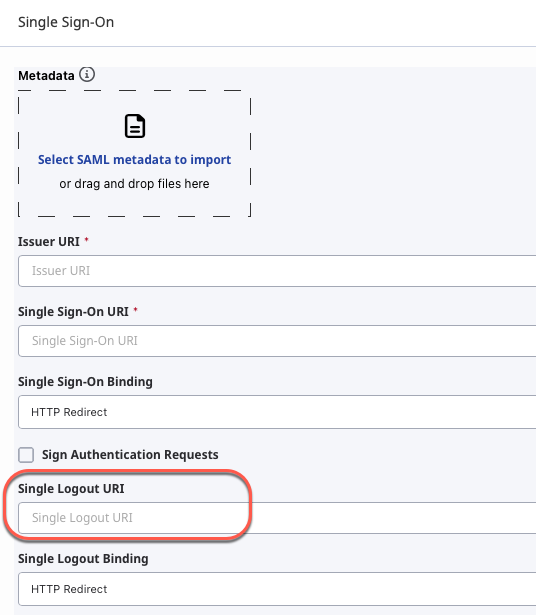
    As the name suggests, with Single Logout, users can log out of either the identity provider or the service provider (Genesys Cloud) and have that logout reflected in both.  In other words, users only need to log out in one place and not both. 
    Single Logout is a little more complex from a configuration perspective.  As shown below, in the configuration for the SSO integration (IT and Integrations > Single Sign-on), if the Single Logout URI field is populated, then the SSO integration is using the Single Logout feature.  However, you also need to check on the Identity Provider configuration whether there is a setting to determine whether the Identity Provider uses signature verification for Single Logout requests.  If it does, then it is using this certificate to do this and the certificate needs to be updated.  If the Identity Provider does not use signature verification for Single Logout requests, you don't need to be concerned with the cert changeover for this feature. 
    Where do I obtain the new certificate?

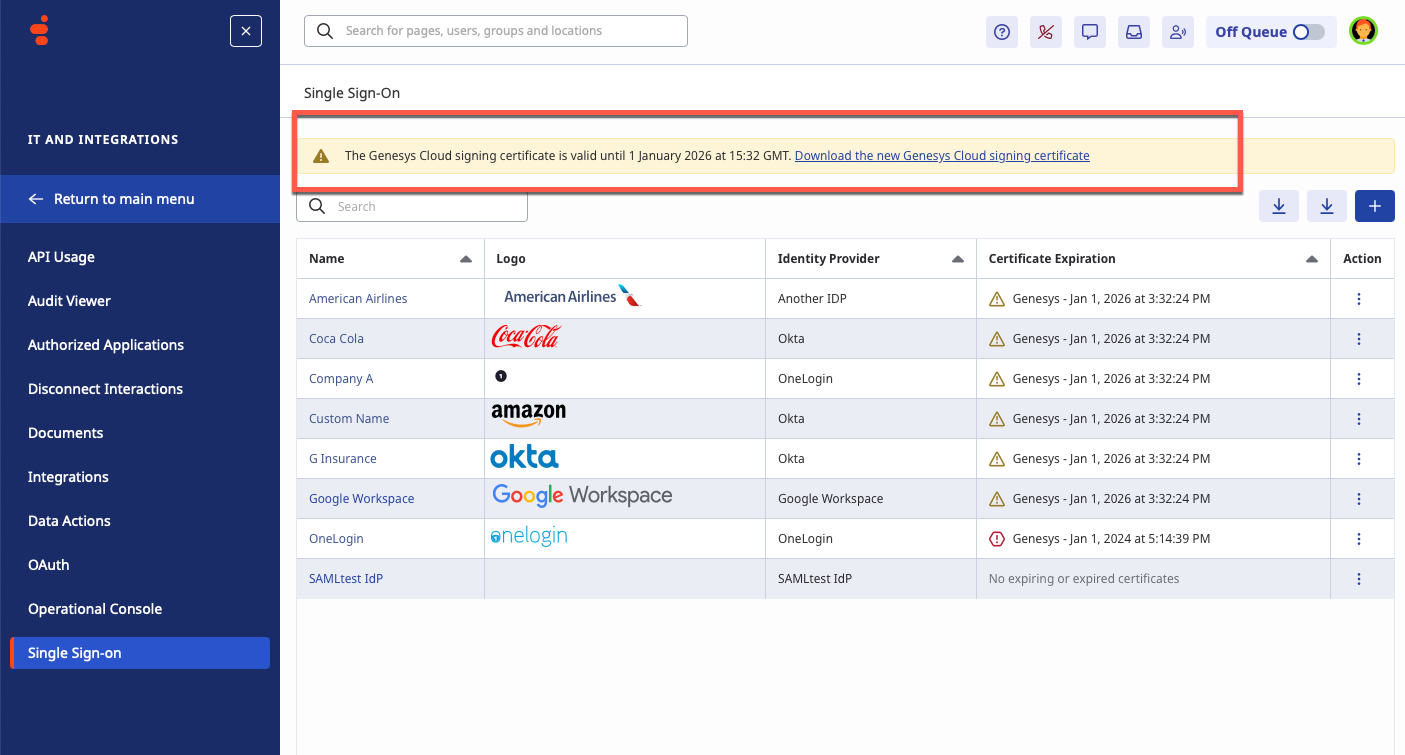
    The new certificate is available to download from the Genesys Cloud Single Sign-on page (IT and Integrations > Single Sign-on) as shown below.  It is also included in the Genesys Cloud Metadata file which can be downloaded via the configuration UI for the specific SSO integration.
    Does Genesys have a report to identify whether I am using these features and need to make this cert change?

    No, Genesys does not have this level of configuration detail.  You need to review the configuration on both Genesys Cloud and on the Identity Provider, as outlined above.

    Can I upload the new certificate before Dec 10th?

    If your Identity Provider allows you to upload multiple certificates, you may upload the new certificate at any time.  However, if your Identity Provider does not allow you to upload multiple certificates, you should not upload the new certificate before Dec 10th.  Genesys Cloud and the Identity Provider both need to use the same cert for the features outlined above.  If the certs don't match, then the features won't work.  

    The existing cert is valid until Jan 1st.  Can I wait until then to make the change?

    No, while the admin UI states that the cert is valid until Jan 1st, we will be replacing this cert on Dec 10th.  So, while this is technically a valid cert until Jan 1st, we will stop using it on Dec 10th and the Identity Provider needs to be updated with the new cert on that date so that it matches the cert in use on Genesys Cloud.  

    Can I test this changeover in my non-production environment before Dec 10th?

    If you switch to use the new cert before Dec 10th on the Identity Provider configuration for your non-production org, the features outlined above will stop working.  This mimics the cert mismatch that will occur when we update the cert on Genesys Cloud on Dec 10th.  You can then correct this cert mismatch by replacing the new cert in the Identity Provider configuration with the current cert, so that the certs match once again.  The affected features should then work correctly from that point forward.  While this isn't exactly replicating the scenario in your non-production environment, it is a good simulation of what will occur on Dec 10th.  

    What happens if I don't update the cert on Dec 10th?

    If your organization uses signed authentication requests and you do not update the certificate, users cannot authenticate.  Obviously this is a very significant impact which is why we are scheduling the cert changeover to occur during normal out-of-hours for each region.  One mitigation option, if the feature is being used, is to disable this feature ahead of the changeover date (uncheck the checkbox) so that it removes it as a concern on the changeover date.  However, if you can update the cert on the Identity Provider configuration at the same time as we update the cert on Genesys Cloud and this is at a time when you would not expect to have users logging into the system, then this additional mitigation should not be needed.

    If your organization uses the Single Logout Feature as part of their single sign-on setup and the single sign-on identity provider requires a certificate for Single Logout, the Single Logout feature stops working. With Single Logout, users can log out of either the identity provider or the service provider (Genesys Cloud). If Single Logout no longer works, the user must log out of both separately.  This feature is a lot less impactful from the cert changeover perspective.  If the cert is not updated in the Identity Provider and the user logs out from Genesys Cloud, it will send a Single Logout request to the Identity Provider which will not be actioned, so the user will remain logged in on the Identity Provider, which is not that significant an issue in the short term, as the SSO integration will still continue to work.

    There is no impact to any other SSO functionality.

    Will the changeover occur exactly at the time in the announcement?

    We expect the cert changeover to occur within approximately 15 mins of the times outlined in the announcement.  There are a number of regions being updated in each timeslot and it will take a few minutes to perform the change.  The changeover times are listed in US Eastern timezone, but the local time (LCL) for each region is also shown.   For example, "prod-aps1: #Mumbai – 0900 ET (1930 LCL)" means that the APS1 region will be updated at 9am EST (US Eastern timezone) which corresponds to 19:30 in Mumbai.  

    Will I have to do this again next year?

    The good news is that the updated cert is valid until Jun 2030, so you won't have to do this again for a number of years.

    I see that there are now two certificates on the SSO page.  Do I need to update both of them?

    We have just added a new enhancement which allows Identity Providers to encrypt SAML assertions.  See this announcement for more details.  Identity Providers use the Genesys Encryption Certificate to encrypt the SAML assertions which we then decrypt.  This certificate won't expire until Jun 2030 so you don't need to worry about this one.  The cert that is expiring is the Genesys Signing Certificate.

    My Identity Provider admin told me that we use a self-signed cert and it doesn't expire until the middle of 2027.  Is he correct?

    He is probably correct.  However, for the SSO integration, there are two parties to the integration and two certs involved; the Genesys Signing certificate (the one that is expiring) which is uploaded in the Identity Provider configuration to support the features outlined above and the identity Provider certificate which is uploaded in the Genesys Cloud SSO configuration.  The Identity Provider certificate, which is what your Identity Provider admin is referencing, is used by Genesys Cloud for SAML signature verification.  

    Last time we did this, there was a certificate for the specific region available in the GitHub repository.  Is there a similar location to download the cert from this time?

    Previously we had to put it on GitHub because we didn’t have a way to download the new cert natively in Genesys Cloud.  We have that now.  Just go to the SSO page and download from there.  The cert is region-specific, so can be used for any org in that region.  The associated link on the Identity Provider will be for the same region that their org is in.


    #API/Integrations
    #Security

    ------------------------------
    David Murray
    Principal Product Manager
    Genesys Cloud
    ------------------------------


  • 2.  RE: Genesys Cloud SSO Certificate Expiry 10Dec2025

    Posted 14 days ago

    This is great! Thank you for this David!


    ------------------------------
    Cameron
    Online Community Manager/Moderator
    ------------------------------


  • 3.  RE: Genesys Cloud SSO Certificate Expiry 10Dec2025
    Best Answer

    Posted 14 days ago

    Thanks...

    I had two or three questions, but with this post they've all been answered.


    ------------------------------
    Kaio Oliveira
    Interaxa
    ------------------------------


  • 4.  RE: Genesys Cloud SSO Certificate Expiry 10Dec2025

    Posted 8 days ago

    Hi David,

    Thank you for the detailed information. Can you confirm whether this cerrificate update on the IdP end still needs to happen if the IdP is Entra ID. I remember we had to go through the same process couple of years ago and we did not have to update the cerrificate on the IdP end when the IdP was Entra ID by then. I raised a ticket to query the same with Genesys support team and they told me that we still need to update the Cerficate on the IdP end even the IdP is Entra ID. So we have send this notification to our customers who are affected by this and they now ask where in IdP they need to upload the new certificate. I was going through the initial configuration guide as per the link Configure Genesys Cloud for Azure for Single sign-on with Microsoft Entra ID - Microsoft Entra ID | Microsoft Learn and there is no place which talks about the certificate upload in to the IdP.

    Also, based on the thread Genesys Cloud SSO Certificate Renewal | Genesys Cloud - Developer Community! I believe this certificate expiry does not affect if the IdP is Entra ID. However, the Genesys support team says the opposite, confusing us as a partner and our customers. Could you please clarify this?


    ------------------------------
    Piyum Wanni Arachchige
    Lead support engineer
    ------------------------------


  • 5.  RE: Genesys Cloud SSO Certificate Expiry 10Dec2025

    Posted 8 days ago

    The certificate update applies to all Identity Providers, including Entra ID.  Whether the cert needs to be updated on the IdP is dependent on whether the cert is being used by the IdP to validate the requests.  If the IdP is not using the cert to validate the requests or if the features outlined in the article have not been configured on Genesys Cloud, then the cert does not need to be updated on the IdP.  If the features are being used AND the IdP has been configured to use the cert to validate these requests, then the cert will need to be updated.  Otherwise these features will stop working once we update to the new cert in Genesys Cloud on Dec 10th.


    ------------------------------
    David Murray
    Principal Product Manager
    Genesys Cloud
    ------------------------------


  • 6.  RE: Genesys Cloud SSO Certificate Expiry 10Dec2025

    Posted 7 days ago

    Hi David,

    Thank you for the clarification. We have already confirmed that the majority of our customers have configured the Single Logout URI on the Genesys side. But non of them have "Sign authentication request" option enabled on Genesys side. What we don't know is how to figure out whether the Entra ID uses signature verification for Single Logout requests. All of our customers to whom we send this notification ask how to confirm that on their end. Do you have any advice, please?


    ------------------------------
    Piyum Wanni Arachchige
    Lead support engineer
    ------------------------------


  • 7.  RE: Genesys Cloud SSO Certificate Expiry 10Dec2025

    Posted 3 days ago

    Hi David,

    I saw the above post regarding my question, but i would like to be very clear on the requirement for renewal of certificate for our ORG. While i raise a support ticket they confirmed our ORG need to update the certificate. But when we checked the same in Entra  in the below path we could not find the existing certificate.

    To upload Genesys Cloud signing certificate in Microsoft Entra, follow these steps: 1. Select your application in App registrations. 2. Go to Certificates & secrets. 3. Click Upload Certificate. 4. Select the certificate file. 5. Click Add.

    Our ORG configuration is below for your reference.  Please let us know if we need to renew the certificate on deadline date of 10th December.We need to get change approval before 4th December. i would appreciate your early response.


    ------------------------------
    Sathyendiran Muthukrishnan
    ------------------------------


  • 8.  RE: Genesys Cloud SSO Certificate Expiry 10Dec2025

    Posted 3 days ago

    Based on what I looked into last time this was done, one of the key places to look is in the SSO setup in the app within Entra ID.  Happy for others to jump in and correct me in the below as I didn't get clear confirmation last time, so this is just going off the fact we did nothing last time.

    If you have the "verification certificates" option enabled then yes you'll need to do the work involved in this certificate change.  But again, I'm only reasonably sure so I'd advise you do your own checking as well, taking into account David's comments on these threads.


    ------------------------------
    Vaun McCarthy
    ------------------------------


  • 9.  RE: Genesys Cloud SSO Certificate Expiry 10Dec2025

    Posted 3 days ago

    Hi Sathyendiran,

    You need to update the certificate in Microsoft Entra ID.  What you are showing in your screenshot is the configuration on Genesys Cloud for the Microsoft Entra ID integration.  You need to look at the configuration on Microsoft Entra ID.  Thanks to @Vaun McCarthy for the associated screenshot.  

    I can see from the Genesys Cloud screenshot you provided that you are not signing authentication requests but you are using Single Logout.  However, you only need to update the cert on Entra ID if the configuration for "Verification Certificates (optional) - Required" (as per Vaun's screenshot) is set to Yes.  Otherwise, Entra ID is not using the Genesys Signing certificate to validate the Single Logout requests. 


    ------------------------------
    David Murray
    Principal Product Manager
    Genesys Cloud
    ------------------------------


  • 10.  RE: Genesys Cloud SSO Certificate Expiry 10Dec2025

    Posted 3 days ago

    Hi David/Vaun, Thanks a lot for your swift response. We have verified the configuration at ENTRA end and we see verification certificate optional is set to NO in our ORG. So we conclude its not necessary for our ORG to update the certificate renewal of Signing certificate. Please do confirm, also i see below Required we see Active is set to 1. Any idea.


    ------------------------------
    Sathyendiran Muthukrishnan
    ------------------------------


  • 11.  RE: Genesys Cloud SSO Certificate Expiry 10Dec2025

    Posted 2 days ago

    Hi David, Could you please provide your confirmation on the above comments for the closure of this thread.


    ------------------------------
    Sathyendiran Muthukrishnan
    ------------------------------


  • 12.  RE: Genesys Cloud SSO Certificate Expiry 10Dec2025

    Posted 2 days ago

    Adding my confirmation that it's not necessary for your ORG to update the certificate renewal, based on the configuration detail you provided.  In relation to Active being set to 1, my assumption is that someone previously uploaded the current Genesys Signing Certificate to Entra ID, possibly so that it would be available in the event that you decided to use it for verification in future.  However, the fact that verification is set to No means it is not being used.  It may make sense to tidy this up on Entra ID, by either removing or updating that certificate to avoid any potential future confusion (e.g. if the Entra ID admin decided to enable verification with an out-of-date cert).  


    ------------------------------
    David Murray
    Principal Product Manager
    Genesys Cloud
    ------------------------------


  • 13.  RE: Genesys Cloud SSO Certificate Expiry 10Dec2025

    Posted 3 hours ago

    Hello David,

    Hope you are doing well.

    Tech support confirmed that we need to update certificate as we are using "Single Logout", but we have a query on how to update as it is asking for PFX password. Please let us know if I am following the right steps uploading the certificate (.cert) file.

    After edit, we are getting below screen

    Do let me know how to get PFX password or is this the right way to update certificate?


    ------------------------------
    Bhagavatula
    ------------------------------