Workforce Engagement Management

 View Only

Sign Up

  • 1.  How can I obtain information from the Development & Feedback section?

    Posted 20 days ago

    Hi team,

    We are using the Development & Feedback section and have already sent our first module. However, in the dashboard we can only see the number of people who have been assigned the course and those who have completed it.

    What we need to see is:

    • Which users are still pending to complete the course
    • The exam results by user

    Thank you for your support.

    Best regards


    #WEM-Quality,WFM,Gamification,etc

    ------------------------------
    Juan Ruiz
    ------------------------------


  • 2.  RE: How can I obtain information from the Development & Feedback section?

    Posted 19 days ago

    Hi Juan,

    I an going to move this over to the Workforce Engagement Management Community as the experts there will be better placed to help with this query.


    ------------------------------
    Sam Jillard
    Online Community Manager/Moderator
    Genesys - Employees
    ------------------------------


  • 3.  RE: How can I obtain information from the Development & Feedback section?

    Posted 15 days ago

    Hey Juan,

    The tracking information for assignments lives inside of the Analytics Workspace. There are two views:

    • My Development
    • Agent Development

    The former focuses things down to the logged in user. The latter is the one you are after and allows you to look across agents.

    You can get there by navigating via the menu to Analytics -> Analytics Workspace -> New Tab -> Employee Engagement -> Agent Development. You should then see a view that looks as follows:
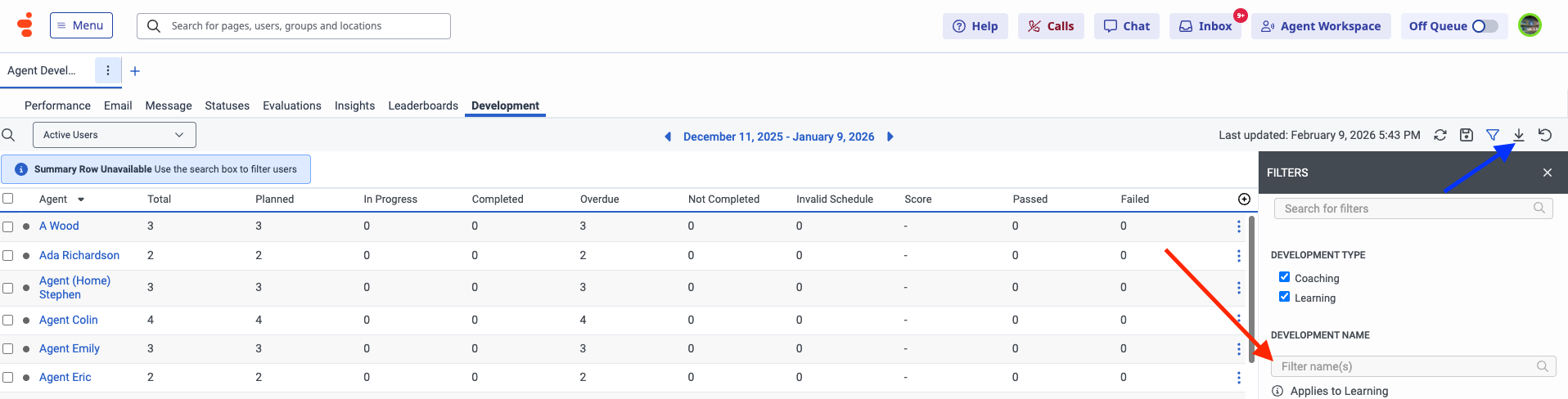
    By default this screen will show all instances of both Coaching and Learning. You can tweak this via the filters. If you are interested in a specific module you can enter the name of your Learning module in the location indicated by the red arrow. There are also export options for this data in the menu indicated by the blue arrow. You can for instance export this as a CSV file and omit any empty rows from your data.

    I hope this helps. Let me know if you have any other questions.

    Cheers,


    ------------------------------
    Paul Turner
    Senior Product Manager
    Genesys - Employees
    ------------------------------