Genesys Cloud - Main

 View Only

Sign Up

  • 1.  How to count "Not Responding" state from an agent

    Posted 24 days ago

    Hello community,

    I'm happy to say that this will be my first post in the community.

    Getting to the point - in my company, we are encountering a problem when counting the "Not Responding" states of agents. That is, when they exceed the maximum ring time (Alerting Timeout) on an agent. Supervisors need to have a count of how many times an agent from their queue ends up in "Not Responding" so they can issue a warning if needed.

    My first impulse was to count the "Alert - No answer" from "Agents Performance" in analytics, but I realized that this field counts all no answers. For example, in the screenshot below, it's a call that exceeded the maximum time it can stay in queue just at the moment it was ringing on an agent - obviously the agent had no time to answer and it was marked as "No answer". Other cases also occur: e.g., the customer hangs up while the call is ringing on the agent.
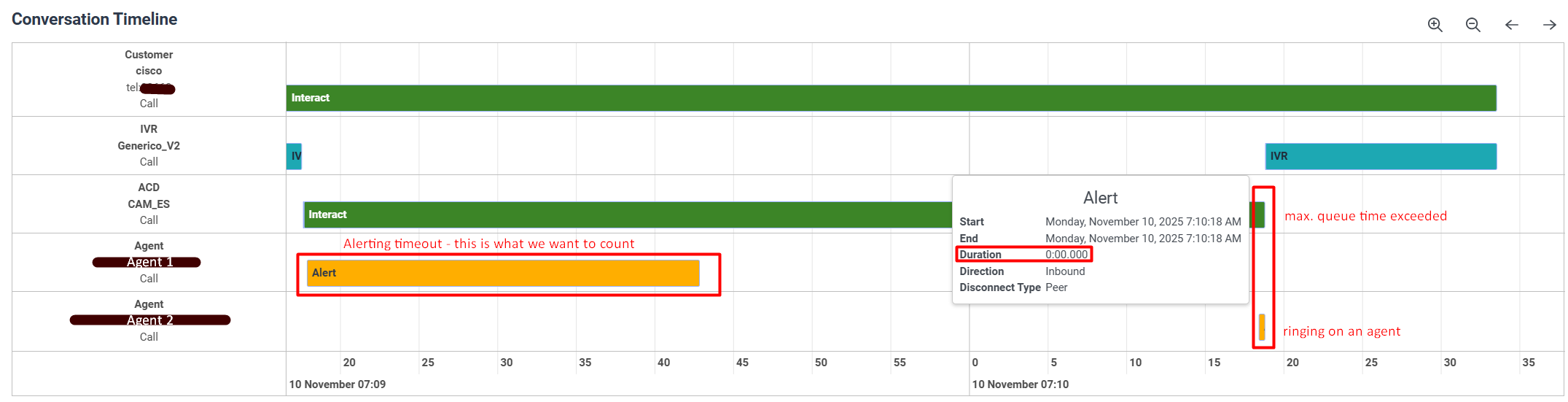
    Do you know where I could get a count of the "Not Responding"?

    Many thanks in advance.

    Best regards.


    #Reporting/Analytics

    ------------------------------
    Rafael Gomez Sanchis
    ------------------------------


  • 2.  RE: How to count "Not Responding" state from an agent

    Posted 24 days ago
    Edited by Jason Kleitz 23 days ago

    Hey Rafael,

    We've been requesting this as well and unfortunately haven't found a perfect solution yet. In the Agent Performance you can filter on queues but I don't believe this accounts for internal calls made on behalf of queues.

    What I typically do is export an interaction report into an excel spreadsheet adding either/both of these columns:

    And then manually calculate the data there. 

    I have submitted an idea regarding this basically asking for ACD metrics associated to agents specifically like "Offered" and "Offered - No answer"
    https://genesyscloud.ideas.aha.io/ideas/DARAR-I-2346

    Would be curious if anyone has found a good way to do this other than what I mentioned above.


    ------------------------------
    Tristen Schwarzenberger
    IT Engineer
    GCP
    ------------------------------


  • 3.  RE: How to count "Not Responding" state from an agent

    Posted 23 days ago

    Hi Rafael!

    This may be the idea that you are looking for:  Differentiate and Capture when Agent is | Genesys Cloud Ideas Portal

    There are numerous Genesys customers asking for expanded "Not Responding" reporting due to the fact that there is more than one reason the system could put the agent in that status.


    ------------------------------
    Russell Donald
    InflowCX
    ------------------------------


  • 4.  RE: How to count "Not Responding" state from an agent

    Posted 21 days ago
    Edited by Rafael Gomez Sanchis 21 days ago

    Thank you mates, i checked your posts


    ------------------------------
    Rafael Gomez Sanchis
    ------------------------------


  • 5.  RE: How to count "Not Responding" state from an agent

    Posted 21 days ago

    I would encourage you and anyone in your organization to Vote on the idea so that it can move onto the Road Map.    The current way of reporting does not work well, counts a call where the customer hangs up and does not show if the agent intentionally declines it or it is a true Alert - No Answer.   This idea has over 400 votes, but apparently we need more.   This is the idea number from the Idea portal.

    1. ANLS-I-102


    ------------------------------
    Judy Jimenez, Call Center Operations Manager
    CURE Auto Insurance
    ------------------------------


  • 6.  RE: How to count "Not Responding" state from an agent
    Best Answer

    Posted 19 days ago

    Hi @Rafael Gomez Sanchis,

    Can you check if the Agent Performance Status Summary can help with what you are looking for (see the screenshot below)? Add the columns to this View: Not Responding and Not Responding % columns. The details about these two columns are

    Not Responding: The amount of time an agent spends in the Not Responding routing status after not accepting an interaction. The Not Responding routing status is when an agent was On Queue or Interacting and did not answer an offered interaction. The agent could still be handling and completing other previous interactions. While Not Responding, the agent does not receive new interactions.

    Not Responding %: The percentage of time that an agent spent in the Not Responding status, calculated by: Not Responding  / (INTERACTING + IDLE + NOT RESPONDING) * 100

    Thanks,


    ------------------------------
    Tatjana Knezevic

    www.startelecom.cloud

    https://www.linkedin.com/company/star-telecom-www-startelecom-ca-/
    ------------------------------