Okay, gotcha! I think we are on the same page here. Agree on the 2nd scenario not working.
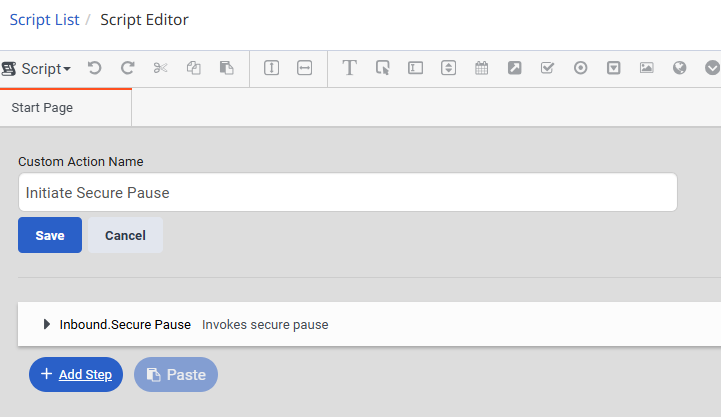
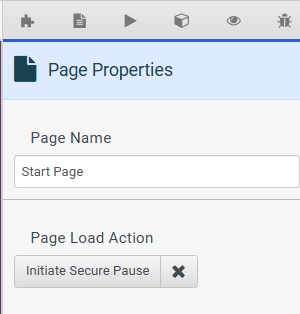
I guess my suggestion was instead of relying on the agent manually clicking it, you could have the script automatically initiate the secure pause to essentially guarantee it always happens; but I would say if it's no bother for you to just have the agent click the secure pause then that works too!
Original Message:
Sent: 02-20-2026 13:15
From: Srikanth k s
Subject: How to Stop Call Recording Only for Queue B When Using the Same In-Queue Flow
@Tristen Schwarzenberger,
I tested the first scenario:
The call initially enters the inbound flow and is transferred to Queue A. From Queue A, the call is then transferred to Queue B. During the transfer, when the agent in Queue B starts speaking with the customer, the agent manually clicks the Secure Pause button.
In this case, the recording is not available for Queue B in the Interaction page. Only the conversation recording for Queue A is available. This behavior is expected, as Queue B should not have any voice recording of the customer-agent conversation. I have tested this scenario and it is working as expected.
However, in the second scenario:
When I configure a recording policy for Queue B with the setting "Do Not Save Recordings", and then transfer the call from Queue A to Queue B, the entire call recording is not available in the Interaction page. It shows that the recording is not available at all.
This behavior is not working as expected. The requirement is that the call should be recorded in Queue A, and recording should stop only after the call is transferred to Queue B - not remove the entire recording.
------------------------------
Srikanth k s
------------------------------
Original Message:
Sent: 02-20-2026 12:02
From: Tristen Schwarzenberger
Subject: How to Stop Call Recording Only for Queue B When Using the Same In-Queue Flow
Thanks for the reply, Srikanth.
Just to clarify -
-You're saying when you look at the interaction detail there is a message saying the interaction doesn't have a recording?
-Did you do have the no recording policy in place that was suggested in this thread during this test, or was this tested prior to that/after it was removed?
-Was the test also completely internal and do you have internal recordings enabled?
Sorry for all the questions, I'm just surprised there would be no recording at all unless either it was blocked by policy completely or it was all internal which again, unsure if you're recording those.
Also just trying to get a better understanding of how the test was made.
Again, thank you for your reply.
------------------------------
Tristen Schwarzenberger
IT Engineer
GCP
Original Message:
Sent: 02-20-2026 11:38
From: Srikanth k s
Subject: How to Stop Call Recording Only for Queue B When Using the Same In-Queue Flow
@Tristen Schwarzenberger, I tested a scenario where, when a call is transferred to Queue B, the agent manually clicks the Secure Pause button before starting the conversation. In that case, I am not able to see the call recording on the Interactions page. What do you suggest? Thanks for sharing another method.
------------------------------
Srikanth k s
Original Message:
Sent: 02-20-2026 10:44
From: Tristen Schwarzenberger
Subject: How to Stop Call Recording Only for Queue B When Using the Same In-Queue Flow
Hey Srikanth,
Another thought would be maybe to create a separate script for Queue B and assign it as the default for that queue.
Secure Pause only stops recording at the time it's initiated so everything prior to it will still get recorded.
You could add a script action to initiate secure pause so it happens automatically when a call is received in Queue B:
Then you could add that action to the start pages load action:
I've never tried this myself but sounds like it could be another possible solution for these scenarios.
------------------------------
Tristen Schwarzenberger
IT Engineer
GCP
Original Message:
Sent: 02-18-2026 22:29
From: Srikanth k s
Subject: How to Stop Call Recording Only for Queue B When Using the Same In-Queue Flow
Hi Rowena Knill, Thank you for sharing the information.
Queue B is not used for direct inbound calls, it is only used when calls are transferred for queue-specific cases.
For example, calls received in Queue A should be recorded until they are transferred to Queue B. Once the transfer to Queue B occurs, the recording should stop.
I will test an alternative scenario: when a call is transferred to Queue B, the agent can manually click the Secure Pause button. In that case, the interaction may not be recorded. I will test this approach and verify the outcome.
------------------------------
Srikanth k s
Original Message:
Sent: 02-18-2026 20:56
From: Rowena Knill
Subject: How to Stop Call Recording Only for Queue B When Using the Same In-Queue Flow
If you don't want any recordings at all from Queue B, then you should be able to set a policy not to retain recordings on Queue B. Is the situation that you want recordings for Queue B only when it is a direct call, not a transfer from queue A? Do you usually record Queue A?
------------------------------
Rowena Knill
Data, Reports Analyst
Original Message:
Sent: 02-18-2026 10:12
From: REDDI SREE
Subject: How to Stop Call Recording Only for Queue B When Using the Same In-Queue Flow
Hi Team,
Suppose Queue A and Queue B are not using the same in-queue flow. Is it possible to suppress/stop call recording specifically for Queue B, even when calls are routed to Queue B from other queues (so the same in-queue flow may not be involved)?
Goal: Ensure calls are not recorded (or are suppressed) when they land in Queue B.
Could you please confirm the best configuration approach for this scenario?
------------------------------
REDDI SREE