Introducing Timeslot picker in Web Messenger: Elevate Your Bot's Self-Service Experience
We're excited to announce the upcoming launch of the Timeslot Picker-a powerful new capability in Genesys Web Messenger designed to streamline appointment scheduling directly within automated bot flows.
Whether your customer is booking a consultation, requesting a callback, or scheduling a support session, the Timeslot Picker enables them to select and confirm a time without leaving the conversation-transforming your self-service experience into a guided, intuitive journey.
A Smarter, More Human Self-Service Journey
Today's customers expect speed and simplicity. TimeSlot Picker empowers your bots to deliver just that-bridging automation with personalized service. It enables:
· Efficient self-service that reduces wait times and eliminates back-and-forth coordination.
· Conversational scheduling that feels natural and responsive across any device.
· Instant confirmations that build trust and keep customers moving forward.
And because it's flexible across industries, the benefits scale to your business context:
· Financial Services: Let customers book private consultations with advisors or loan officers-on their time.
· Retail: Allow shoppers to schedule personal styling sessions, product returns, or support follow-ups.
· Travel & Hospitality: Offer concierge-style bookings for services like check-ins or experience upgrades.
· Education: Enable students to schedule tutoring, office hours, or enrollment consultations.
· Public Sector: Empower citizens to book appointments for licenses, permits, or document processing-without waiting in line.
With this enhancement, your bots become more than just virtual assistants-they become capable digital representatives that manage time-sensitive tasks with ease.
How It Works: Step-by-Step Experience
Prerequisite steps
It is required to set up the Timeslot picker as a new "Ask for Slot" type in Architect.
You can find the details and the step-by-step guide here: Use Architect to create a digital bot to schedule an appointment
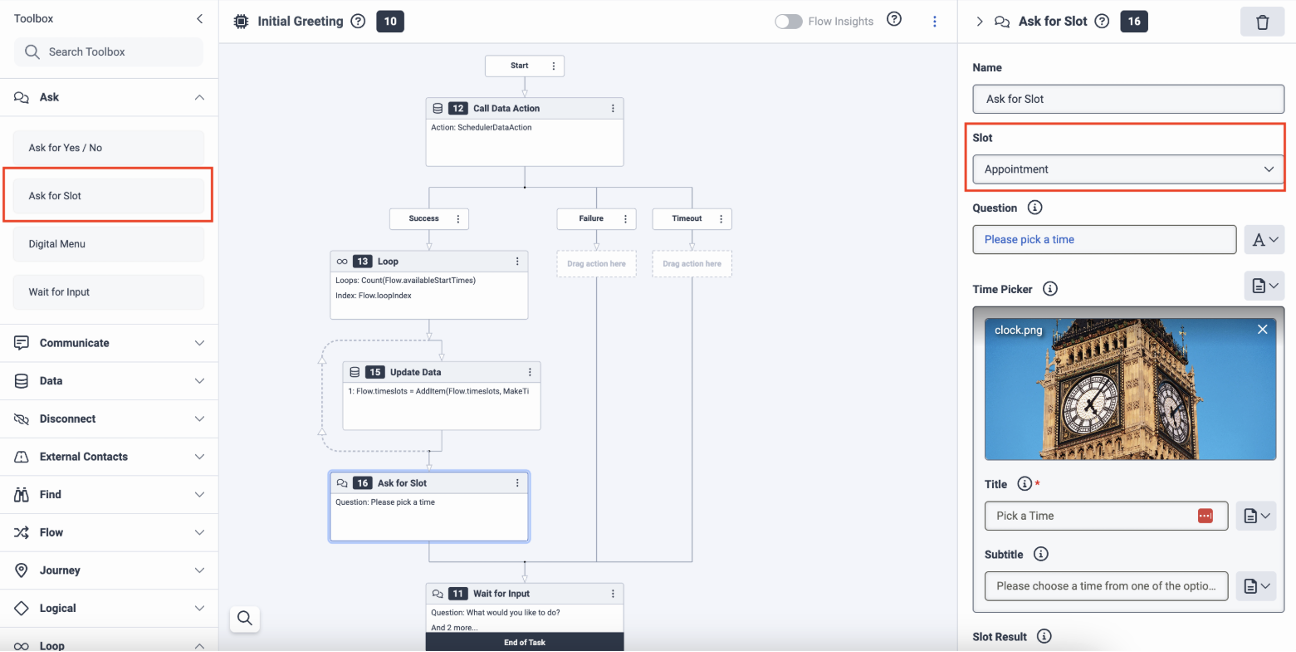
Timeslot picker as a new "Ask for Slot" type in Architect
Important note
- authoring in Architect is always in UTC
- display for end user is always in the user's timezone
- it is not configurable
STEP1: Bot initiates the scheduling offer
The bot proactively prompts the customer with a question like:
"Would you like to schedule a time?"
Timeslot picker is presented as a card with clear call-to-action button that launches the picker flow.
Please note that Timeslot picker card consists of 4 main parts:
- Title (mandatory)
- Subtitle (optional)
- Image (optional)
- Call-to-Action button (mandatory)
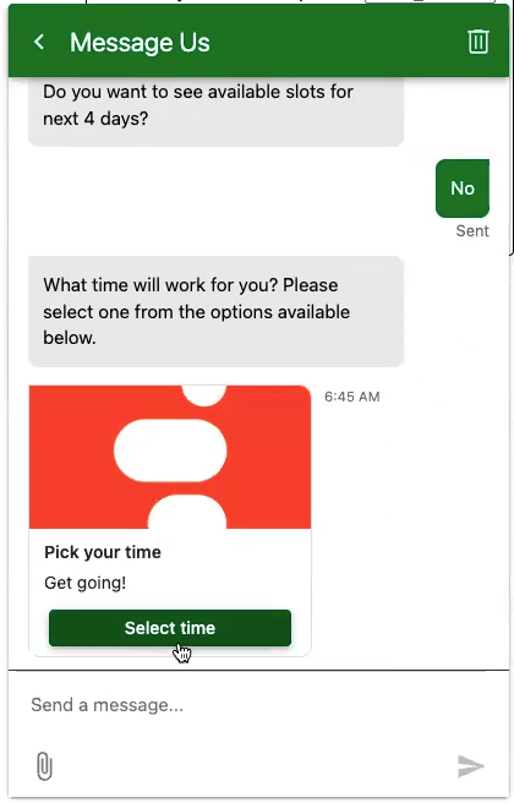
Timeslot picker card with subtitle and image
STEP2A: Present timeslot options for the upcoming days
The bot shows a list of available timeslots for the upcoming 4 days.
User selects their preferred time with a single tap and then sends it back - no typing required. Please note that only a single timeslot can be selected.
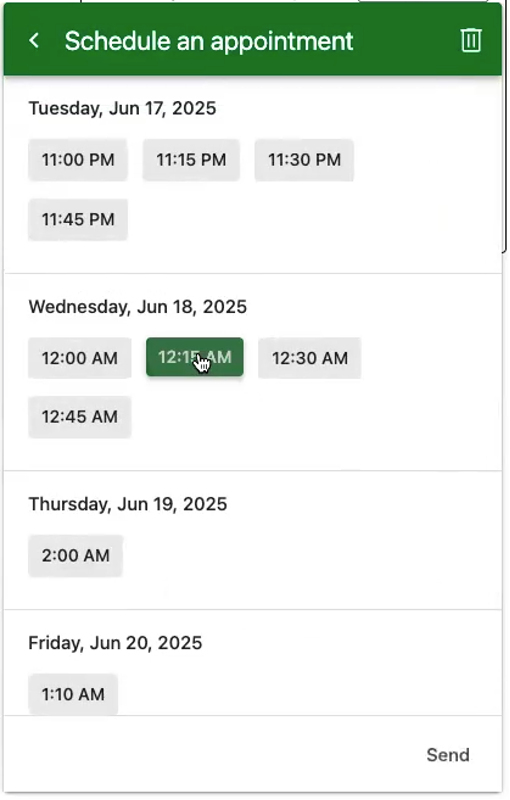
List of available timeslots for the upcoming 4 days
STEP 2B: Present timeslot options for longer period
If there are available timeslots for longer period (more than 4 days) then the bot automatically presents a monthly calendar view.
The user selects a month, a day, and available timeslot.
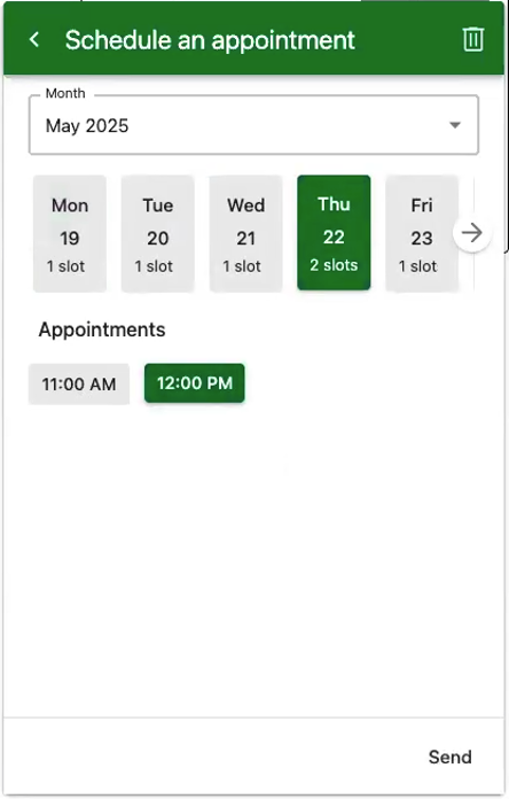
Calendar view with Day selection showing available timeslots
Step 3: Confirm the selection
After selecting a time, the customer receives an immediate in-chat confirmation.
The confirmed selection can also trigger downstream actions-such as syncing with an external calendar, logging the appointment in a CRM, or initiating a follow-up workflow-through seamless integration with your backend systems using Genesys Cloud Data Actions.
This ensures that time slot selections don't just stay in the conversation-they become actionable events across your enterprise systems, driving real outcomes automatically.
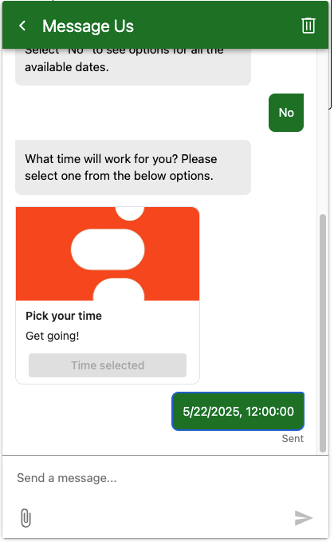
Timeslot picker confirmation message
Timeslot timezone adjustment
Please note that the user-selected timeslot is stored in UTC by default.
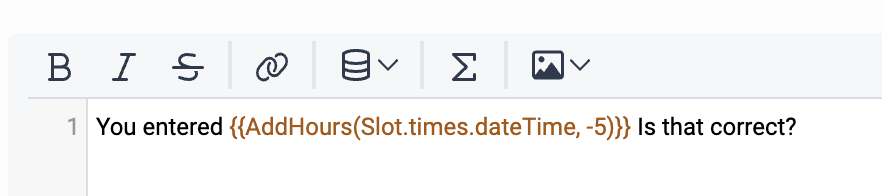
If you need to use the timeslot in a different timezone during later steps, you can apply an hour offset using the following expression:
AddHours(Slot.timeslot.dateTime, -5)
-
timeslot is the name of your timeslot variable
-
.dateTime accesses the actual datetime value
-
-5 adjusts the time (hour) to your desired timezone (e.g., UTC-5)
Be sure to adjust the offset as needed based on your target timezone.
Example for usage:
Key Benefits
For Customers:
- Empowered Self-Service: Customers can manage their own scheduling without waiting for an agent.
- Faster Resolutions: Automated flows reduce time-to-action and increase satisfaction.
- Time Zone Clarity: Appointments are shown in the user's local time to avoid confusion.
For Businesses:
- Increased Containment: Fewer hand-offs to agents, while still delivering value.
- Reduced Operational Load: Less need for agent-led scheduling.
- Conversion-Driven Conversations: Transform chat interactions into confirmed bookings.
- Backend Flexibility: Easily integrates with third-party scheduling platforms and CRMs.
Launch Details
Ready to Enhance Your Bot Experience?
Integrating Timeslot Picker takes just minutes-and elevates your digital customer journey significantly. If you're already using Genesys Messenger and Architect, this upgrade is a quick win.
Join the conversation in the Genesys Community to share how you plan to use Timeslot Picker, ask questions, or explore ideas with other customers.
Additional guides in Genesys Cloud Resource Center
Use Architect to create a digital bot to schedule an appointment
------------------------------
Adam Gyebnar
Product Manager
------------------------------