Original Message:
Sent: 02-04-2026 11:46
From: Marcello Jabur
Subject: JSONPath $.divisions[*] with the Contains operator to check if your specific ID exists in that list is not working in genesys cloud trigger
Well, that's the thing then, the event doesn't actually take into consideration the other 2 divisions.
Since the event is based on an user, the division shown in there is probably just the one where that user is created.
The other 2 divisions are associated with the conversation (Could be from a queue, a flow, or whatever else), but it's not associated with that user directly.
What you could try is getting the conversationId from the event, and then getting the division information from the API (the same API from where you sent the screenshot showing all 3 divisions) using Data Actions.
Then you can check if the division is in there (during the workflow), and if it is you can run the rest of the flow, or just end the flow if it isn't.
The problem with that solution is that you can't actually filter in the Trigger itself (so all conversations will run the workflow), but then you filter at the start of the workflow using Data Action.
Not sure if that works for you, but could be a solution.
------------------------------
Marcello Jabur
------------------------------
Original Message:
Sent: 02-04-2026 11:40
From: Logan Supparayan
Subject: JSONPath $.divisions[*] with the Contains operator to check if your specific ID exists in that list is not working in genesys cloud trigger
Please find the below, I tried already, flow.jsonData variable, it returns divisionId value for single division only, not the collections.

------------------------------
Logan Supparayan
CX
Original Message:
Sent: 02-04-2026 11:28
From: Marcello Jabur
Subject: JSONPath $.divisions[*] with the Contains operator to check if your specific ID exists in that list is not working in genesys cloud trigger
You can try some tests to check what is being received in the whole event.
For that what I usually do is change the Trigger "Data Format" to Json, like this:
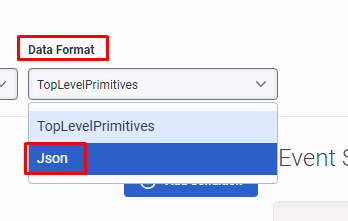
Then you can create an input variable on your workflow named "jsonData" (type JSON). (For reference: Create a trigger View summary - Genesys Cloud Resource Center)
And your whole event will be received in that variable.
This way you can check if all 3 divisions are there or not (and what is actually the name of the object - divisions, divisionId or divisionIds).
Also, as a last option, if you can't actually filter this on the trigger itself, you can use that variable (that has the whole event information) to filter the interactions with the division that you need (If the division is not there, just end the workflow... otherwise run the rest of it).
------------------------------
Marcello Jabur
Original Message:
Sent: 02-04-2026 11:23
From: Logan Supparayan
Subject: JSONPath $.divisions[*] with the Contains operator to check if your specific ID exists in that list is not working in genesys cloud trigger
Oh, just an API return for the conversation.
------------------------------
Logan Supparayan
CX
Original Message:
Sent: 02-04-2026 11:18
From: Marcello Jabur
Subject: JSONPath $.divisions[*] with the Contains operator to check if your specific ID exists in that list is not working in genesys cloud trigger
Regarding that screenshot that you showed above, is that from the actual event being triggered, or just an API return for the conversation?
I ask that because it would be ideal to have the actual event, just to confirm if all 3 divisions appear in the event itself, or just the first one.
------------------------------
Marcello Jabur
Original Message:
Sent: 02-04-2026 11:10
From: Logan Supparayan
Subject: JSONPath $.divisions[*] with the Contains operator to check if your specific ID exists in that list is not working in genesys cloud trigger
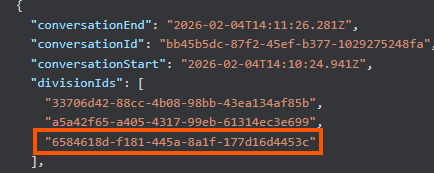
I tried with divisionId which was matched using first divisionId always; not able to refer the third divisionId is highlighted below for the particular conversation. So, I
want to match with the third divisionId in array, is there any possibilities on this scenario?
------------------------------
Logan Supparayan
CX
Original Message:
Sent: 02-04-2026 10:57
From: Marcello Jabur
Subject: JSONPath $.divisions[*] with the Contains operator to check if your specific ID exists in that list is not working in genesys cloud trigger
Hi Logan,
When I look at the schema for that event it doesn't seem to be a "divisions" in there, only a "divisionId":
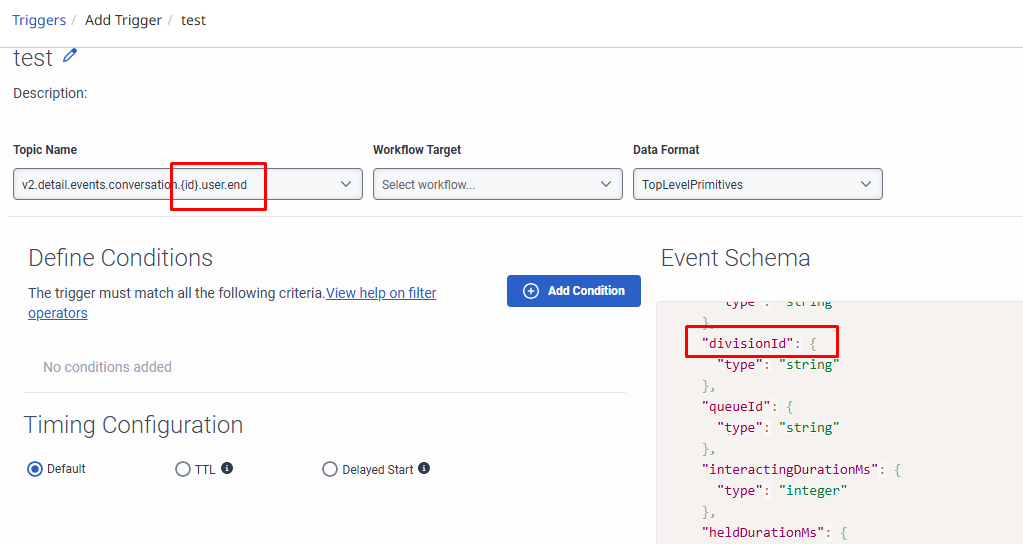
Not sure if that changes when you have more than 1 division.
Maybe you can test with "divisionId" instead and check if anything changes.
Also, I'm not sure if you need the "$." in there, since you are also not using it for the "mediaType" condition. Have you tried without it?
------------------------------
Marcello Jabur