Good Day Victor
I tested this on my side and was able to view the logs by doing the following,
- Click on help, select log capture option
- Click on Send Logs Now
- Wait a few seconds and then go to Log capture under IT & Integration menu to view logs
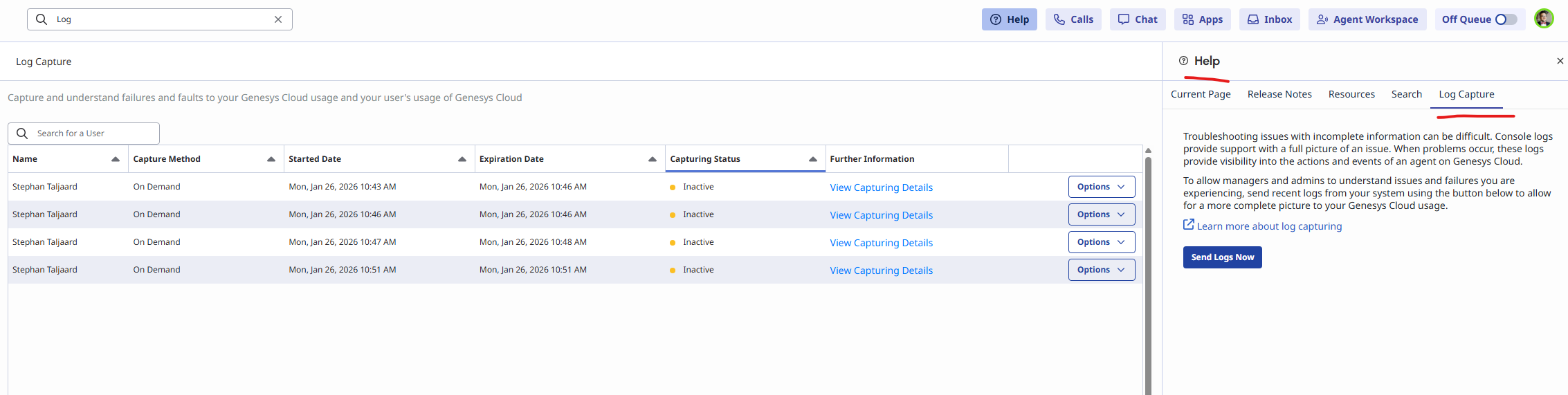
Below is the link i used on resource center. Let me know if this helps.
https://help.genesys.cloud/articles/send-on-demand-capture-logs-to-administrators/
Regards
------------------------------
Stephan Taljaard
EMBEDIT s.r.o
------------------------------
Original Message:
Sent: 01-26-2026 01:24
From: VICTOR SHVETSKY
Subject: Log Capture
Can someone please explain to me how to use Log Capture? According to the documentation it is possible to request a log for any agent (even not monitored one) if it is for the last 5 minutes.
I logged into workspace, set myself to OnQueue, then wen OffQueue, and then went to Log Capture and typed my name. I set the time to 3:00 PM - 3:20 PM (it is 3:18 PM now) and it does not show anything.
#System/PlatformAdministration
------------------------------
VICTOR SHVETSKY
CEO
------------------------------