Genesys Cloud - Main

 View Only

Sign Up

  • 1.  Log Capture

    Posted 16 days ago

    Can someone please explain to me how to use Log Capture? According to the documentation it is possible to request a log for any agent (even not monitored one) if it is for the last 5 minutes. 

    I logged into workspace, set myself to OnQueue, then wen OffQueue, and then went to Log Capture and typed my name. I set the time to 3:00 PM - 3:20 PM (it is 3:18 PM now) and it does not show anything. 


    #System/PlatformAdministration

    ------------------------------
    VICTOR SHVETSKY
    CEO
    ------------------------------


  • 2.  RE: Log Capture
    Best Answer

    Posted 16 days ago

    Good Day Victor

    I tested this on my side and was able to view the logs by doing the following,

    1. Click on help, select log capture option
    2. Click on Send Logs Now
    3. Wait a few seconds and then go to Log capture under IT & Integration menu to view logs
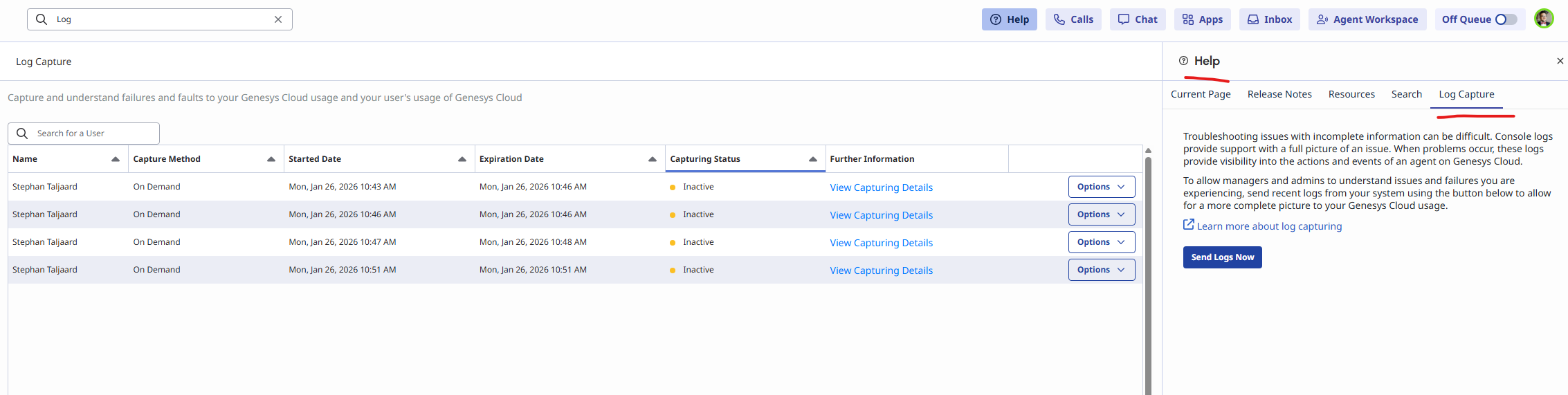
    Below is the link i used on resource center.  Let me know if this helps.

    https://help.genesys.cloud/articles/send-on-demand-capture-logs-to-administrators/

    Regards


    ------------------------------
    Stephan Taljaard
    EMBEDIT s.r.o
    ------------------------------