Hi Jürgen,
Apologies , I just came across the update about the new People admin page changes.
I haven't got access to this updated experience yet, but it looks like the before/after details are covered here:
https://community.genesys.com/viewdocument/user-management-users-people-admin-page-update?CommunityKey=f4bf88cc-0f42-4b62-a248-018993248afa&tab=librarydocuments
There is also an active feedback thread here, and it looks like this may be the best place to comment so Genesys or others who already have access can confirm the current behaviour:
https://community.genesys.com/discussion/user-management-users-people-admin-page-redesign
Hope this helps.
------------------------------
Phaneendra
Technical Solutions Consultant
------------------------------
Original Message:
Sent: 04-24-2026 02:58
From: Jürgen Enzenberger
Subject: new admin (People management ) design, How I can transfer queues and skills from one agent to another ?
Hello Phaneendra, the screenshots which you added is showing this function with the old UI. How it works in the new UI design ?
------------------------------
Jürgen Enzenberger
operational manager
------------------------------
Original Message:
Sent: 04-23-2026 03:28
From: Phaneendra Avatapalli
Subject: new admin (People management ) design, How I can transfer queues and skills from one agent to another ?
Hi Jürgen,
If this is what you are referring to, you can try the following:
User Access Management > Users
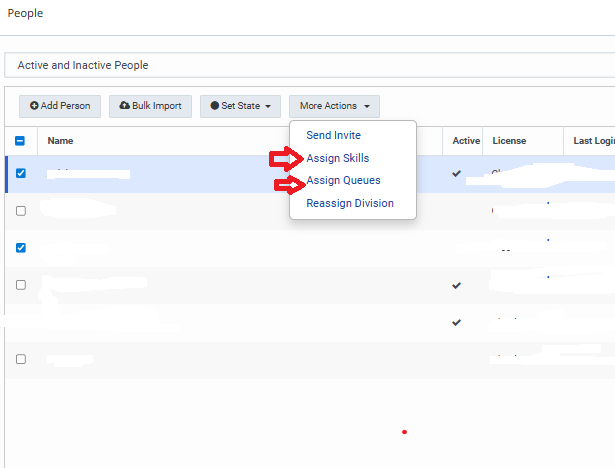
Select the staff member(s), then click More Actions, where you will see:
- Assign Skills
- Assign Queues
I've attached a screenshot as well, hopefully this is what you are after where you select staff and Assign skills or Queues.
------------------------------
Phaneendra
Technical Solutions Consultant