We're thrilled to introduce the new Adherence Widget, that will be available on the Agent Overview screen!
This enhancement gives agents a powerful, visual way to understand their adherence performance - whether for a single day, a full week, or an entire month - all without leaving their overview.
With flexible time views, quick navigation, and a detailed drill-down modal, this update makes it easy for agents to see how they're doing and where exceptions occur.
🌟 What's New
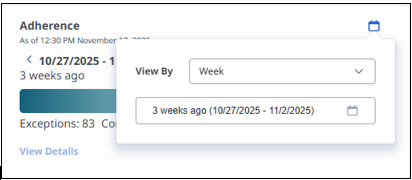
🗓️ Flexible Date Selection
Agents can now view adherence over a day, week, or month with a built-in date picker.
-
Default: Today's date
-
Week view: Uses the BU's configured start day
-
Month view: Follows the calendar month
-
Historical data: View adherence up to 550 days in the past
-
Navigation arrows make it easy to move backward or forward through dates
📈 Adherence Bar & Key Metrics
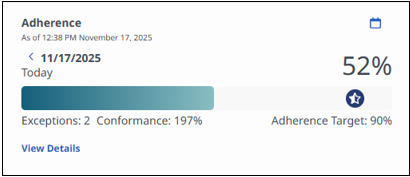
The widget includes a visual Adherence Bar for the selected date range, displaying:
-
Adherence Target – Always shows the current target
-
Exceptions Count – Total number of adherence exceptions during the period
-
Conformance % – Can be easily toggled on or off with agent permissions
Together, these metrics give agents a clear snapshot of their performance at a glance.
🔗 Adherence Details at a Click
A "View Details" link opens a rich, interactive Adherence Details modal for daily review.
🧭 Inside the Adherence Details Modal
The modal provides a detailed breakdown of an agent's adherence for a single day - including schedule comparisons and exceptions visualization.
Key features:
-
Date picker (single-day only)
-
Back and forward arrows to switch days
-
Adherence bar with current adherence and target values
-
Exceptions count and Conformance %
🕓 Schedule Section:
A visual timeline compares Scheduled vs. Actual activities:
-
Scheduled: Displays scheduled activity codes
-
Actual: Shows the category of the agent's real-time status
-
Exceptions: Highlighted in pink where scheduled and actual don't match
Hovering over an exception opens a tooltip with:

🗓️ Adherence Data on the Schedule Screen
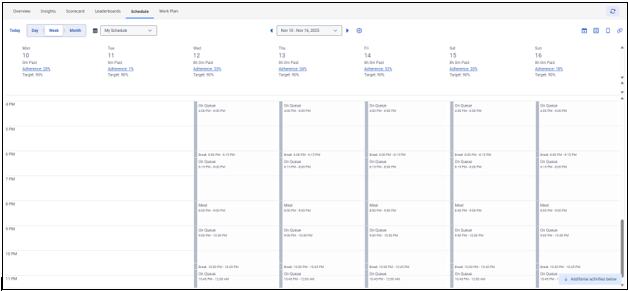
Agents will now see daily adherence values directly within the Agent Schedule screen:
-
Displayed beneath the date in both Week and Day views
-
The day's adherence appears as a hyperlink
-
The Adherence Target is also shown alongside the adherence value
This gives agents consistent, contextual access to adherence information no matter how they view their schedule.
🔐 New Permissions Required
Two new permissions have been added to control visibility of adherence metrics:
-
Workforce Management>Agent Historical Adherence>View - this will give agents visibility of the adherence widget with adherence data
-
Workforce Management>Agent Historical Adherence Conformance>View - this will give agents visibility of the adherence widget with both adherence and conformance data
Agents must also have the existing schedule view permission to see adherence:
Workforce Management > Agent Schedule > View
📅 Availability
The Adherence Widget will begin rolling out on Monday, November 17, 2025 and will be enabled in all regions by end of day Wednesday, November 19, 2025.
Once available, agents will need to be assigned the appropriate permissions to see the new widget in their Agent Overview.
#Intraday,Shrinkage,Adherence
------------------------------
Belinda Herrera
Genesys, Staff Product Manager
------------------------------