Genesys Cloud - Main

 View Only

Sign Up

  • 1.  NOT RESPONDING

    Posted 16 hours ago
    Edited by ANA BELEN ALONSO VIDALES 13 hours ago

    Hey everyone,

    I've noticed a few agents are showing up as 'not responding,' even though their auto-answer are set up.

    Besides direct transfers between agents, any ideas what else could be making them look like that?"
    agentA
    Thanks in advance
    BR


    #Telephony

    ------------------------------
    ANA BELEN ALONSO VIDALES
    CTI
    ------------------------------


  • 2.  RE: NOT RESPONDING

    Posted 15 hours ago

    Hi Ana

    The "Not Responding" status is caused when an agent does not answer the interaction before the timeout threshold is reached.  This can also be caused by connectivity issues.

    Common Causes and Solutions:

    • Declined/Missed Calls: The agent missed the alert.
    • Multiple Sessions: The agent is logged in on multiple tabs, browsers, or devices.
    • Network Interruption: Unstable internet (VPN/proxy) causes WebRTC or WebSocket disconnections.
    • Audio Issues: Headset switching or WebRTC "flapping" during an inbound call.
    • Browser Issues: High CPU usage, browser extensions, or putting tabs to

    Have you done any diagnostic tests and confirmed the results?  I would also suggest to enable the network/console logs as this might be helpful in finding the root cause.

    Hope this helps.

    Regards


    ------------------------------
    Stephan Taljaard
    EMBEDIT s.r.o
    ------------------------------


  • 3.  RE: NOT RESPONDING

    Posted 14 hours ago

    Hi Ana,

    Adding to the points already mentioned, even with Auto Answer enabled, the client still needs to successfully negotiate the WebRTC connection. If there are issues such as microphone permissions, network instability, or WebRTC connectivity, agents can still end up in Not Responding.

    It may also be worth checking the WebRTC troubleshooter and network readiness test for the affected users.


    ------------------------------
    Phaneendra
    Technical Solutions Consultant
    ------------------------------


  • 4.  RE: NOT RESPONDING

    Posted 13 hours ago

    Hi

    I will review all your recommendations.

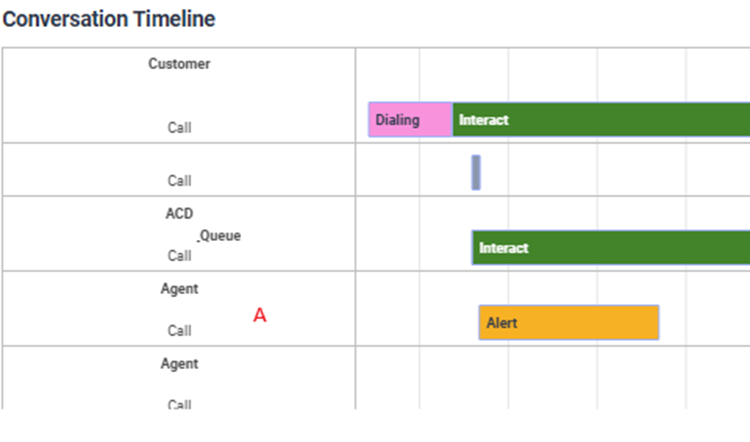
    Today, I've reviewed the following case: once again, an agent with an active automatic response has been in "not responding" status from Friday at 9 PM until today. Until now, I hadn't detected this type of case, and I'm not sure I fully understand how it's working.
    Regards


    ------------------------------
    ANA BELEN ALONSO VIDALES
    CTI
    ------------------------------


  • 5.  RE: NOT RESPONDING

    Posted 13 hours ago
    Edited by Phaneendra Avatapalli 13 hours ago

    Hi Ana,

    Looking at the timeline, my understanding is that the Alert event may not have cleared down properly for the agent, which could explain why they ended up in Not Responding even with Auto Answer enabled.

    It may be worth checking browser/network logs or the WebRTC troubleshooter for the affected agent, and as a quick check, asking them to go Off Queue and back On Queue to see if the state clears.

    Hope someone from community might add more if they have seen similar behaviour.


    ------------------------------
    Phaneendra
    Technical Solutions Consultant
    ------------------------------


  • 6.  RE: NOT RESPONDING

    Posted 10 hours ago

    Hi ANA

    Also, complementing what was said, what you can do is create a trigger based on the "users...activity" event when the status "routingStatus.status = NOT_RESPONDING" is identified.
    Create a workflow that will call an API to return the agent to the "on queue" status.


    ------------------------------
    Kaio Oliveira
    GCP - GCQM - GCS - GCA - GCD - GCO - GPE & GPR - GCWM

    PS.: I apologize if there are any mistakes in my English; my primary language is Portuguese-Br.
    ------------------------------