Genesys Cloud - Main

 View Only

Sign Up

  Thread closed by the administrator, not accepting new replies.
  • 1.  Questions regarding transfer

    Posted 08-11-2024 18:18
    No replies, thread closed.

    Hi,

    I've got some question regarding transfer,

    Does agents still available for transfer even they are offline or their queue is deactivated? (Email interaction/Call interaction)


    If so, why every Team member in the queue is not visible while performing the transfer? Is there any exception to be not included in the transfer?

    Thank you!


    #Telephony
    #Unsure/Other

    ------------------------------
    Jason Botea
    Elanco US Inc.
    ------------------------------


  • 2.  RE: Questions regarding transfer

    Posted 08-12-2024 08:06
    No replies, thread closed.

    Hi Jason,

    Do you mean direct transfers or are you transferring to a queue?


    ------------------------------
    Sam Jillard
    Online Community Manager/Moderator
    Genesys - Employees
    ------------------------------


  • 3.  RE: Questions regarding transfer
    Best Answer

    Posted 08-13-2024 02:05
    No replies, thread closed.

    Hi Jason,

    I am not shure about your choice of words. "Offline" means, that the agent ist not logged into Genesys. You can blind transfer to an offline agent, but the voicemail should abswer (if activated). But the agent is not aviable himself, because he is logged out. As long as an agent is "aviable" (green), you can transfer a call directly to him, even if he is not "in queue" (blue).
    What do you mean with "every Team member in the queue is not visible while performing the transfer?"

    Best regards
    Christoph


    ------------------------------
    Christoph Domaschke
    CRONBANK AG
    ------------------------------


  • 4.  RE: Questions regarding transfer

    Posted 08-14-2024 08:40
    Edited by Antwuan Rencher 08-14-2024 11:48
    No replies, thread closed.

    Regarding "why every Team member in the queue is not visible":

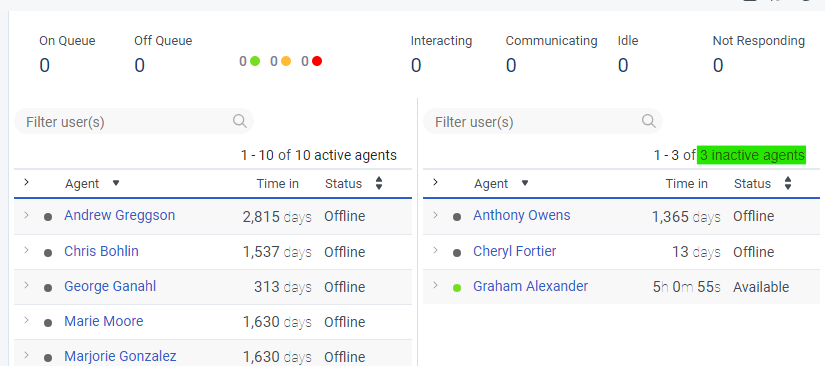
    If you look in the Performance>Workspace>Queue Activity view, click on the specific queue, then look at the list of agents you will see all the agents who are members of the queue and are active in the queue.

    Look at the upper right above the list and check for a number next to inactive agents. If it is something other than 0 then some agents have been set inactive even though they are members of the queue, and they will not receive interactions on that specific queue.

    https://help.mypurecloud.com/articles/activate-agents-on-queues/

    You can click on n inactive agents to see the names of inactive agents.


    ------------------------------
    George Ganahl GCP, GCSME, ICCE, ICHD, etc.
    Senior Principal PS Consultant
    Genesys
    ------------------------------