And thanks for the information as well. I haven't had to use this yet, but I'm sure the time will come, I will keep the information in mind!
Original Message:
Sent: 02-10-2026 14:12
From: Terence Ayers
Subject: Sending external email from Flow: Inbound Call
Thank you for all your help. I have it working.
One caveat - the JSON has to exactly match. I was missing the "Flow." in the JSON, I had "conservationID": "{$input.conversationID}" instead of "Flow.conservationID": "{$input.conversationID}"
Its those little caveats that are hard to find when you are not sure on the data flow specifics.
------------------------------
Terence Ayers
-
------------------------------
Original Message:
Sent: 02-10-2026 14:05
From: Marcello Jabur
Subject: Sending external email from Flow: Inbound Call
Hi Terence,
I have never used the workflow API, so Christoph can probably give you some better answers regarding that.
But just to give you some ideas.. When I do it using Triggers, the information that we can send to a workflow is related to the event that was triggered.
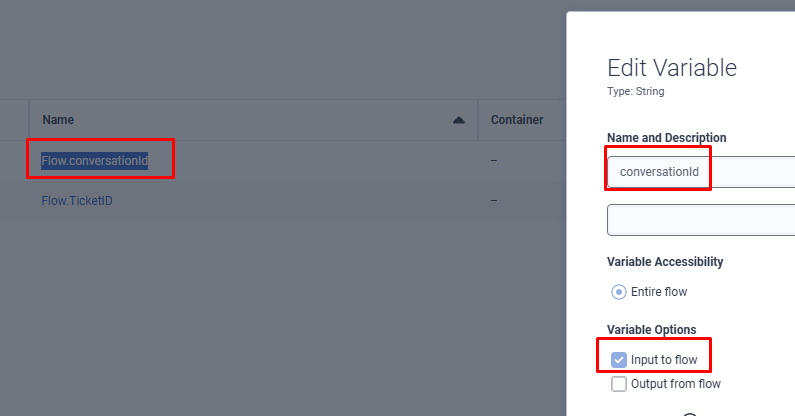
You usually will create a variable with the same name as the attribute of the event that you want to map, and define it as an input variable.
So, for instance, below is the schema of one of the possible events:
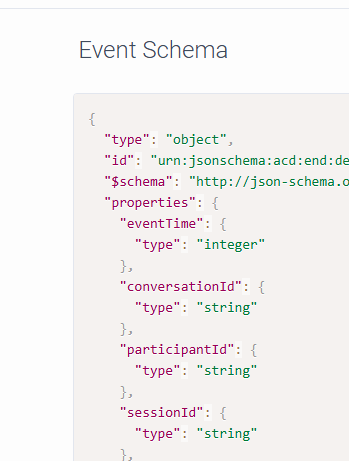
If I wanted the conversationId to be available in my Workflow, I would have to created an input variable on the Workflow with the EXACT same name as the event attribute (so the variable would be named: "Flow.conversationId"):
---------------
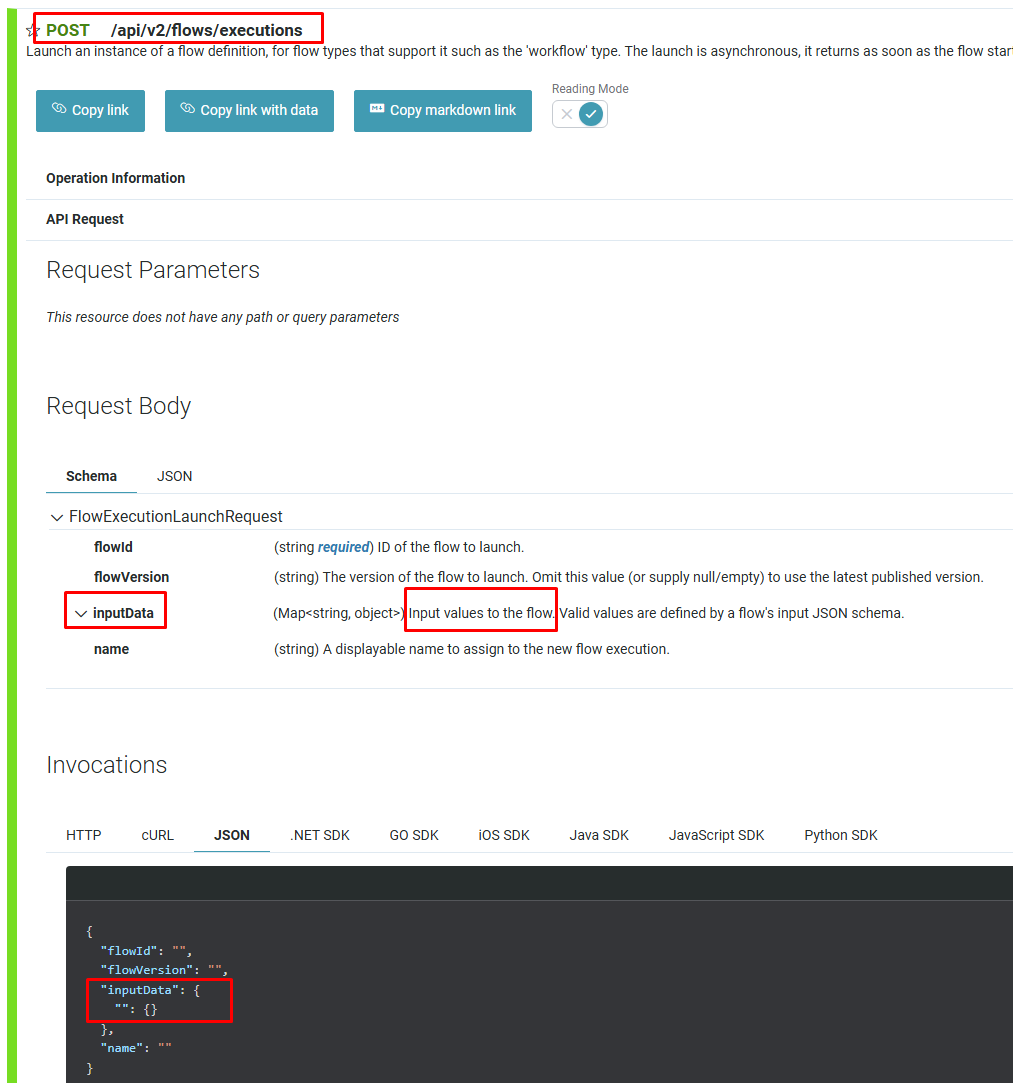
Now, since you are not going to be using Triggers, and instead is using the workflow API, it seems that there is an attribute in the request body from that API where you can insert your data, as shown below:
---
So like I said, I'm not 100% sure on how you do it, but it seems to me that you should define a name for that string attribute on the API, and the value should be a json object.
Then you should create an input variable on your workflow of type JSON (I believe, not 100% sure), and it will receive the json attribute that you passed on the API.
If that's all correct, you should have that "inputData" for the API defined as an input for your Data Action, so that you can dynamically pass the values that you want from your Inbound Call Flow whenever you invoke the Data Action.
------------------------------
Marcello Jabur
Original Message:
Sent: 02-10-2026 12:24
From: Terence Ayers
Subject: Sending external email from Flow: Inbound Call
Christoph,
I think I am getting it. In the Flow: Inbound Call I am calling a Data Action using the /api/v2/flows/executions API to call the Flow: Workflow with the "Send Notification" element.
The only issue I am having now is passing variables from the "Inbound Call" script to the "Workflow" script. I created a flow variable in both scripts with the same name. I marked it as inbound for the Workflow, but I don't think it is getting there.
Am I missing something?
------------------------------
Terence Ayers
Original Message:
Sent: 02-10-2026 09:46
From: Christoph Domaschke
Subject: Sending external email from Flow: Inbound Call
Hi Terence,
what is your exact use case? "No agents logged in" in a specific queue? Do you want to check opening times?
------------------------------
Christoph Domaschke
Produktmanager Kunden-Dialog-Center
Original Message:
Sent: 02-10-2026 09:39
From: Terence Ayers
Subject: Sending external email from Flow: Inbound Call
Thank you Marcello, it was my initial understanding that "Send Notification" was just for internal to the Genesys Cloud platform, not able to send messages external to agents email addresses.
So you create the Workflow to Send Notification and using a trigger to call the work flow? I am reviewing the trigger config, but not sure the JSON Path I should be using to only call the workflow if it routes through a logic check? Is there a good resource to help understand how to use the trigger to call the workflow?
------------------------------
Terence Ayers
Original Message:
Sent: 02-09-2026 21:58
From: Marcello Jabur
Subject: Sending external email from Flow: Inbound Call
Hi Terence,
When you say that "Send Notification" will not work, are you talking about the "Send Notification" component from Workflows?
If that's the case, why wouldn't it work? Can't you set up an user with the email address that you want to send notifications to? And then set up the "Send Notification" component to notify that user through email? I believe that could work.
But if that's not a viable solution for you, I guess the next best thing would be setting up a custom email integration ("Agentless" type) as you mentioned, and then using the Agentless Email APIs
------------------------------
Marcello Jabur