Not sure if this will help you Vaun, but I've found that if an Agent records a prompt, you can find it in Architect like so, and you could probably edit existing ones.
Below is a greeting I created, which I assume can just be edited to use TTS instead of the audio file.
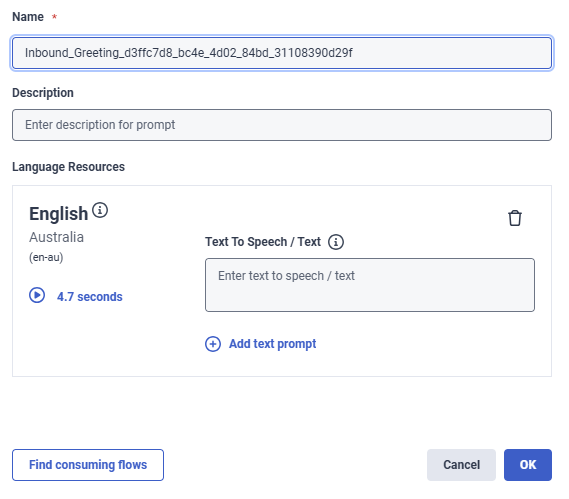
I've also used the Orchestrators AMA tool and it gave me this information;
If you have the Architect > User Prompt > Edit permission, you can edit another user's agent greeting through Architect. Here's where to access it:
Location:
- Navigate to Architect in Genesys Cloud
- Click or hover over the Prompts menu
- Select User
From there, you can view, edit, or manage user prompts, including agent greetings.
Alternative Method - Programmatic Assignment:
Administrators can also assign agent greetings programmatically using the Genesys Cloud public API:
- Create a greeting as an Architect user prompt
- Assign it to specific agents using the API:
PUT /api/v2/telephony/agents/{agentId}/greetings
This API method allows bulk or automated assignment of greetings to multiple agents without requiring each agent to manually configure their own greeting in their Preferences.
Required Permissions:
- Architect > User Prompt > View - To view agent greetings
- Architect > User Prompt > Edit - To edit agent greetings
- Architect > User Prompt > Add - To add new agent greetings
Maybe that might help?
------------------------------
Robert Niblock
Contact Centre Technology Analyst
------------------------------
Original Message:
Sent: 04-12-2026 17:20
From: Vaun McCarthy
Subject: Agent Greeting with TTS
Hi Cameron I'm circling around and came across this thread too. Can you please point me to the resource centre article that talks about this TTS only option and the support for SSML in these?
------------------------------
Vaun McCarthy
------------------------------
Original Message:
Sent: 03-04-2026 11:52
From: Cameron Tomlin
Subject: Agent Greeting with TTS
Hello Jonathan,
I believe you can use TTS prompts for agent greetings, and not limited to recorded audio files.
- Create a prompt in Architect
- Select the option "This announcement plays TTS only" if you don't plan to upload recorded audio.
- Enter the text you want spoken by the TTS engine in the TTS text field.
You can even use SSML for more advanced TTS control.
Hope this helps!
------------------------------
Cameron
Online Community Manager/Moderator